Courses

Students learn by doing, from their first ideas in code to working systems with motors, cameras and AI. Each student learns at their own pace. Why we teach this way: our approach.

Ways to take part

Most students join a course of weekly lessons. Camps and open days are two more ways to take part. See the dates and the place.

Courses

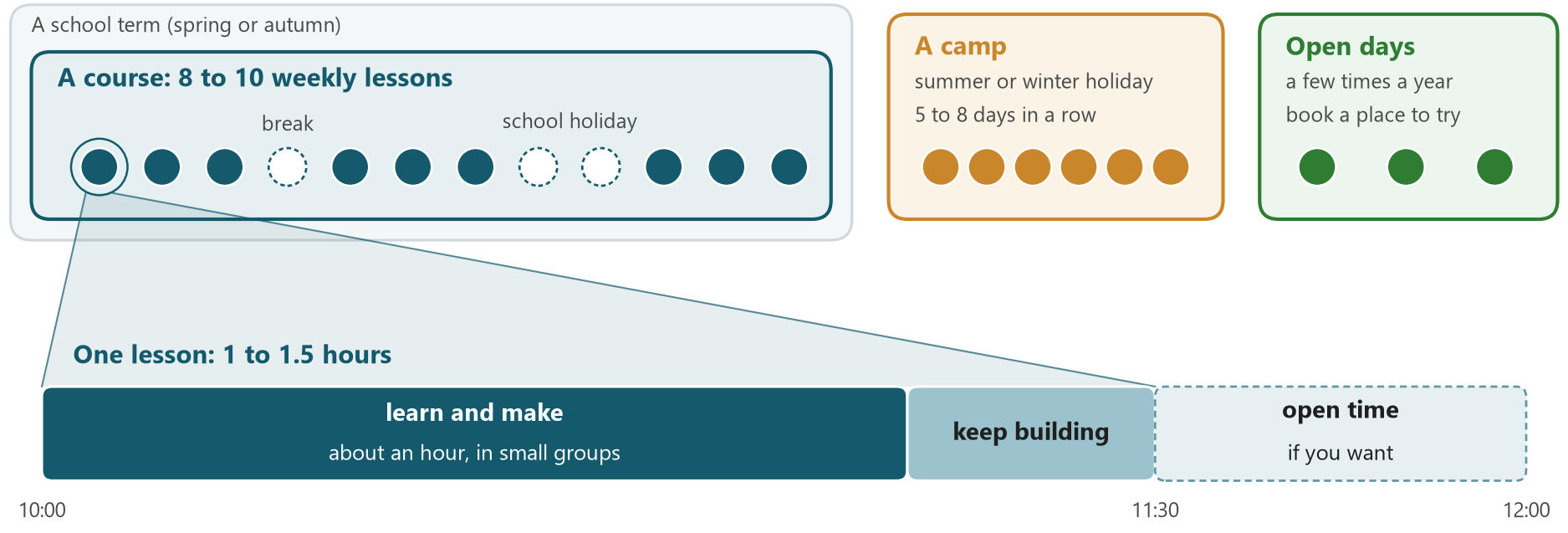
About 8 to 10 lessons with a focused scope, for example getting started, building a sumo robot or exploring AI. Within the autumn or spring term, lessons run 3 to 5 weeks in a row, then take a short break.

Lessons

Once a week: a short start together, about an hour of learning and making in small groups, then time to keep building. Students who want to can stay a little longer.

Camps

Several days in a row in the summer holiday, sometimes the winter holiday: one bigger project from start to finish. Camps are announced separately.

Open days

A few times a year. Students book a place to try a project, so we can prepare tools and parts for them. Parents, family and friends can drop in and see what the students make. Ask us about the next one.

Side by side: a course of 8 to 10 weekly lessons inside a school term, with a break and the school holiday as empty circles; a camp of 5 to 8 days in a row in the summer or winter holiday; a few open days a year. Below, one lesson zoomed in: about an hour of learning and making, then keep building until 11:30, then open time until 12:00 if you want

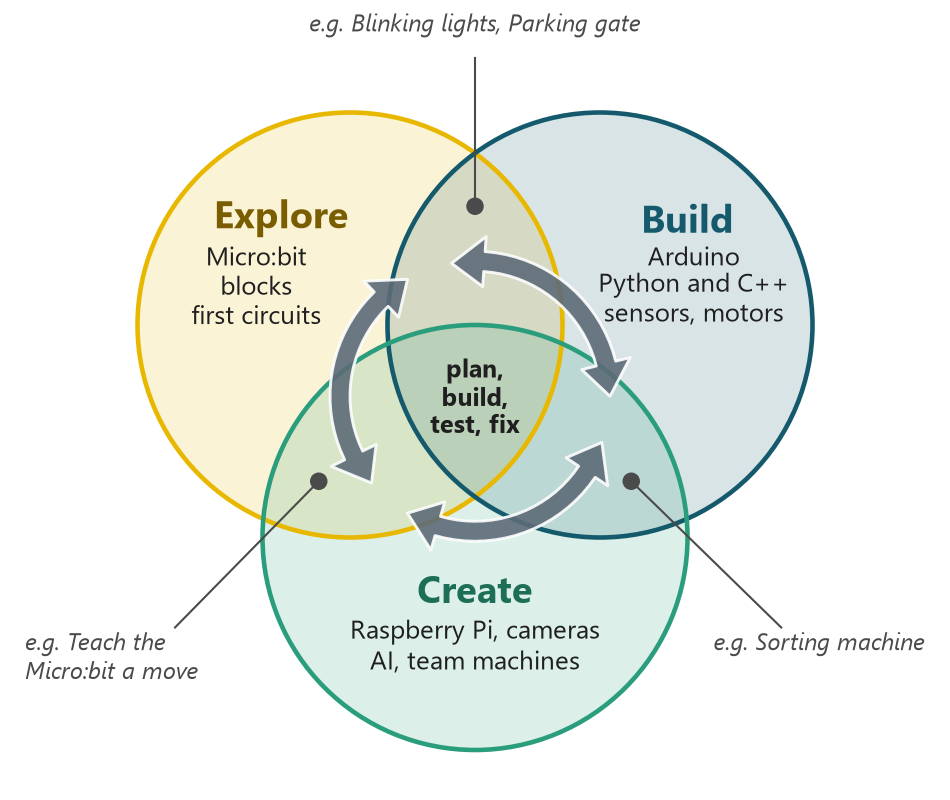
Explore, Build, Create: three learning modes

The three modes overlap, and they are not levels to pass: most projects mix them, and people who have worked with technology for years still explore, build and create every day.

Students come back to the same learning areas again and again, often in a new project, and go a little deeper each time. Doing a project again is part of learning, not a step back.

New to coding and electronics? Most students start in Explore, with a Micro:bit project. Tried some already? Tell us what you have done and what you like, and we suggest a first project.

In every project, students practise the know-how without AI first, then decide whether a little AI help is useful. Some projects use AI inside the machine, and students test what it can and cannot do.

Three overlapping circles: Explore (Micro:bit, blocks, first circuits), Build (Arduino, Python and C++, sensors, motors) and Create (Raspberry Pi, cameras, AI, team machines). Example projects such as Blinking lights, Parking gate and the Sorting machine sit where two circles overlap; plan, build, test and fix sit in the middle, and arrows go round through all three circles, both ways, again and again.

What students learn

The same five learning areas run through all three modes, and go deeper each time. This is our plan today; it grows with the group, and our approach says why.

Explore

A good place to start: no experience needed

Logical thinking

Put steps in the right order
Find a fault one step at a time

Programming

MakeCode blocks: events, sequences, loops, conditions, variables

Electronics

LEDs, buttons and simple circuits on a breadboard
The Micro:bit's own sensors: light, sound, motion

Systems thinking

Describe the idea, make a plan, then build, test and fix
See how the parts of a small machine work together

Meet AI

What AI is, where it helps and how it can be wrong
Try AI with the teacher, check its answers, and teach the Micro:bit a move by showing examples

Build

Sensors, motors and code you type

Logical thinking

Turn one range of numbers into another
Split a big problem into small parts you can test

Programming

Python on the Micro:bit, C++ on the Arduino
Functions, lists and simple state machines

Electronics

Digital and analog signals, PWM
Servos and motors with drivers, distance and infrared sensors, power

Systems thinking

Use sensor readings to make decisions and control a motor; read wiring diagrams and datasheets
Plan, build, test and improve a whole machine; measure and compare

Engineer with AI

Use AI to plan, write code, find and fix errors, and test. Check every answer on the real project
Choose between a simple rule and a trained model

Typical projects

Create

Bigger machines, often as a team

Logical thinking

Break a big machine into parts that can be built and tested alone

Programming

Raspberry Pi and Linux; larger Python programs with libraries

Systems thinking

Mechanics, electronics and software in one machine
Cameras, computer vision and radio communication

Create with AI

Machines that use AI for their main task: object detection, sorting, self-driving, with the model running on the machine itself (edge AI)
Describe the code you need, let AI draft it, then review and test it

Typical projects

Raspberry Pi AI carObject sorter with machine learningSumo robotRobot arm

one "I can" step, like "I can wire an LED safely"Read a row from left to right. Tap a row, a column, a box or a dot; tap it again to clear

steps in order, one fault at a timeranges, small partsbig machines in small partsbeing planned
MakeCode blocksPython and C++Raspberry Pi and Linuxbeing planned
LEDs, buttons, circuitssignals, servos, sensors
idea, plan, build, testsensor, decision, motor; test and improvecameras, vision, radio
what AI isAI as a helperAI inside the machine

Along the way, students also work in teams, keep notes, explain what they found and learn to work safely: habits that stay with them.

How to join

We begin with a short chat with the family to find a good first project.