Micro:bitMakeCodeExplorersFirst steps

Shake the dice

Shake the Micro:bit and it rolls a number from 1 to 6. Make it spin first, play rock, paper, scissors, and count your sixes: is your dice fair? Nothing to wire, and a cardboard shaker box to print.

QR code to this pageScan to open

What you learn

9 things on the Explorers, first steps: the Micro:bit alone, the shake sensor and random numbers path: open to see them

On the learning path: Explorers, first steps: the Micro:bit alone, the shake sensor and random numbers

Programming

  • Make a program with blocks and download it to your Micro:bit
  • on shake starts the roll
  • pick random chooses a number nobody can guess
  • A spin and a sound first, then the number from story 2
  • if and else if pick the picture for rock, paper or scissors from story 3
  • hand and sixes remember a number from story 3

Electronics

  • The Micro:bit feels a shake by itself

Thinking and making

  • Roll many times: is your dice fair?

AI in the loop

  • You make the rules of the game, and you decide if it is fair from story 3

1See it in action


On screen: the Micro:bit is shaken, a small and a big diamond spin, a number appears, and a chart counts the rolls
Shake, spin, roll story 2, on screen
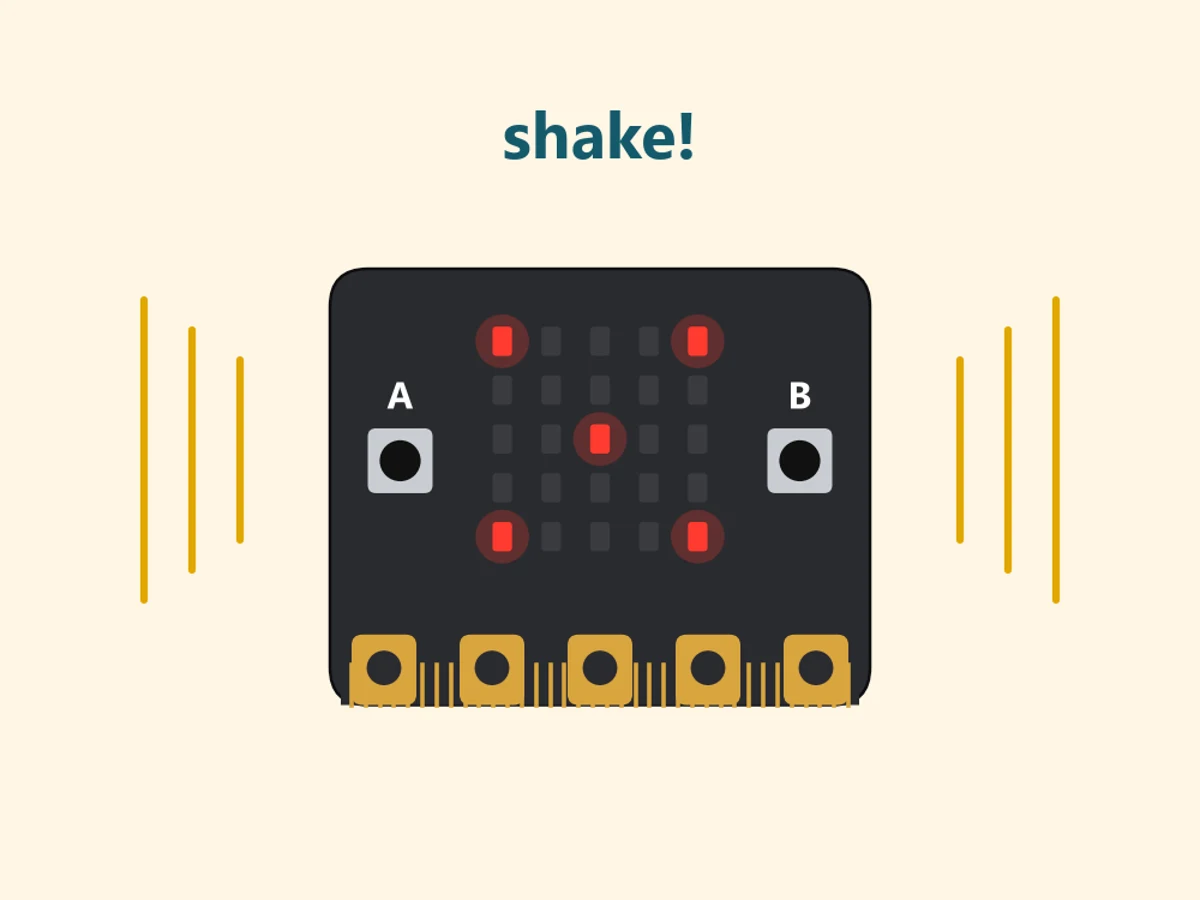
A Micro:bit showing the five of a dice, with shake lines around it
Your dice in your hand or in a shaker box

2Parts you need

Micro:bit V2 and a USB cable
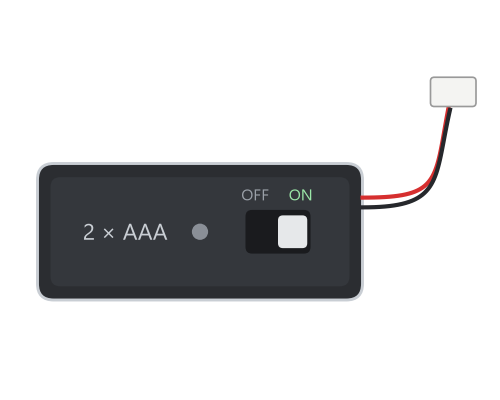
Battery pack with ON/OFF switch (to play anywhere)

And: a computer with Chrome or Edge. For the shaker box: cereal box card, a glue stick and scissors.

3Learn the basics

Read these before you start, or come back when you need them.

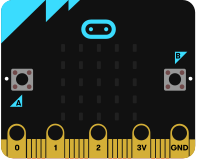
012 3VGND rings for crocodile clips logo: touch it buttonA buttonB

Meet the Micro:bit

The Micro:bit is a small computer that you program yourself. On the front: 25 red lights (the screen), button A and button B, and a logo you can touch. Inside: a shake sensor, a speaker, a microphone and a compass. At the bottom: rings for crocodile clips.

It does nothing until you give it a program: you make it in MakeCode and download it.

More: get your program onto the Micro:bit
  1. Open MakeCode (makecode.microbit.org) in Chrome or Edge and make your program with blocks. The Micro:bit on the left of the screen (the simulator) shows what it will do.
  2. Connect the real Micro:bit with the USB cable. A small yellow light on the back comes on.
  3. Press Download. The first time, choose Connect and pick your Micro:bit (BBC micro:bit).
  4. The yellow light flashes while the program goes over, then your program starts by itself.
  5. Test it on the real Micro:bit. To start it again from the beginning, press the reset button on the back.

Without the cable: a battery pack (2 × AAA) in the white socket on the back. The program stays on the Micro:bit until you download a new one.

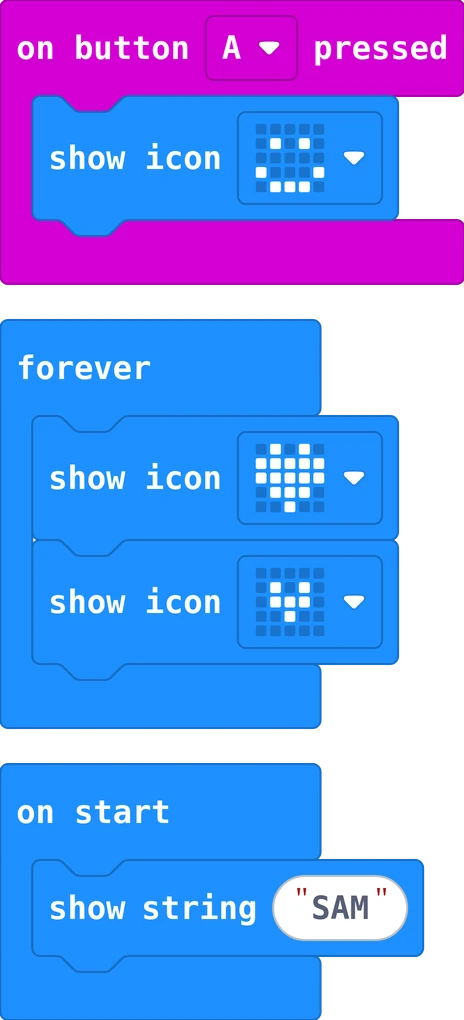
Real MakeCode blocks: on button A pressed shows a smile, forever shows a big and a small heart again and again, on start shows the name SAM once

Blocks: when does my program run?

In MakeCode you drag blocks from the colourful list and snap them together. The outer block decides when the blocks inside run: on start runs them once, when the Micro:bit starts. forever runs them again and again. on button A pressed runs them every time something happens: that is an event.

Inside a block, the steps run from top to bottom, one after the other.

More: tips for your first program
  • A block must click in. A grey, loose block does nothing: drag it until it snaps into place.
  • Find blocks by colour. Basic (blue) shows things, Input (pink) has the buttons and shake, Music (red) plays sounds.
  • Try it first on the screen. The simulator on the left runs your program: click A and B there.
  • Undo with the arrow at the bottom, or press Ctrl and Z.
  • Text in quotes. Click in the white field of show string and type your own words.
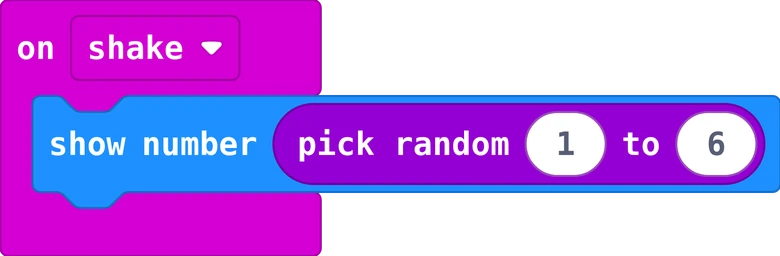
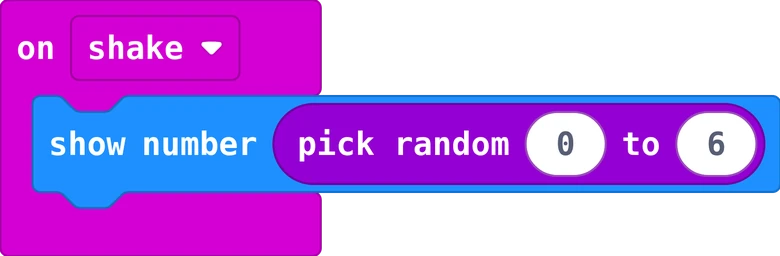
Real MakeCode blocks: on shake, show number pick random 1 to 6 123456 60 rolls: about 10 each

Let the computer choose: random

pick random 1 to 6 (in Math) gives a number nobody can guess: 1, 2, 3, 4, 5 or 6. Both ends can come out. Every time the block runs, it picks again. That is how a dice, a game or a surprise works.

Choose the smallest and the biggest number with care. To use the same pick twice, put it in a variable first.

More: is it fair?
  • Fair means every number has the same chance. Roll 60 times and count: each number comes about 10 times, never exactly. That is normal.
  • No memory: after three sixes, a six is just as likely as before.
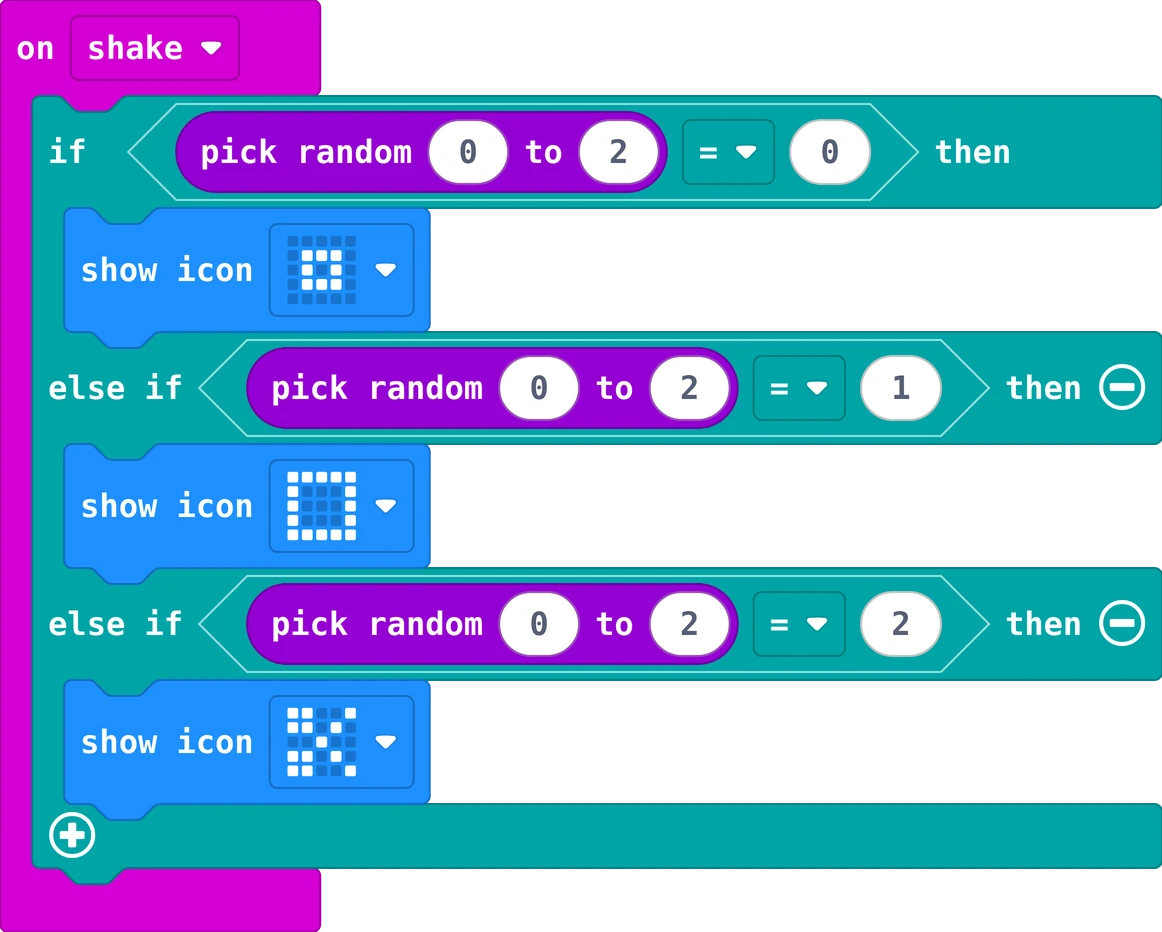
  • Pick once: if pick random 0 to 2 = 0 and else if pick random 0 to 2 = 1 pick two different numbers. Set a variable first, then ask about the variable.
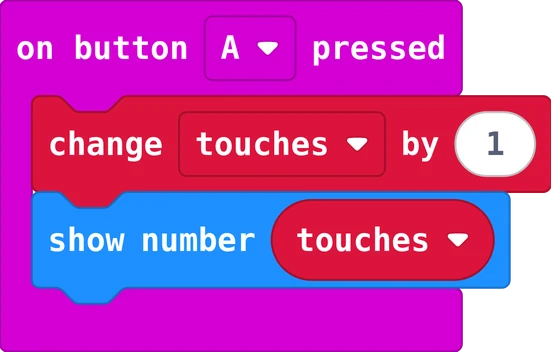
Real MakeCode blocks: on button A pressed, change touches by 1, then show number touches

Variables: boxes that remember

A variable is a box with a name. It remembers a number or a word while the program runs: how many touches, how many lives, when the clock started. You set it, change it, and read it by putting its name where a number goes.

Set it once at the start, change it when something happens, show it when you want to see it.

More: in MakeCode
  • Make a variable: Variables, then Make a Variable..., and give it a name that says what it remembers: touches, lives, start. Not x.
  • set touches to 0 puts a number in the box. Put it in on start: once.
  • change touches by 1 adds one; change lives by -1 takes one away.
  • true or false: a variable can also remember yes or no, like playing: is the game running?

Careful: a set inside forever runs again and again, so the box starts over every round.

4Build a shaker box

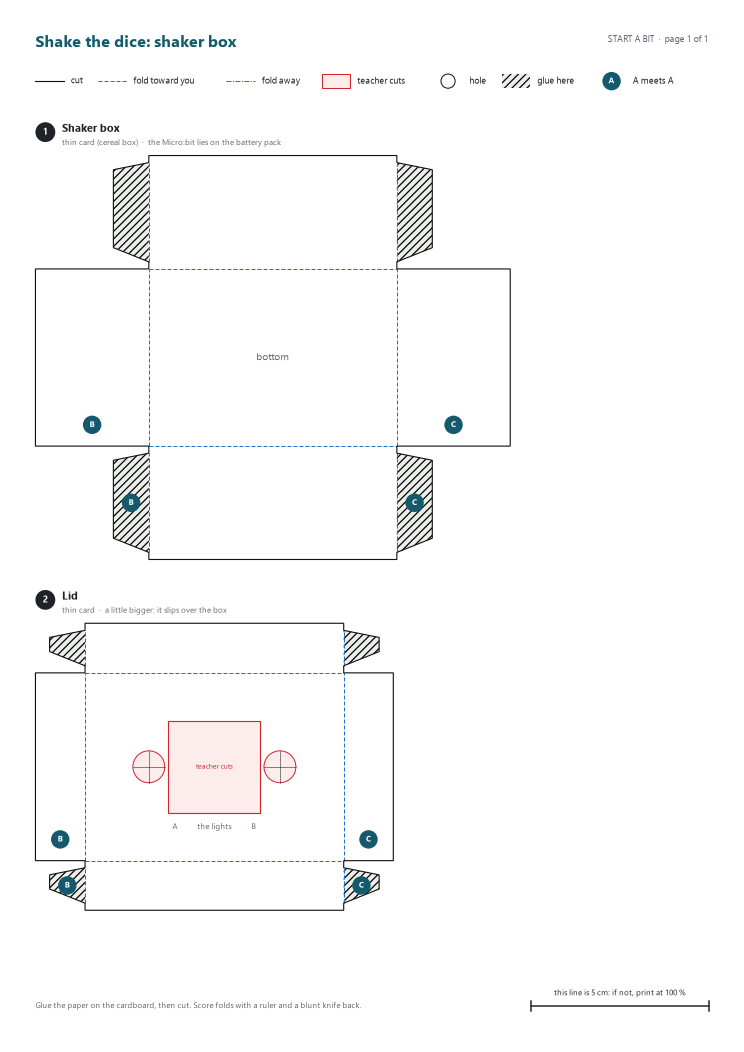
A dice wants to be shaken. Put the Micro:bit and its battery pack in a small box with a window for the lights, and shake the box. You can also just shake the Micro:bit in your hand.

Cardboard templates, page 1 of 1

Cardboard templates to print (PDF, 1 page)

Print at 100 % (actual size), check the 5 cm line, glue the paper on the cardboard, then cut. How to make cardboard parts that fit

Also: glue stick, a little tape to hold the Micro:bit in place.

The parts

  1. 1 Shaker box thin card (cereal box)
  2. 2 Lid thin card

Put it together: 6 steps

5Try it

The dice lab runs every story on screen. Drag the Micro:bit quickly to shake it, or roll 60 times at once and look at the chart: is your dice fair?

Open the dice lab in a new tab

6Program it

You see the program for . Choose another story in the bar at the top of the page.

on shake is in Input; pick random in Math; show number and show icon in Basic; sounds in Music. First time in MakeCode? The Name badge shows how to start.

Story 1: Shake for a numberrandom
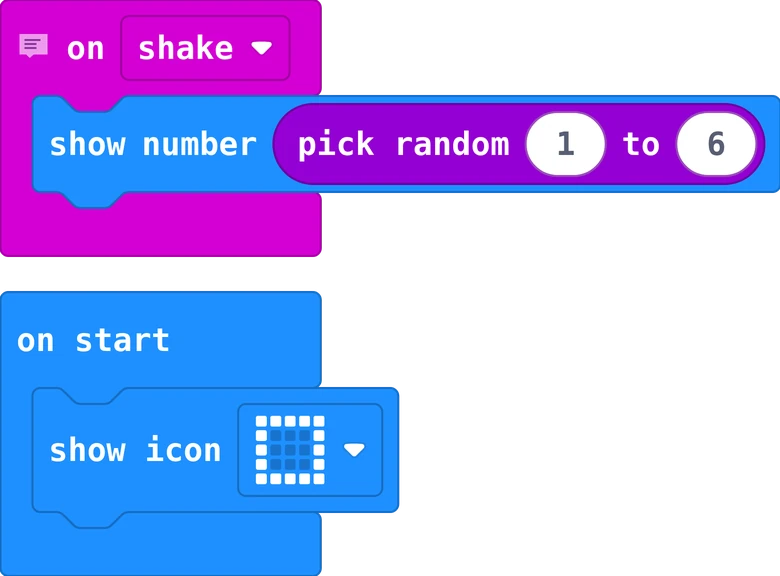
The MakeCode blocks of story 1
The same in Python
# Story 1: Shake for a number. Shake the Micro:bit: it picks a number from 1 to 6.

def on_gesture_shake():
    basic.show_number(randint(1, 6))
input.on_gesture(Gesture.SHAKE, on_gesture_shake)

basic.show_icon(IconNames.SQUARE)

Put show number into on shake, and pick random 1 to 6 into the number's place. Every shake picks a new number. The square at the start shows that the dice is ready.

Your turn: make it a dice for a game that needs numbers from 1 to 10.

You first

Your first roll is yours: drag on shake and show number yourself, then find pick random in Math.

Story 2: Roll with a spinsteps in order
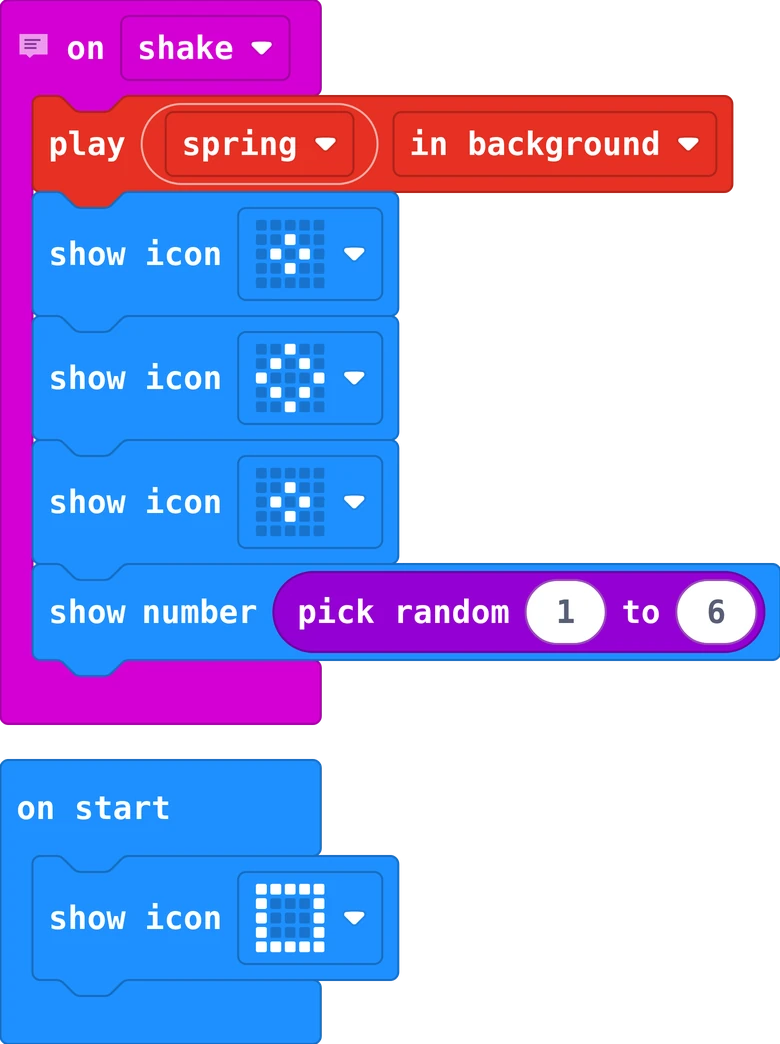
The MakeCode blocks of story 2
The same in Python
# Story 2: Roll with a spin. A little animation and a sound, then the number.

def on_gesture_shake():
    music.play(music.builtin_playable_sound_effect(soundExpression.spring),
        music.PlaybackMode.IN_BACKGROUND)
    basic.show_icon(IconNames.SMALL_DIAMOND)
    basic.show_icon(IconNames.DIAMOND)
    basic.show_icon(IconNames.SMALL_DIAMOND)
    basic.show_number(randint(1, 6))
input.on_gesture(Gesture.SHAKE, on_gesture_shake)

basic.show_icon(IconNames.SQUARE)

A real dice tumbles before it stops. Three pictures and a sound first, then the number: the blocks run from top to bottom.

Your turn: make your own spin with other pictures, or a different sound.

Story 3: Rock, paper, scissorsif and else if
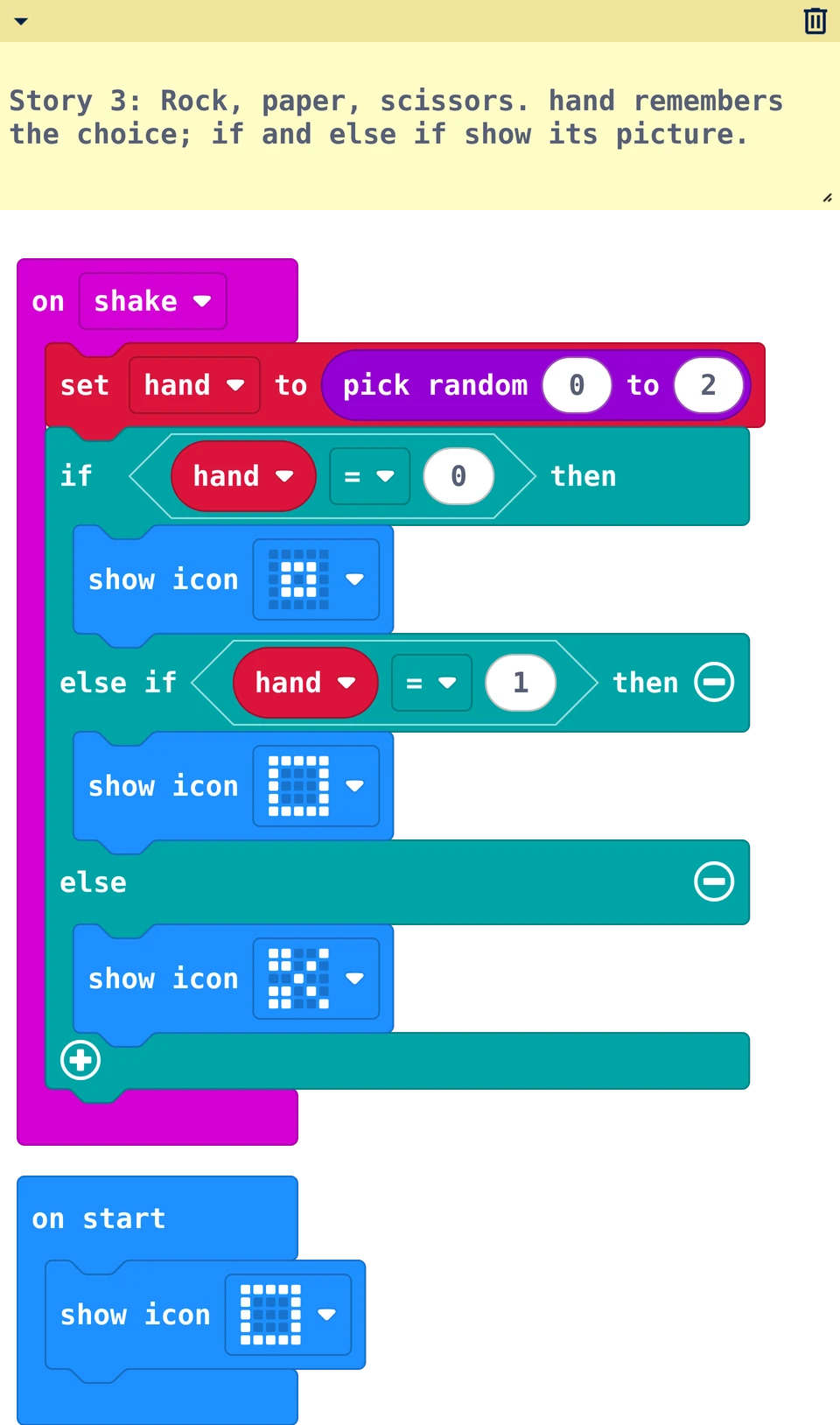
The MakeCode blocks of story 3
The same in Python
# Story 3: Rock, paper, scissors. hand remembers the choice; if and else if show its picture.
hand = 0

def on_gesture_shake():
    global hand
    hand = randint(0, 2)
    if hand == 0:
        basic.show_icon(IconNames.SMALL_SQUARE)
    elif hand == 1:
        basic.show_icon(IconNames.SQUARE)
    else:
        basic.show_icon(IconNames.SCISSORS)
input.on_gesture(Gesture.SHAKE, on_gesture_shake)

basic.show_icon(IconNames.SQUARE)

The variable hand remembers one random number: 0, 1 or 2. Then if and else if choose the picture: a small square is the rock, a big square the paper, and the scissors are a picture of their own.

Your turn: play against the person next to you: count, shake, show!

Story 4: Count your sixesa counter
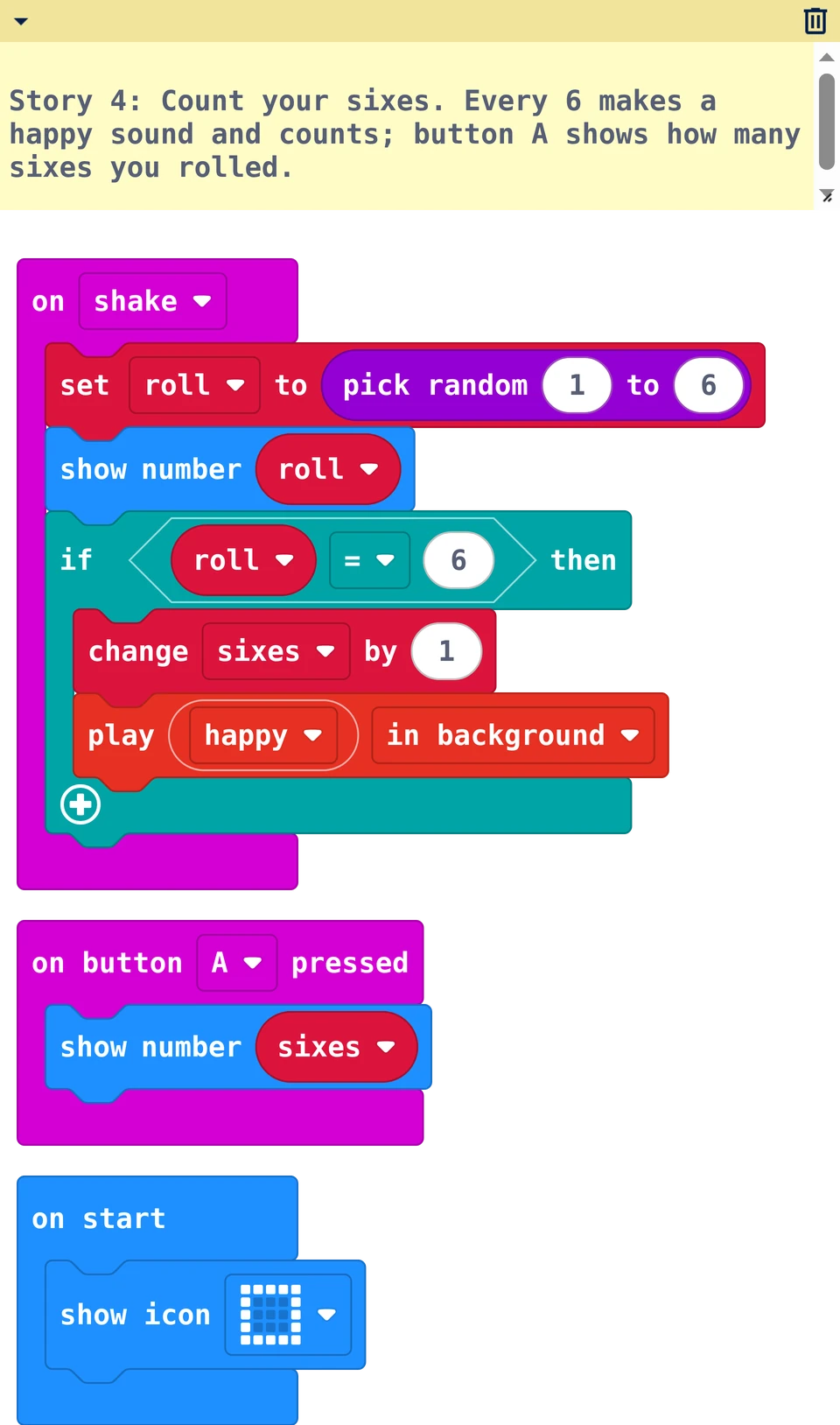
The MakeCode blocks of story 4
The same in Python
# Story 4: Count your sixes. Every 6 makes a happy sound and counts; button A shows how many sixes you rolled.
roll = 0
sixes = 0

def on_gesture_shake():
    global roll, sixes
    roll = randint(1, 6)
    basic.show_number(roll)
    if roll == 6:
        sixes += 1
        music.play(music.builtin_playable_sound_effect(soundExpression.happy),
            music.PlaybackMode.IN_BACKGROUND)
input.on_gesture(Gesture.SHAKE, on_gesture_shake)

def on_button_pressed_a():
    basic.show_number(sixes)
input.on_button_pressed(Button.A, on_button_pressed_a)

basic.show_icon(IconNames.SQUARE)

roll keeps the number so the program can show it and ask about it. Every six plays a happy sound and adds one to sixes. Button A shows how many sixes you have rolled.

Your turn: shake 30 times. How many sixes did you expect? How many did you get?

Real world

Games, lotteries and computer games all use random numbers. People check that they are fair, like you do with 60 rolls.

7Challenges

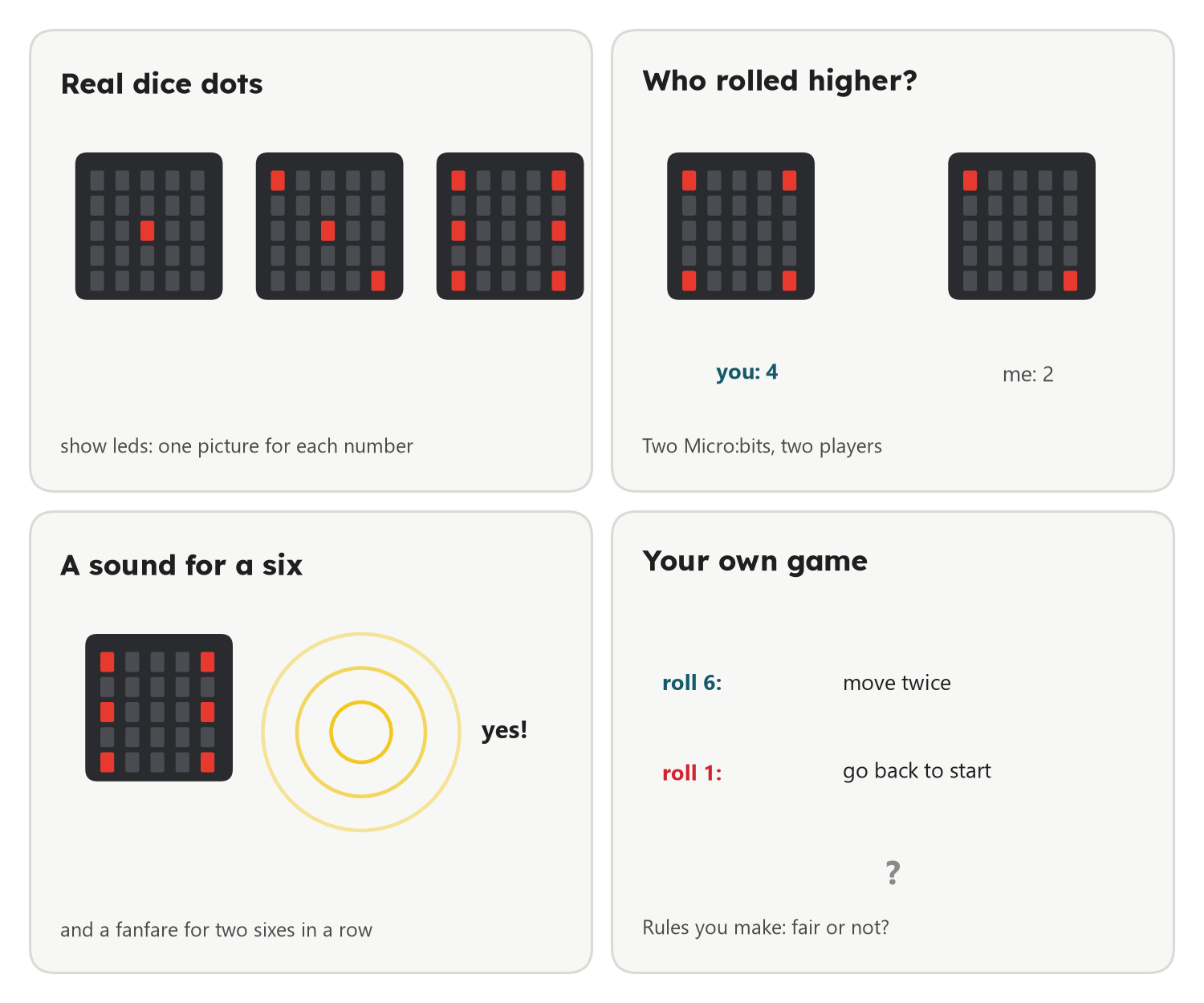
Four challenges: real dice dots with show leds, two players and who rolled higher, a sound for a six, and your own game rules

Challenges

  • Real dice dots: show leds with the dots of a dice for each number (if, else if ... six times).
  • A sound for a six: and a fanfare when two sixes come one after the other.
  • Lizard and Spock: rock, paper, scissors with five pictures instead of three.

Explore further

  • Who rolled higher? Two Micro:bits, two players: say who wins before you look.
  • Your own game: make the rules: a 6 moves twice, a 1 goes back. Is it fair?
  • Count all six: one variable for each number, and button B shows them all.

8How others did it

Other kids made their dice their own way. Made yours your own way? Show your teacher.

Nothing here yet. Made it your own way? Show your teacher: it may end up here.

9Check what you learned

Before you leave. Your teacher picks some of these for you: answer out loud, draw on paper, or work with the person next to you. Some cards change with your story: now .

Answer it

Tap an answer: you see at once if it is right, and why

  1. pick random 1 to 6 can give ...

  2. When does "on button A pressed" run?

  3. True or false: the Micro:bit feels a shake without any extra part.

  4. Why does the dice show the spin before the number?

  5. hand is 2. Which picture shows?

  6. You roll 60 times. About how many sixes do you expect?

  7. True or false: after three sixes in a row, a six is less likely next time.

  8. An AI says: "Make pick random 1 to 7 and show 6 when it is 7: then you win more." What do you say?

Predict, then try

Choose what will happen, then try it in the lab or on your board

  1. You turn the Micro:bit very slowly. Will it roll?

  2. Can the dice show the same number two times in a row?

  3. You roll 60 times and press A. Predict the number of sixes, then try it in the lab.

I can …

Tick what is true for you today. Your ticks stay on this computer.

Find the bug

A mistake we often see in class. What does the board do? Why? How do you fix it?

"I shake and shake. Mostly I get 1 to 6, but now and then the dice shows 0."

The MakeCode blocks of this program
The same in Python
def on_gesture_shake():
    basic.show_number(randint(0, 6))
input.on_gesture(Gesture.SHAKE, on_gesture_shake)
Need a hint?

Look at the two numbers in pick random. Which numbers can come out?

  • Which block gives a fair dice?

"Rock, paper, scissors: most shakes show a picture, but sometimes the screen stays the same."

The MakeCode blocks of this program
The same in Python
def on_gesture_shake():
    if randint(0, 2) == 0:
        basic.show_icon(IconNames.SMALL_SQUARE)
    elif randint(0, 2) == 1:
        basic.show_icon(IconNames.SQUARE)
    elif randint(0, 2) == 2:
        basic.show_icon(IconNames.SCISSORS)
input.on_gesture(Gesture.SHAKE, on_gesture_shake)
Need a hint?

How many times does this program pick a random number in one shake?

  • How do you make sure one picture always shows?

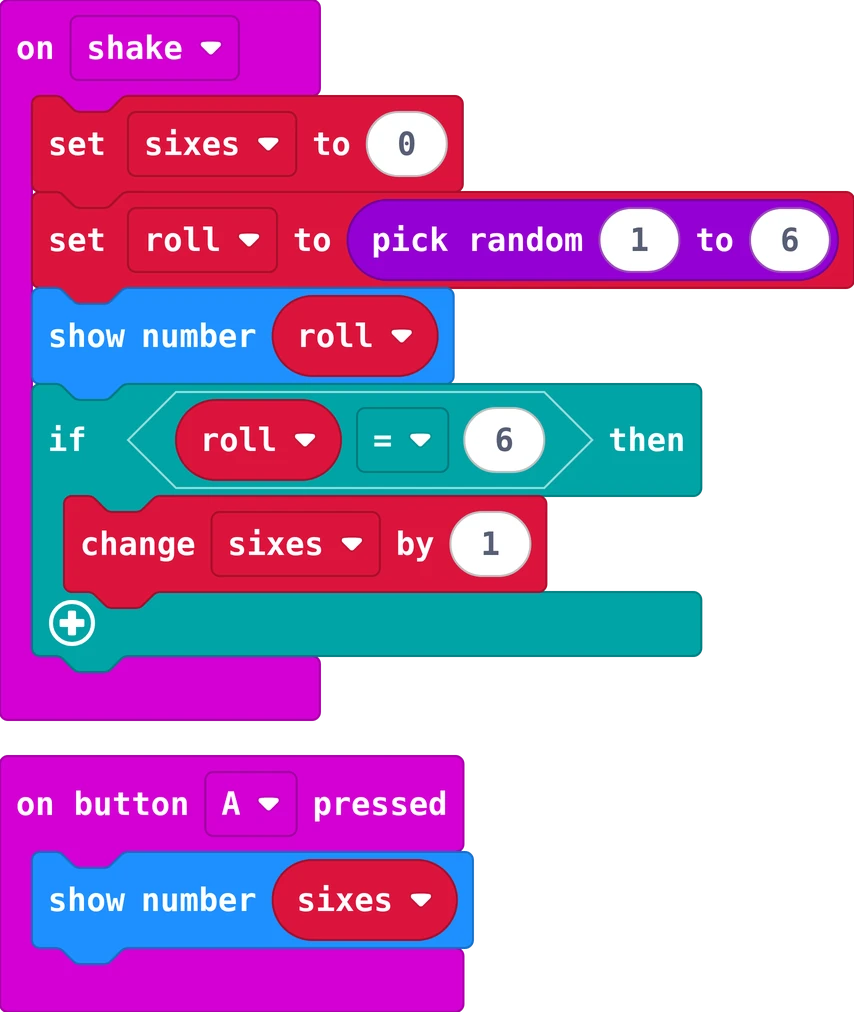
"I rolled three sixes. Button A shows 1, or 0, never 3."

The MakeCode blocks of this program
The same in Python
sixes = 0
roll = 0

def on_gesture_shake():
    global sixes, roll
    sixes = 0
    roll = randint(1, 6)
    basic.show_number(roll)
    if roll == 6:
        sixes += 1
input.on_gesture(Gesture.SHAKE, on_gesture_shake)

def on_button_pressed_a():
    basic.show_number(sixes)
input.on_button_pressed(Button.A, on_button_pressed_a)
Need a hint?

Where does sixes go back to 0? When does that block run?

  • Where does set sixes to 0 belong?

Show it without help

Two minutes: play with someone and explain it

  1. Roll and say which numbers can come out, and why.
  2. Point to the block that decides rock, paper or scissors.
  3. Say how you can test that your dice is fair.

Then: What did you make today? Which game would you like to make next?

Ask one question

Each of you asks one question about today

Ask your teacher or the class one question about today. Anything counts: a part, a block, a word on this page, something that went wrong, or where this is used in real life. There are no wrong questions, only questions nobody asked.

Start with: Why does …?   What happens if …?   How does a real … do it?   What does … mean?   Could I use this to …?

Poster to print (PDF)