Build the barrier at the entrance of a car park. A servo lifts it when the sensor sees a car, the program
remembers to close it after the car has passed, counts the cars, and shows FULL when there is no room left.
Scan to open
What you learn
17 things on the Builders path: open to see them
On the learning path: Builders with the Arduino and C++: a sensor, a servo, and a program that remembers
Programming
A state machine: the gate is closed, open or waiting, and the program remembers which from story 3
Count the cars in a variable, and count each one only once from story 4
Decide with if and else, and with two numbers: one to open, one to close
Short waits that you count, instead of one long delay that makes the board blind from story 3
Two libraries: Servo for the gate, HCSR04 for the sensorThe Servo library for the gate; the US-016 needs none
C++: bool variables, and &&, || and ! in a condition
Electronics
A 180° servo turns to an angle and holds it: the barrier
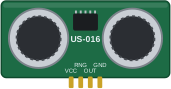
The ultrasonic sensor sees the car coming: it times an echoThe analog ultrasonic sensor sees the car coming: a voltage on A0from story 2
Thinking and making
Draw the state chart first: closed, open, waiting; then build one story at a time
Print the count and the distance: the Serial Monitor shows what the program believes
AI in the loop
Ask an AI to check your states against the state chart
Spot the AI mistakes: counting too often, waiting blind
A rule opens for every car; trained AI can read number plates
Bigger challenge: train a model to see a toy car
People decide what is fair and safe; the gate only follows
AI along the project: states, the counter, tricky test cases
Systems
Sensor, decision, output: a car park that runs itself
1See it in action

Count the cars story 4, on screen
2Parts you need
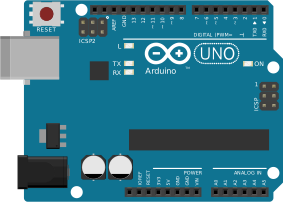
Arduino UNO
Breadboard
180° servo
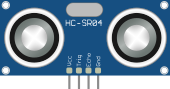
Ultrasonic sensor (HC-SR04)from story 2
Analog ultrasonic sensor (US-016)from story 2
LEDsfrom story 4
220 Ω resistorsfrom story 4
And jumper wires, a USB cable, and something to be the barrier: a lolly stick or a strip of cardboard taped
to the servo arm. Your teacher hands them out.
Another Arduino board?
Other boards work with the same pins. In the Arduino IDE choose Arduino Uno for the UNO R3, Arduino Uno
WiFi Rev2 for the WiFi board, or Arduino Nano for a Nano (D2, D4, D9, D11, D12, 5V and GND).
3Learn the basics
The parts of this project, each explained once for all projects. Open "More" to dig deeper.
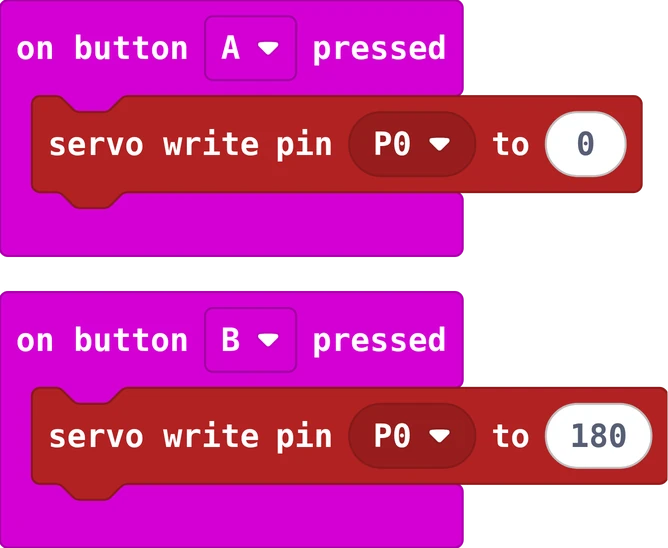
Servo
A servo is a small motor with gears and a little control chip. A 180° servo turns to an angle and
stays there. A 360° servo (continuous) spins round, forwards or backwards: that one can drive a wheel.
Three wires: brown or black to GND, red to +, orange or yellow is the signal from a pin.
More: how a pin controls it
The board sends a short pulse 50 times a second. A pulse of 1 millisecond means 0°, 1.5 milliseconds 90°,
2 milliseconds 180°. A 360° servo reads the same pulses as a speed: 90 stands still, below 90 turns one way,
above 90 the other way. Servos can take more current than a board pin gives, so a servo board like the
Kitronik Simple Servo board gives them their own battery power.
#include<Servo.h>Servoarm;// one Servo object per servovoidsetup(){arm.attach(9);// the signal wire on pin 9}voidloop(){arm.write(0);// to 0 degreesdelay(1000);arm.write(180);// to 180 degreesdelay(1000);}
Ultrasonic distance sensor
One can sends a click, too high for us to hear. The other listens for the echo from the wall.
A stopwatch measures how long the trip took. Sound needs about 29 µs for 1 cm, and the click went there
and back, so:
distance in cm = time in µs ÷ 2 ÷ 29.1
More: see it slowly, our two sensors side by side, and how to read each
Our two sensors, side by side
HC-SR04 times the echo
How
Trig makes the click; Echo stays HIGH as long as the trip takes
Pins
VCC · Trig · Echo · GND
Read it
a library, or pulseIn and the maths
Range
2 to 400 cm, about 3 mm steps
Nothing there
no echo: the library gives −1
Good for
most hobby projects: many examples online
US-016 an analog sensor
How
times the echo itself and gives a voltage: further = higher
Pins
VCC · Range · Out · GND
Read it
analogRead, no library
Range
2 to 300 cm (Range high or open, 3 mm a step), or up to 1 m (Range on GND, 1 mm a step)
Nothing there
the highest value: about 307 cm
Good for
simple code, and fine steps close up
Which would you choose? A parking assist that must see 3 m. A gate that only needs
to know "a car is there". A ruler that measures a book on the table to the millimetre. A project that also uses
every analog pin for knobs. Explain your choice to the person next to you.
Both see in a cone of about 15°. Soft things (a pillow, a jumper) and slanted surfaces send the
sound away: then there is no echo, or a wrong one. Wait at least 60 ms between two clicks, or you may hear the
old echo.
Reading the HC-SR04
#include<HCSR04.h>UltraSonicDistanceSensorsensor(12,11);// Trig on 12, Echo on 11voidsetup(){Serial.begin(9600);}voidloop(){Serial.println(sensor.measureDistanceCm());// -1: nothing in rangedelay(200);}
The HCSR04 library (by Martin Sosic, Library Manager) does the timing. Without it: Trig HIGH for 10 µs,
then pulseIn(echoPin, HIGH) gives the time in µs, and time ÷ 2 ÷ 29.1 is the distance. Always treat −1 as
"far away", not as "very close".
Reading the US-016
constintsensorPin=A0;// OUT; Range on 5V (or open): up to 3 mfloatmeasureDistance(){returnanalogRead(sensorPin)*0.3;// one step is 3 mm = 0.3 cm}voidsetup(){Serial.begin(9600);}voidloop(){Serial.println(measureDistance());delay(200);}
The voltage on OUT goes from 0 V to 5 V for 0 to about 307 cm, and analogRead turns that into 0 to 1023:
every step is 3 mm. With Range on GND the sensor measures up to about 1 m instead, 1 mm a step: then the number
from analogRead is the distance in mm. The sensor checks Range only when it gets power. Check it with a
tape measure: if every number is off by the same factor, change the 0.3 a little (calibrating).
State machine: what the program remembers
A sensor only tells you what is true now. To close a gate three seconds after a car has gone, the
program must remember which state it is in: closed, open, or waiting to close. A program built that way
is a state machine, and engineers draw it as a state chart: a box for each state, an arrow for each
thing that makes it change.
Keep the state in a variable (like gateOpen), change it only when something happens, and act
on it every loop.
More: state chart or flow chart, and counting something once
A flow chart shows the steps of the program one after the other. A state chart shows the states and
what moves the machine from one to the next; it does not care how many lines of code that takes. Traffic
lights, washing machines, lifts, games (playing, paused, game over) and robots are all state machines.
The same idea counts a car once. The loop runs ten times a second, so a car that stands in front of the sensor
for two seconds is "near" twenty times. Remember what the sensor said last time: the car has driven past
when it was near last time and is not near now. That is a tiny state machine too, with two states: no car, car.
boolcarWasNear=false;// the state of the sensor last time roundintcars=0;voidloop(){boolnear=sensor.measureDistanceCm()<15;if(carWasNear&&!near){// near before, not near now: a car drove pastcars=cars+1;}carWasNear=near;// remember for the next loopdelay(100);}
The same gate as a flow chart: the steps, not the states. Draw both for your program and compare.
4Wire it
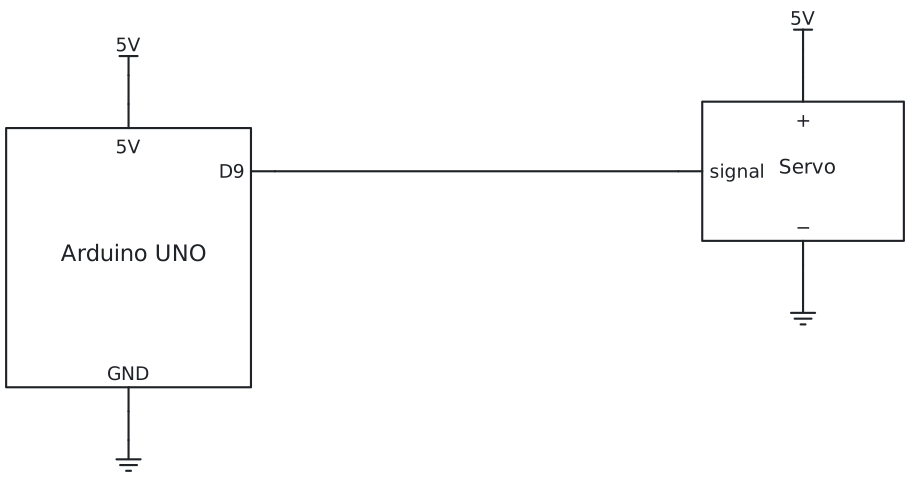
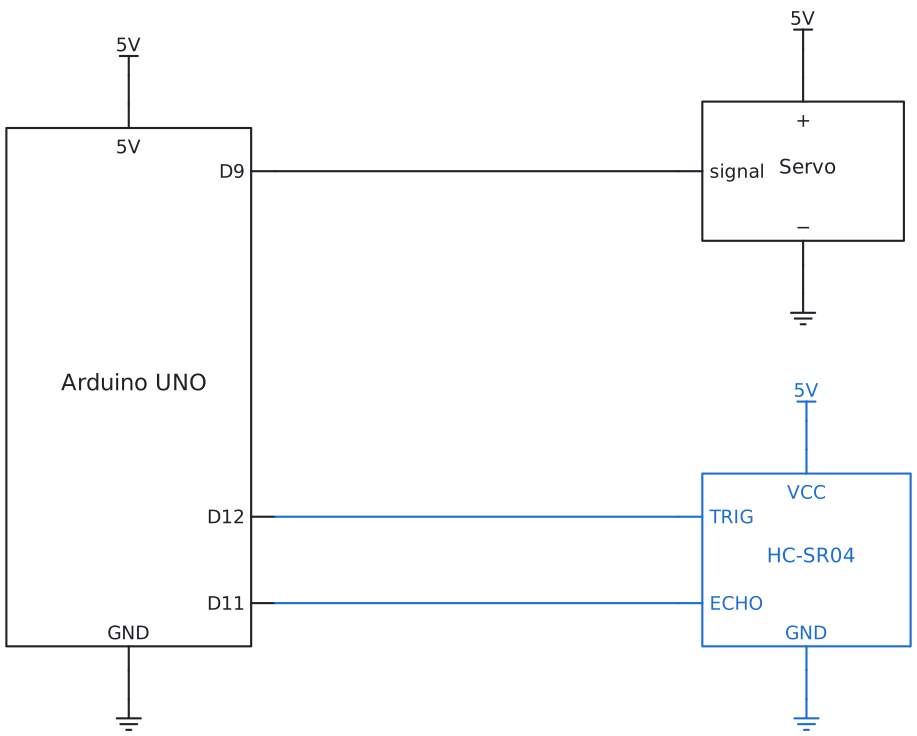
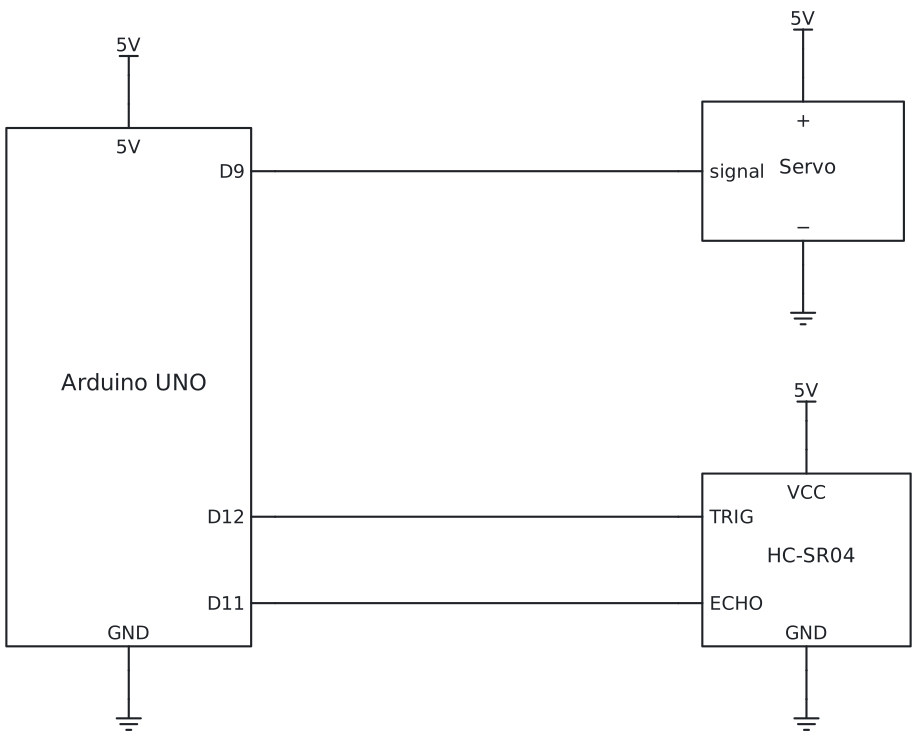
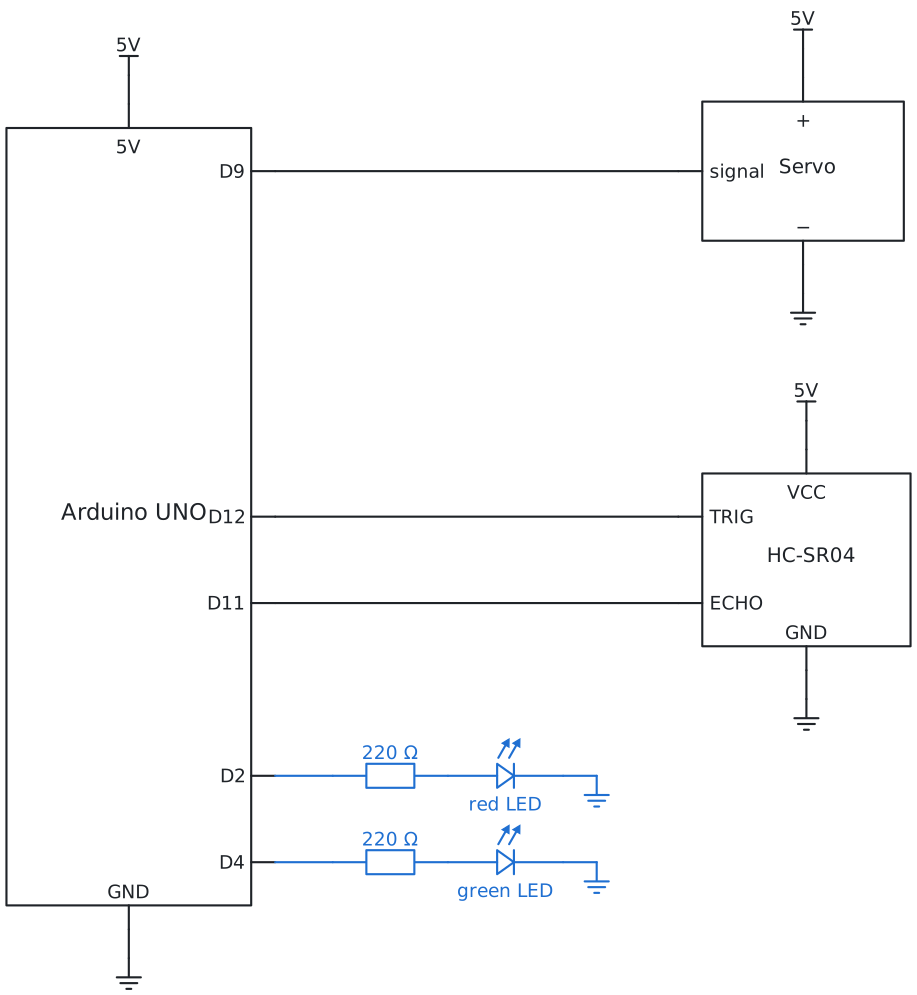
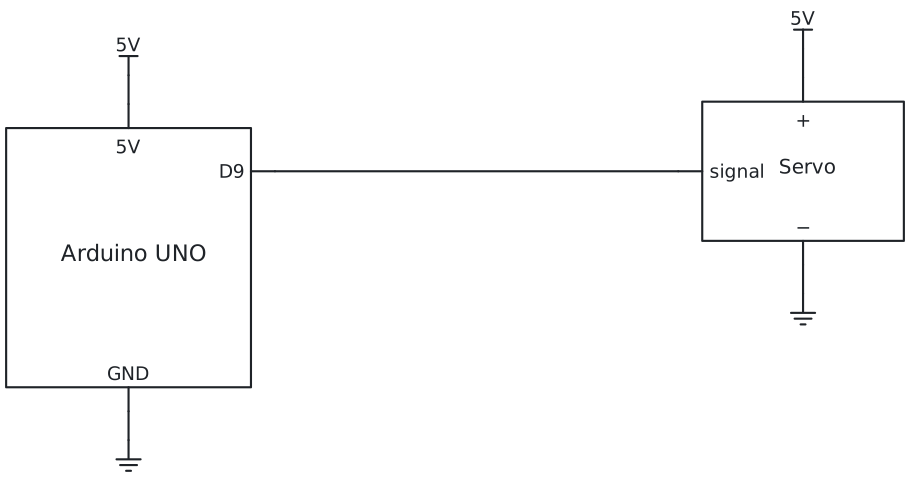
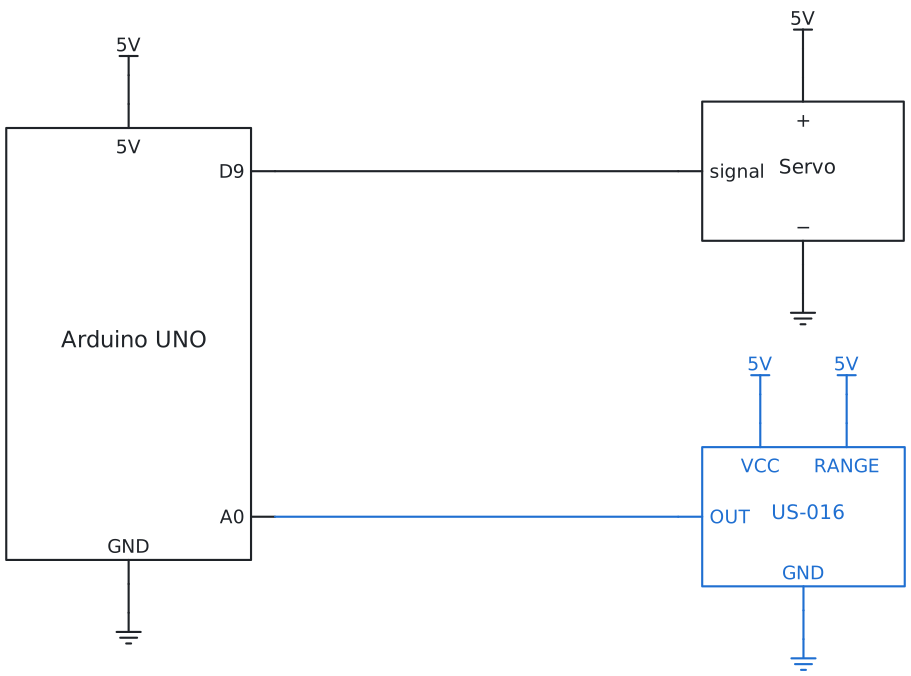
The picture shows the wiring for your story. Start with the servo alone; each story adds a little, and nothing
you built has to change. The new parts have a dashed box.
The servo stays off the breadboard: its plug takes three jumper wires, brown to the − rail, red to the + rail,
orange to pin 9. The 5V pin feeds the + rail. One small servo is fine on the board's 5V; a big one needs its own
power.
The sensor sits on four jumper wires too: VCC to the + rail, GND to the − rail, Trig to pin 12,
Echo to pin 11.
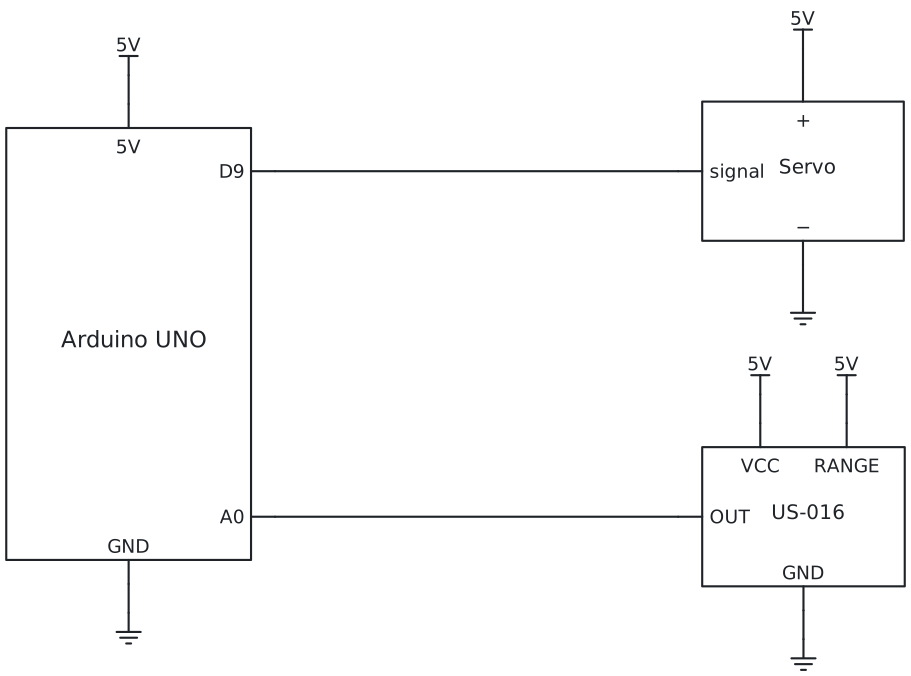
The sensor sits on four jumper wires too: VCC and RANGE to the + rail, GND to the − rail, OUT to
the analog pin A0.
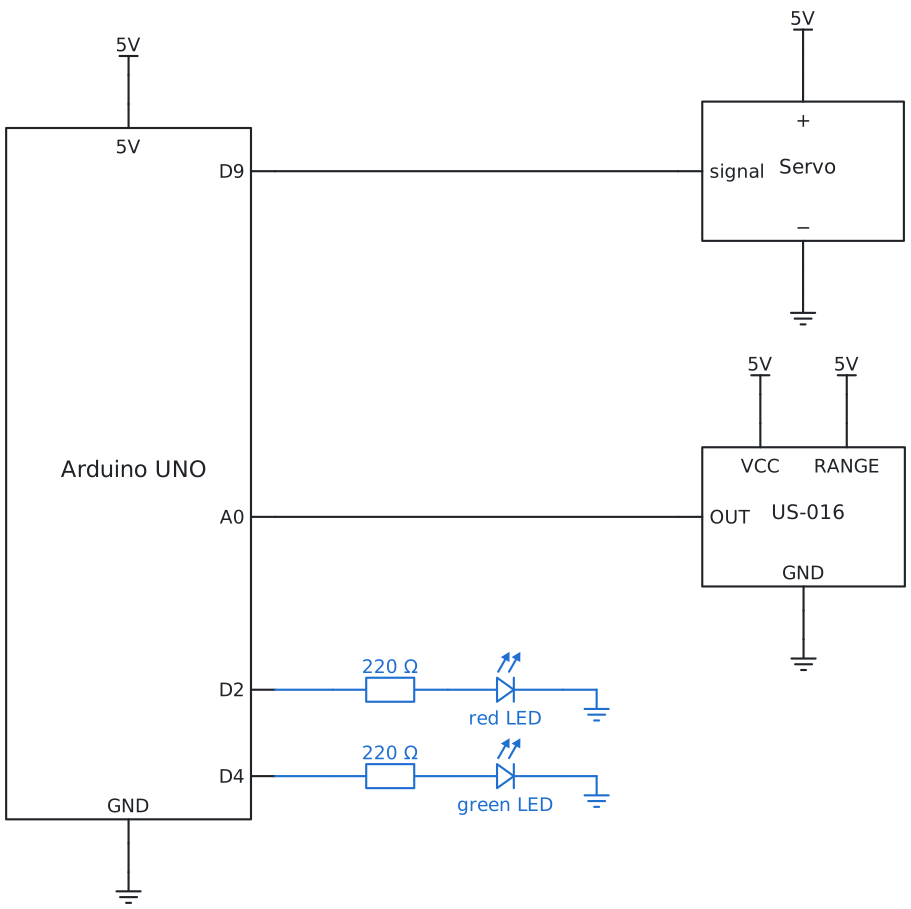
Circuit diagram: the same wiring, drawn the way engineers do
Every line is a wire and every part has its own symbol. The parts new in this story are blue.
How to read a circuit diagram
5Try it
The gate lab runs every story on screen: send cars, watch the sensor, the arm and the variables, and see which
lines of the program run.
You see the program for . Choose another story in the bar at the top of the page.
In the Arduino IDE the Servo library is already there. For the sensor,
install HCSR04 by Martin Sosic once (Library Manager).The US-016 needs no
library: measureDistance reads A0 and turns it into cm. Then type the code, choose your board and port,
and Upload. Go as far as you like: every story works on its own.
Story 1: Lift the gatea servo, two angles
#include<Servo.h>constintgatePin=9;constintclosed=0;// degrees: the barrier lies flatconstintopen=90;// degrees: the barrier stands upServogate;voidsetup(){gate.attach(gatePin);// tell the Servo library which pingate.write(closed);}voidloop(){gate.write(open);// liftdelay(2000);gate.write(closed);// lowerdelay(2000);}
A 180° servo goes to the angle you write and holds it. Tape the barrier to the arm while the servo is at 0,
so that 0 is flat and 90 stands up.
Your turn: does the gate need the whole 90°? Find the smallest angle that lets a toy car through.
Story 2: Open when a car comessensor and if
#include<HCSR04.h>#include<Servo.h>constinttriggerPin=12;constintechoPin=11;constintgatePin=9;constintclosed=0;constintopen=90;constintcarIsNear=15;// cmUltraSonicDistanceSensorsensor(triggerPin,echoPin);Servogate;voidsetup(){Serial.begin(9600);gate.attach(gatePin);gate.write(closed);}voidloop(){floatdistance=sensor.measureDistanceCm();Serial.println(distance);if(distance>0&&distance<carIsNear){// a car in front of the gategate.write(open);}else{gate.write(closed);}delay(100);}
#include<Servo.h>constintsensorPin=A0;// US-016 OUT; RANGE on 5V: the 3 m rangeconstintgatePin=9;constintclosed=0;constintopen=90;constintcarIsNear=15;// cmServogate;floatmeasureDistance(){// the US-016 gives a voltage: on the 3 m range one step is 3 mmreturnanalogRead(sensorPin)*0.3;// cm}voidsetup(){Serial.begin(9600);gate.attach(gatePin);gate.write(closed);}voidloop(){floatdistance=measureDistance();Serial.println(distance);if(distance>0&&distance<carIsNear){// a car in front of the gategate.write(open);}else{gate.write(closed);}delay(100);}
The same rule as the parking assist, with a servo instead of a light. Try it in the lab: the gate closes the
moment the car has passed the sensor, right on top of it. Story 3 fixes that.
Your turn: hold a hand in front of the sensor and move it slowly away. At which distance does the
gate close?
Story 3: Close after the car has passeda state, a counter
#include<HCSR04.h>#include<Servo.h>constinttriggerPin=12;constintechoPin=11;constintgatePin=9;constintclosed=0;constintopen=90;constintcarIsNear=15;// cm: openconstintcarIsGone=30;// cm: further than this counts as goneconstintcloseAfter=30;// loops of 100 ms with no car: 3 secondsUltraSonicDistanceSensorsensor(triggerPin,echoPin);Servogate;boolgateOpen=false;// the state: what the gate is doing right nowintclearFor=0;// how many loops the way has been clearvoidsetup(){gate.attach(gatePin);gate.write(closed);}voidloop(){floatdistance=sensor.measureDistanceCm();boolnear=distance>0&&distance<carIsNear;boolgone=distance<0||distance>carIsGone;if(near){// a car: open, and start counting from zero againgateOpen=true;clearFor=0;gate.write(open);}elseif(gateOpen&&gone){// open, and nothing there: count the clear timeclearFor=clearFor+1;if(clearFor>=closeAfter){gateOpen=false;gate.write(closed);}}delay(100);}
#include<Servo.h>constintsensorPin=A0;// US-016 OUT; RANGE on 5V: the 3 m rangeconstintgatePin=9;constintclosed=0;constintopen=90;constintcarIsNear=15;// cm: openconstintcarIsGone=30;// cm: further than this counts as goneconstintcloseAfter=30;// loops of 100 ms with no car: 3 secondsServogate;boolgateOpen=false;// the state: what the gate is doing right nowintclearFor=0;// how many loops the way has been clearfloatmeasureDistance(){// the US-016 gives a voltage: on the 3 m range one step is 3 mmreturnanalogRead(sensorPin)*0.3;// cm}voidsetup(){gate.attach(gatePin);gate.write(closed);}voidloop(){floatdistance=measureDistance();boolnear=distance>0&&distance<carIsNear;boolgone=distance<0||distance>carIsGone;if(near){// a car: open, and start counting from zero againgateOpen=true;clearFor=0;gate.write(open);}elseif(gateOpen&&gone){// open, and nothing there: count the clear timeclearFor=clearFor+1;if(clearFor>=closeAfter){gateOpen=false;gate.write(closed);}}delay(100);}
Two new ideas. A state: gateOpen remembers what the gate is doing. A counter: instead of one
long delay, which would make the board blind, the program waits 100 ms at a time and counts to 30. A bool is
a variable that is true or false.
Your turn: make the gate wait 5 seconds instead of 3. One number.
Story 4: Count the cars, show FULLcount once, two LEDs
#include<HCSR04.h>#include<Servo.h>constinttriggerPin=12;constintechoPin=11;constintgatePin=9;constintredLedPin=2;// FULLconstintgreenLedPin=4;// places freeconstintclosed=0;constintopen=90;constintcarIsNear=15;constintcarIsGone=30;constintcloseAfter=30;constintplaces=3;// how many cars fit in our car parkUltraSonicDistanceSensorsensor(triggerPin,echoPin);Servogate;boolgateOpen=false;boolcarWasNear=false;// the state of the sensor last time roundintclearFor=0;intcars=0;// how many cars are insidevoidsetup(){Serial.begin(9600);pinMode(redLedPin,OUTPUT);pinMode(greenLedPin,OUTPUT);gate.attach(gatePin);gate.write(closed);}voidloop(){floatdistance=sensor.measureDistanceCm();boolnear=distance>0&&distance<carIsNear;boolgone=distance<0||distance>carIsGone;if(carWasNear&&!near&&gateOpen){// it was near, now it is past the sensor: a car drove incars=cars+1;Serial.print("cars inside: ");Serial.println(cars);}boolfull=cars>=places;digitalWrite(redLedPin,full);digitalWrite(greenLedPin,!full);if(near&&!full){gateOpen=true;clearFor=0;gate.write(open);}elseif(gateOpen&&full){// the last place is taken: close at once, the next car waitsgateOpen=false;gate.write(closed);}elseif(gateOpen&&gone){clearFor=clearFor+1;if(clearFor>=closeAfter){gateOpen=false;gate.write(closed);}}carWasNear=near;// remember for next timedelay(100);}
#include<Servo.h>constintsensorPin=A0;// US-016 OUT; RANGE on 5V: the 3 m rangeconstintgatePin=9;constintredLedPin=2;// FULLconstintgreenLedPin=4;// places freeconstintclosed=0;constintopen=90;constintcarIsNear=15;constintcarIsGone=30;constintcloseAfter=30;constintplaces=3;// how many cars fit in our car parkServogate;boolgateOpen=false;boolcarWasNear=false;// the state of the sensor last time roundintclearFor=0;intcars=0;// how many cars are insidefloatmeasureDistance(){// the US-016 gives a voltage: on the 3 m range one step is 3 mmreturnanalogRead(sensorPin)*0.3;// cm}voidsetup(){Serial.begin(9600);pinMode(redLedPin,OUTPUT);pinMode(greenLedPin,OUTPUT);gate.attach(gatePin);gate.write(closed);}voidloop(){floatdistance=measureDistance();boolnear=distance>0&&distance<carIsNear;boolgone=distance<0||distance>carIsGone;if(carWasNear&&!near&&gateOpen){// it was near, now it is past the sensor: a car drove incars=cars+1;Serial.print("cars inside: ");Serial.println(cars);}boolfull=cars>=places;digitalWrite(redLedPin,full);digitalWrite(greenLedPin,!full);if(near&&!full){gateOpen=true;clearFor=0;gate.write(open);}elseif(gateOpen&&full){// the last place is taken: close at once, the next car waitsgateOpen=false;gate.write(closed);}elseif(gateOpen&&gone){clearFor=clearFor+1;if(clearFor>=closeAfter){gateOpen=false;gate.write(closed);}}carWasNear=near;// remember for next timedelay(100);}
A car standing in front of the sensor is "near" ten times a second. To count it once, the program
remembers what the sensor said last time: a car has driven in when it was near last time and is not
near now, while the gate is open. ! means not. With three cars inside, red is on and the gate stays
closed. When the last place is taken, the gate closes at once, even if the next car is already near: it waits for a
free place.
Your turn: cars also leave. Add a button that counts one down, like the lab's "A car leaves".
Really stuck? Try first: you learn the most by building it yourself. If it still does not work, your
teacher can give you a code for a ready-made program of your story.
Type the code in the lock at the top right of the page.
7Challenges
Challenges
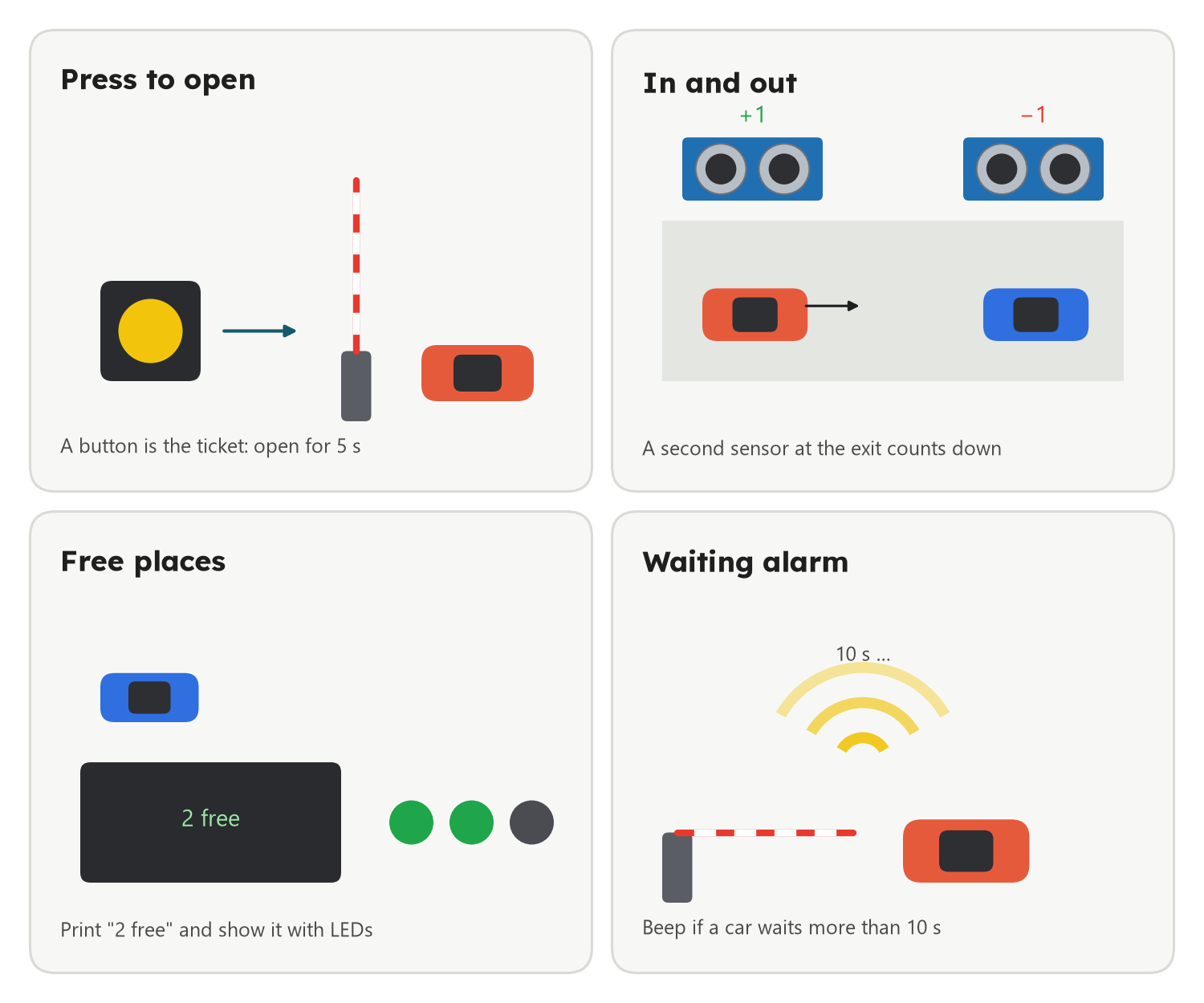
Press to open: a button is the ticket: press it and the gate lifts for five seconds.
In and out: a second sensor at the exit counts a car down, so the car park fills and empties by itself.
Free places: print "2 free" on the Serial Monitor, and show the number with LEDs.
Explore further
Waiting alarm: a buzzer beeps if a car has waited more than ten seconds (a counter again).
Slow arm: lift the barrier in small steps, one degree at a time, like a real gate.
Without delay: use millis() instead of counting loops, so the loop can run as fast as it likes.
Example solution for Press to open, and hints for the others. Try first; if you get stuck, or
want to study it at home, ask your teacher for the code.
Type the code in the lock at the top right of the page.
8Team up with AI
Meet AIExplorers: see it, try it, judge it
Engineer with AIBuilders: use it at every step, train a model
Build with AICreators: AI drafts the code and runs inside your machine
Engineer with AI: use it at the right step of the project, give it the facts it needs, and test every idea on the real thing. Some jobs need a trained model, some only a rule: you choose. How to team up with AI
AI in the real world
Car parks that read number plates
Many car parks have a camera at the gate. Trained AI finds the number plate in the picture and reads the letters, and the gate opens for cars that have paid or are on a list.
What only you can do
You are the engineer
What is fair? Who gets in when only one place is left? People decide the rules a machine follows.
Safety. The arm must never come down on a car or a person: you test that, again and again.
Explain it. Show your state chart to someone who has never seen it: can they follow it?
AI along the way
Where AI helps in this project, and your part
Step
AI can
You
Plan
List the states and what makes the gate change state
Draw the state chart and compare
Program
Draft the car counter
Find where it would count one car twice
Train
Learn to see a toy car in a camera picture (Teachable Machine)
Take good pictures, test, compare with the sensor
Test
Suggest tricky cases: two cars close together, a car that backs out
Try them in the gate lab and on the real gate
Ask the AI
Check my states
My Arduino parking gate has three states: closed, open and waiting.
A sensor sees cars and a servo lifts the arm.
For each state, list what makes the gate go to another state.
Then tell me which situation I may have forgotten.
Then check:
Compare with the state chart on this page: does the AI have the same arrows?
Does it say you forgot something? Try it in the gate lab.
If the AI is wrong, explain why to a friend.
Spot the AI mistake
How do I count the cars that drive in?
Add 1 to the count every time the sensor sees a car closer than 15 cm.
An example answer, written for practice.
What goes wrong?
The loop runs many times a second. Count once: when a car was near and now has gone.
Spot the AI mistake
How long should my gate wait before it closes?
Use delay(5000) after the car has gone, then close the gate.
An example answer, written for practice.
What is the problem with delay(5000) here?
During delay the board is blind. Count short waits instead, and keep looking with the sensor.
Rule or trained model
The gate opens for every car. What would you need to open it only for cars on a list?
Distance cannot tell cars apart. Reading a plate in a picture is a job for trained AI.
Teach it by examples
Teach a computer to see a toy car
A challenge for two with Teachable Machine (Google, free, no account; the pictures stay on your computer) and the laptop camera. How it works
Make two classes: car and no car.
Record many pictures of a toy car (all sides, near and far) and of the empty road.
Press Train, then test it with other toys and your hand.
Compare: when is the camera model better than the ultrasonic sensor, and when is it worse?
Wise and fair
Four rules for every AI tool
Private: never type or upload names, addresses or photos of people.
Real: AI can sound sure and be wrong. Test it on the real thing.
Honest: say what AI did and what you did.
Yours: you put it on the board, so you answer for it.
9How others did it
Other kids solved the same task their own way: shorter, longer, with a smart trick, or not
working yet. Open one to see it, find the bug or make it better. Made it your own way? Show your teacher.
What they did: When a car is near, the gate opens, waits two seconds, closes, and only then measures again.
Look closer: It works for one slow car. But while it waits, nothing is measured: a second car right behind gets the gate on its roof. Story 3 counts short waits instead.
Your turn: Drive two toy cars one after the other. What happens to the second one?
Before you leave. Your teacher picks some of these for you: answer out loud, draw on paper, or work with the person
next to you. Some cards change with your story: now .
Answer it
Tap an answer: you see at once if it is right, and why
gate.write(90) tells a 180° servo to …
A 180° servo goes to an angle and holds it; a 360° servo would read 90 as "stand still".
A servo plug has three wires. The darkest one goes to …
Brown or black is GND, red is +, orange/yellow/white is the signal.
Why can one small servo run from the board, while a motor needs its own battery?
Every part takes current; the board can only give so much. Two servos or a motor want their own power.
The library gives −1. What does that mean?
The sensor works from about 2 cm to 400 cm. Further away, or at a bad angle, no echo comes back.
An if block checks something. If the answer is false, what happens?
If only runs its inside when the check is true.
Why does the gate program need a variable like gateOpen?
Closing three seconds after a car has gone is about the past; the sensor only knows the present.
Which of these is a state?
A state is what is going on right now, kept in a variable; a measurement is one number from one moment.
What does the board do during delay(3000)?
delay stops the whole program. Long waits make the board blind; count short waits instead.
A car stands in front of the sensor for two seconds. How do you count it once?
Remember the sensor's answer from last time: the moment it changes from near to not near, the car has driven past.
What is a variable?
The program can put a value in the box, read it later and change it.
bool full = cars >= places; What is full when cars is 3 and places is 3?
3 is greater than or equal to 3, so the comparison is true.
The US-016 gives a voltage on its OUT pin. How does the Arduino read it?
The voltage grows with the distance; analogRead turns 0 to 5 V into 0 to 1023, and on the 3 m range each step is 3 mm.
Which of our two ultrasonic sensors needs the board to time the echo?
The HC-SR04 gives a pulse as long as the echo took; the US-016 does the timing itself and gives a voltage.
A program that remembers whether the gate is closed, open or waiting, and changes when something happens, is a …
Engineers call it a state machine, and draw it as a state chart.
In a state chart, what does an arrow show?
Boxes are states, arrows are changes; a flow chart is the one with the steps of the program.
The echo comes back after 1164 µs. How far away is the wall, in cm? (time ÷ 2 ÷ 29.1)
1164 ÷ 2 = 582 µs one way; 582 ÷ 29.1 = 20 cm.
True or false: a pillow is as easy to measure as a wall.
False: soft things swallow the click and slanted ones send it away, so there is no echo or a wrong one.
Choose what will happen, then try it in the lab or on your board
Swap the numbers: closed = 90 and open = 0. What does the barrier do?
The servo only knows angles. Names are for us; keep them true, or the next story gets confusing.
Hold your hand 10 cm in front of the sensor and keep it there. What does the gate do?
Every loop sees the hand and writes open; the servo stays where it is told.
Change closeAfter from 30 to 10. When does the gate close after the car has gone?
10 loops of 100 ms make one second.
Three cars are inside, places is 3. A fourth car drives up. What happens?
full is true, so the gate does not open. When a car leaves, full is false, the gate opens, and the car is counted as it drives past the sensor.
Draw it
For
Draw the state chart of the gate: a box for each state (closed, open, waiting)
and an arrow for each thing that changes it (a car comes, the way has been clear for 3 s).Draw the flow chart of your program: a box for each step, a diamond for each
question. Then point at your drawing and tell your teacher what the arm does.
How to draw a flow chart
Flow charts
A flow chart shows what a program does, one step after the other. It works for every board and every
language: the blocks change, the idea stays.
Rounded box: where it starts
Box: one thing to do
Diamond: a question with two answers, yes and no
Arrow: what comes next; an arrow back up repeats
One box for each step, a diamond for each question, and follow the arrows with your finger.
More: how to draw your own
Draw on paper with a pencil. Read your program from the top and draw one box for each block or line. "Forever"
and "loop" are an arrow back up. "If", "while" and "on button pressed" are questions: a diamond with yes and no.
Then point at the boxes with your finger and say out loud what the board does. If your finger gets stuck, the
program would get stuck too.
I can …
Tick what is true for you today. Your ticks stay on this computer.
Find the bug
A mistake we often see in class. What does the board do? Why? How do you fix it?
"The program uploads, the Serial Monitor shows the distances, but the servo never moves a millimetre."
The sensor says 14.9, then 15.1, then 14.8 cm. What does the program do with each number?
What stops the shivering?
One number, 15, decides both opening and closing. Around that line the measurement jitters a little and the gate follows every jitter. Fix: Two numbers: open when closer than 15 cm, close only when further than 30 cm (or after a clear time), like story 3.
"The gate opens for the first car and closes after 3 seconds, fine. But if a second car comes right behind it, the gate closes on top of it."
voidloop(){floatdistance=sensor.measureDistanceCm();if(distance>0&&distance<carIsNear){gate.write(open);delay(3000);// keep it open for three secondsgate.write(closed);}delay(100);}
Need a hint?
While delay(3000) runs, does the program measure anything?
Why is a long delay a problem here?
delay(3000) stops everything for three seconds: no measuring, no deciding. The gate closes blindly when the time is up. Fix: Count the clear time in small steps (clearFor, 100 ms each) and measure in between, like story 3.
"One toy car drives up and the Serial Monitor says 1, 2, 3 … 20 cars. The red FULL light comes on at once."
How many times does loop run while the car stands in front of the sensor?
How do you count a car once?
The program adds 1 every loop while the car is near: ten times a second. It never asks whether this is the same car as last time. Fix: Remember carWasNear and count only when near is true now and was false last time.
"The Serial Monitor only shows 0 or 1, whatever is in front of the US-016. Far away it says 1, very close it says 0."
The US-016 gives a voltage that can be anything from 0 V to 5 V. Which read gives you all the steps in between?
Which line reads the US-016 right?
digitalRead only answers LOW or HIGH, 0 or 1. The voltage on OUT has many steps; only analogRead gives them, as 0 to 1023. Fix: int reading = analogRead(sensorPin);
Ask one question
Each of you asks one question about today
Ask your teacher or the class one question about today. Anything counts: a part, a block, a word on this page,
something that went wrong, or where this is used in real life. There are no wrong questions, only questions
nobody asked.
Start with: Why does …?What happens if …?How does a real … do it?What does … mean?Could I use this to …?
Answers for the teacher. A model state chart for each story. The questions and bugs above show their own answers.
Type the code in the lock at the top right of the page.
 START A BIT
 Scan to open