 START A BIT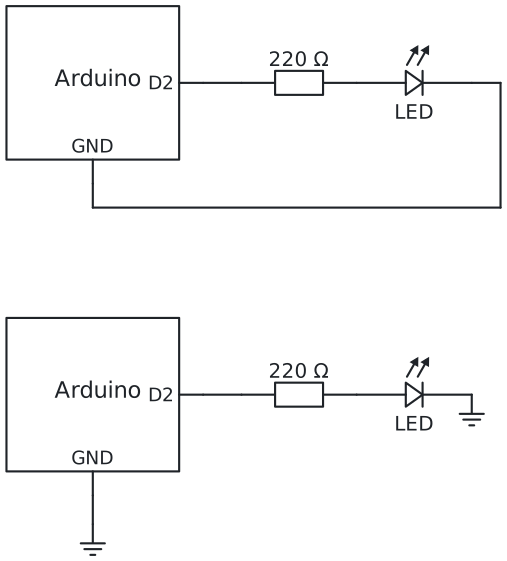
Circuit diagram
The wiring picture shows where every wire goes on your table. A circuit diagram shows only what is connected to what: every line is a wire and every part has its own symbol. Engineers all over the world draw circuits like this, so a diagram from a book or a website works for you too.
Follow a line from a pin: everything on that line is connected. All GND symbols are connected to each other, so the two drawings are the same circuit.
More: the symbols, and from the diagram to the breadboard
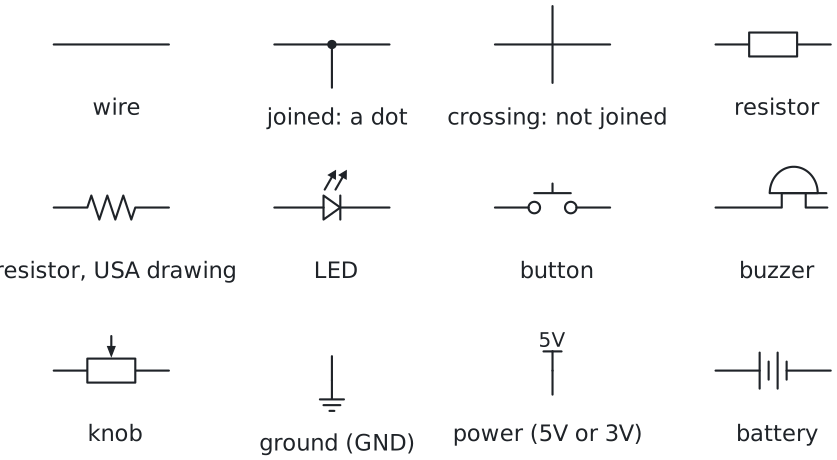
- A dot joins wires. Two lines that cross without a dot are not connected.
- Boxes are boards. A box with pin names is a board or a module, like the Arduino or a sensor. Its pins have the same names as on the real board.
- The triangle of the LED points the way the current flows, from the long leg (+) to the short leg (−). The short leg goes to GND.
- Two resistor drawings. Europe draws a box, the USA a zigzag. Both mean the same part.
From the diagram to the breadboard: take one line at a time, start at a pin of the board, and put a tick on the line when its wire is in. When every line has a tick, the circuit is complete.
Try it: open the circuit diagram under "Wire it" in a project, cover the wiring picture, and wire it from the diagram only.