ArduinoC++Builders
Parking assist: beep before you bump

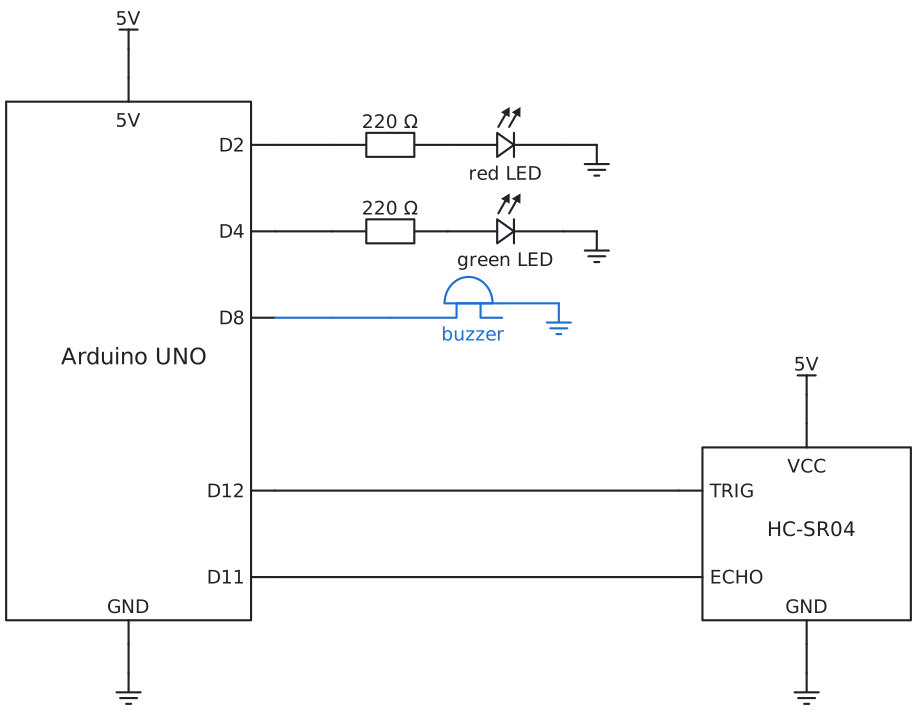
Build the helper a car has at the back. A sensor measures how far away the wall is, lights warn you, and a
beeping gets faster the closer you get. Then park without a bump.

Scan to open
6Program it
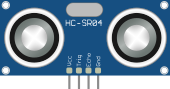
You see the program for . Choose another story in the bar at the top of the page.
In the Arduino IDE, install the library once: Library Manager (the books icon on the left), search for
HCSR04 and install the one by Martin Sosic. Then type the code, choose your board and port, and
Upload. Go as far as you like: every story works on its own.
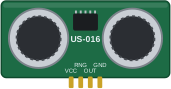
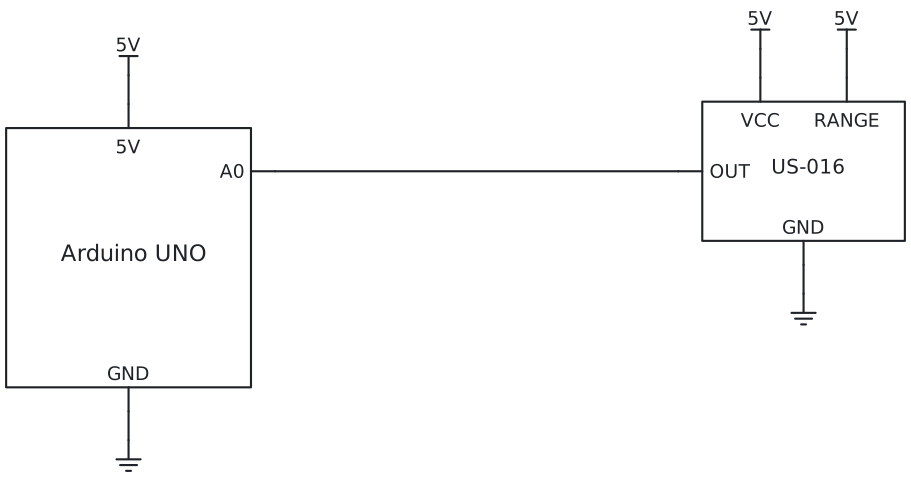
The US-016 needs no library: it gives a voltage, and analogRead reads it. The function
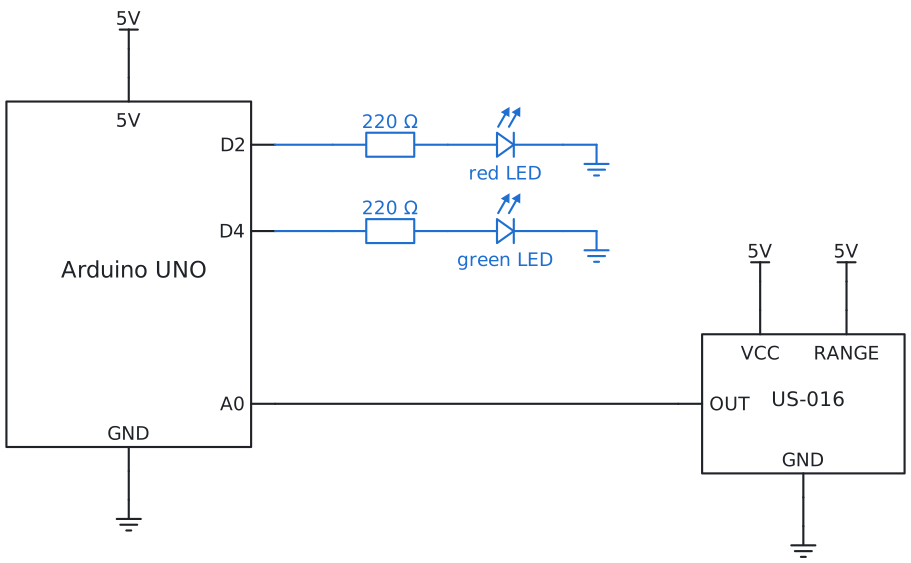
measureDistance turns 0 to 1023 into cm (× 0.3 on the 3 m range); the rest of each program is the same as with the HC-SR04
(switch the sensor in the bar and compare). Type the code, choose your board and port, and Upload.
Story 1: See the distancemeasure, print
#include <HCSR04.h>

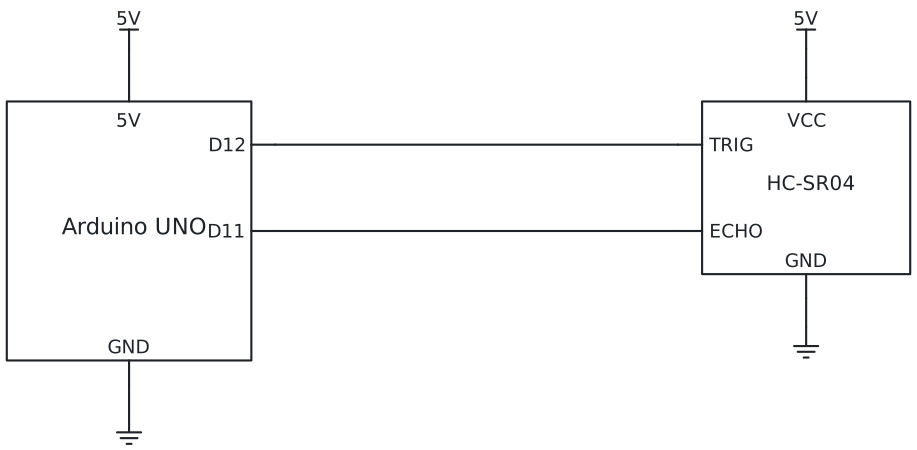
const int triggerPin = 12;
const int echoPin = 11;
UltraSonicDistanceSensor sensor(triggerPin, echoPin);

void setup() {
  Serial.begin(9600);                 // talk to the computer: open the Serial Monitor at 9600
}

void loop() {
  float distance = sensor.measureDistanceCm();   // -1 when nothing is in range
  Serial.print(distance);
  Serial.println(" cm");
  delay(200);
}
const int sensorPin = A0;           // US-016 OUT; RANGE on 5V: the 3 m range

float measureDistance() {            // the US-016 gives a voltage: on the 3 m range one step is 3 mm
  return analogRead(sensorPin) * 0.3;    // cm
}

void setup() {
  Serial.begin(9600);                 // talk to the computer: open the Serial Monitor at 9600
}

void loop() {
  float distance = measureDistance();   // always a number, in cm
  Serial.print(distance);
  Serial.println(" cm");
  delay(200);
}
Open the Serial Monitor (the magnifying glass, top right) and set it to 9600. Hold your hand in front of
the sensor and move it: the numbers follow your hand. float is a number with a decimal point.
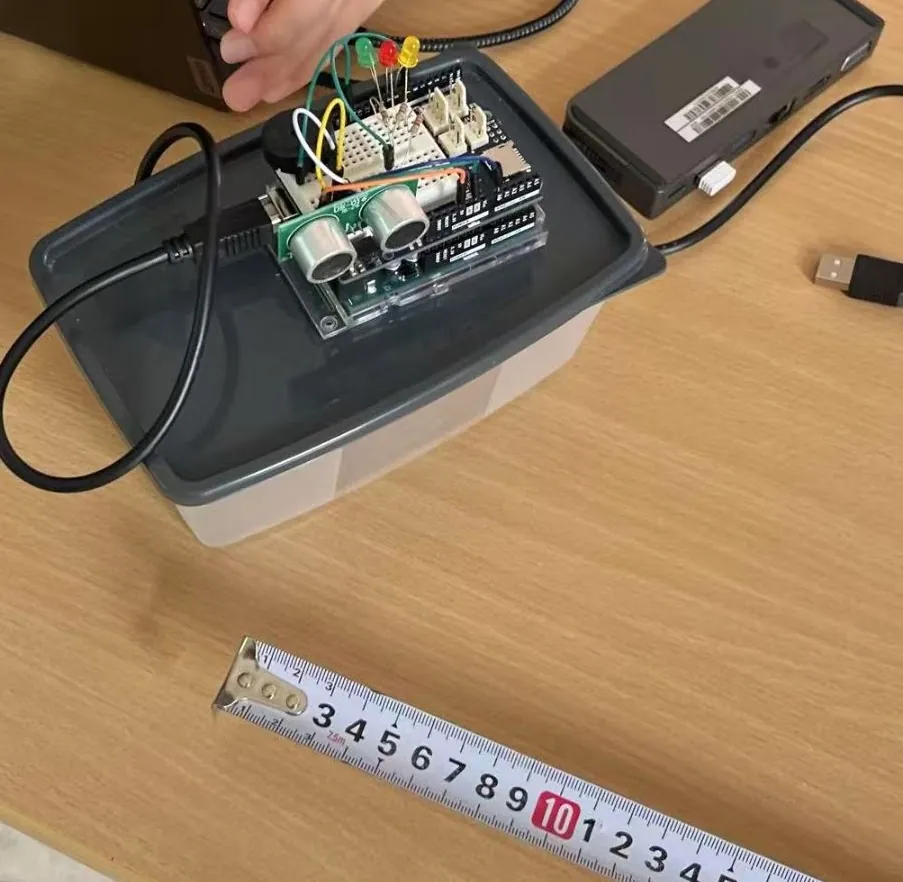
Check the US-016 with a tape measure: hold a book at 20, 50 and 100 cm. If the numbers are
off by the same factor, change the 300 in measureDistance: that is calibrating a sensor.
Your turn: how close can your hand come before the numbers go strange? And how far away
does the wall still count?
Story 2: Red when too closea rule with if
#include <HCSR04.h>

const int triggerPin = 12;
const int echoPin = 11;
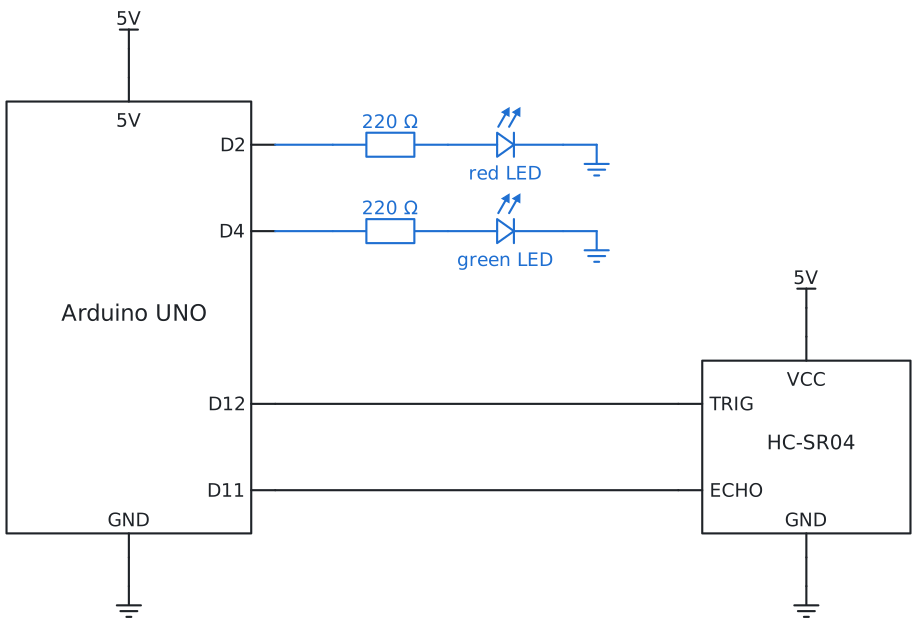
const int redLedPin = 2;
const int greenLedPin = 4;
const int tooClose = 30;            // cm
UltraSonicDistanceSensor sensor(triggerPin, echoPin);

void setup() {
  Serial.begin(9600);
  pinMode(redLedPin, OUTPUT);
  pinMode(greenLedPin, OUTPUT);
}

void loop() {
  float distance = sensor.measureDistanceCm();
  Serial.println(distance);
  if (distance > 0 && distance < tooClose) {     // -1 means: nothing in range, so that counts as far
    digitalWrite(redLedPin, HIGH);
    digitalWrite(greenLedPin, LOW);
  } else {
    digitalWrite(redLedPin, LOW);
    digitalWrite(greenLedPin, HIGH);
  }
  delay(100);
}
const int sensorPin = A0;           // US-016 OUT; RANGE on 5V: the 3 m range
const int redLedPin = 2;
const int greenLedPin = 4;
const int tooClose = 30;            // cm

float measureDistance() {            // the US-016 gives a voltage: on the 3 m range one step is 3 mm
  return analogRead(sensorPin) * 0.3;    // cm
}

void setup() {
  Serial.begin(9600);
  pinMode(redLedPin, OUTPUT);
  pinMode(greenLedPin, OUTPUT);
}

void loop() {
  float distance = measureDistance();
  Serial.println(distance);
  if (distance > 0 && distance < tooClose) {     // the US-016 never gives -1; the check does no harm
    digitalWrite(redLedPin, HIGH);
    digitalWrite(greenLedPin, LOW);
  } else {
    digitalWrite(redLedPin, LOW);
    digitalWrite(greenLedPin, HIGH);
  }
  delay(100);
}
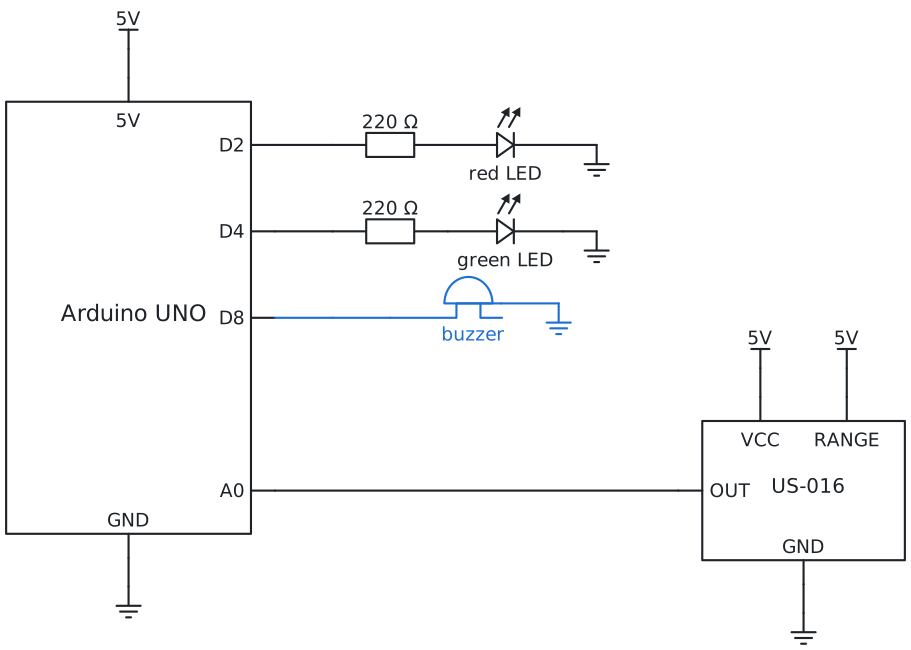
The sensor measures, the if decides, the LEDs show it. && means and: both must be
true. The first part keeps −1 out, because −1 is smaller than 30 and would look like
"very close".The US-016 never gives −1; the first part keeps the program the same
for both sensors.
Your turn: change tooClose until the red comes on exactly where you want it.
Story 3: Beep faster, closertone, map
#include <HCSR04.h>

const int triggerPin = 12;
const int echoPin = 11;
const int redLedPin = 2;
const int greenLedPin = 4;
const int buzzerPin = 8;
const int tooClose = 30;            // cm: from here the beeping starts
UltraSonicDistanceSensor sensor(triggerPin, echoPin);

void setup() {
  pinMode(redLedPin, OUTPUT);
  pinMode(greenLedPin, OUTPUT);
  pinMode(buzzerPin, OUTPUT);
}

void loop() {
  float distance = sensor.measureDistanceCm();
  if (distance > 0 && distance < tooClose) {
    digitalWrite(redLedPin, HIGH);
    digitalWrite(greenLedPin, LOW);
    int gap = map((int) distance, 0, tooClose, 50, 500);   // closer: a shorter gap between the beeps
    tone(buzzerPin, 1000);          // a beep of 1000 Hz ...
    delay(60);
    noTone(buzzerPin);              // ... for 60 ms
    delay(gap);
  } else {
    digitalWrite(redLedPin, LOW);
    digitalWrite(greenLedPin, HIGH);
    delay(100);
  }
}
const int sensorPin = A0;           // US-016 OUT; RANGE on 5V: the 3 m range
const int redLedPin = 2;
const int greenLedPin = 4;
const int buzzerPin = 8;
const int tooClose = 30;            // cm: from here the beeping starts

float measureDistance() {            // the US-016 gives a voltage: on the 3 m range one step is 3 mm
  return analogRead(sensorPin) * 0.3;    // cm
}

void setup() {
  pinMode(redLedPin, OUTPUT);
  pinMode(greenLedPin, OUTPUT);
  pinMode(buzzerPin, OUTPUT);
}

void loop() {
  float distance = measureDistance();
  if (distance > 0 && distance < tooClose) {
    digitalWrite(redLedPin, HIGH);
    digitalWrite(greenLedPin, LOW);
    int gap = map((int) distance, 0, tooClose, 50, 500);   // closer: a shorter gap between the beeps
    tone(buzzerPin, 1000);          // a beep of 1000 Hz ...
    delay(60);
    noTone(buzzerPin);              // ... for 60 ms
    delay(gap);
  } else {
    digitalWrite(redLedPin, LOW);
    digitalWrite(greenLedPin, HIGH);
    delay(100);
  }
}
A beep is a short tone and a gap. map turns the distance into the gap: 30 cm gives 500 ms between beeps,
0 cm gives 50 ms. The closer, the faster, just like in a real car.
Your turn: make the note higher when it is closer too: a second map for the number in tone.
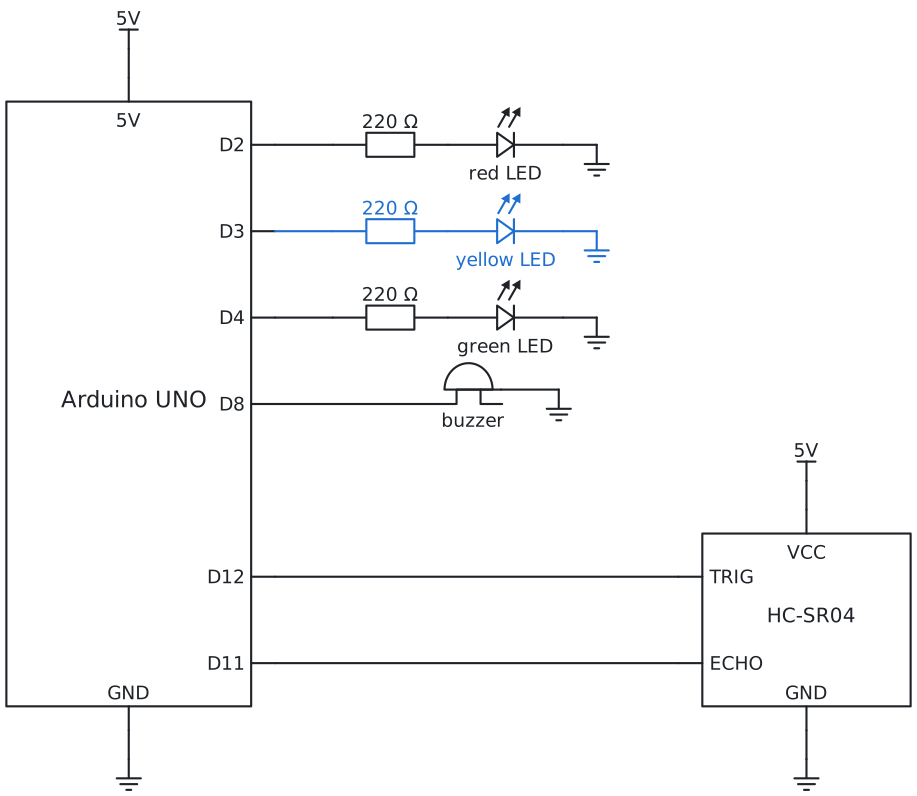
Story 4: Park like a real carzones with else if
#include <HCSR04.h>

const int triggerPin = 12;
const int echoPin = 11;
const int redLedPin = 2;
const int yellowLedPin = 3;
const int greenLedPin = 4;
const int buzzerPin = 8;
const int slowDown = 40;            // cm: yellow
const int tooClose = 20;            // cm: red and beeping
const int stopHere = 8;             // cm: red and a steady tone
UltraSonicDistanceSensor sensor(triggerPin, echoPin);

void setup() {
  pinMode(redLedPin, OUTPUT);
  pinMode(yellowLedPin, OUTPUT);
  pinMode(greenLedPin, OUTPUT);
  pinMode(buzzerPin, OUTPUT);
}

void lights(bool red, bool yellow, bool green) {
  digitalWrite(redLedPin, red);
  digitalWrite(yellowLedPin, yellow);
  digitalWrite(greenLedPin, green);
}

void loop() {
  float distance = sensor.measureDistanceCm();
  if (distance < 0 || distance >= slowDown) {    // far away, or nothing in range
    lights(false, false, true);
    noTone(buzzerPin);
    delay(100);
  } else if (distance >= tooClose) {             // getting close: slow down
    lights(false, true, false);
    noTone(buzzerPin);
    delay(100);
  } else if (distance >= stopHere) {             // close: beep, faster and faster
    lights(true, false, false);
    int gap = map((int) distance, stopHere, tooClose, 60, 400);
    tone(buzzerPin, 1000);
    delay(60);
    noTone(buzzerPin);
    delay(gap);
  } else {                                       // stop!
    lights(true, false, false);
    tone(buzzerPin, 1500);
    delay(100);
  }
}
const int sensorPin = A0;           // US-016 OUT; RANGE on 5V: the 3 m range
const int redLedPin = 2;
const int yellowLedPin = 3;
const int greenLedPin = 4;
const int buzzerPin = 8;
const int slowDown = 40;            // cm: yellow
const int tooClose = 20;            // cm: red and beeping
const int stopHere = 8;             // cm: red and a steady tone

float measureDistance() {            // the US-016 gives a voltage: on the 3 m range one step is 3 mm
  return analogRead(sensorPin) * 0.3;    // cm
}

void setup() {
  pinMode(redLedPin, OUTPUT);
  pinMode(yellowLedPin, OUTPUT);
  pinMode(greenLedPin, OUTPUT);
  pinMode(buzzerPin, OUTPUT);
}

void lights(bool red, bool yellow, bool green) {
  digitalWrite(redLedPin, red);
  digitalWrite(yellowLedPin, yellow);
  digitalWrite(greenLedPin, green);
}

void loop() {
  float distance = measureDistance();
  if (distance < 0 || distance >= slowDown) {    // far away, or nothing in range
    lights(false, false, true);
    noTone(buzzerPin);
    delay(100);
  } else if (distance >= tooClose) {             // getting close: slow down
    lights(false, true, false);
    noTone(buzzerPin);
    delay(100);
  } else if (distance >= stopHere) {             // close: beep, faster and faster
    lights(true, false, false);
    int gap = map((int) distance, stopHere, tooClose, 60, 400);
    tone(buzzerPin, 1000);
    delay(60);
    noTone(buzzerPin);
    delay(gap);
  } else {                                       // stop!
    lights(true, false, false);
    tone(buzzerPin, 1500);
    delay(100);
  }
}
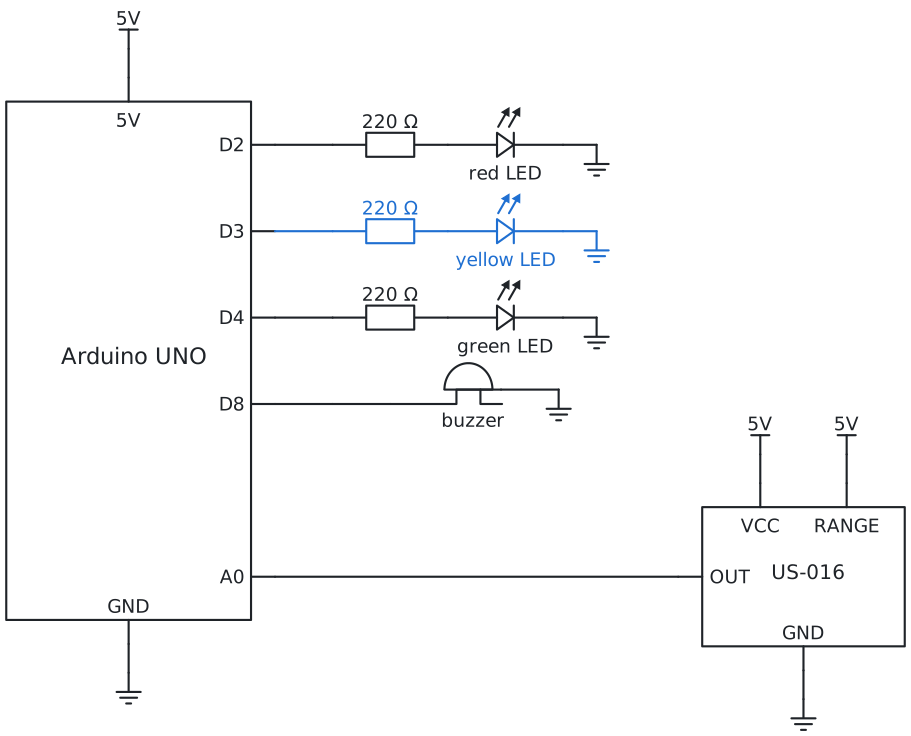
Four zones, one after the other: else if only runs when everything above it was false, so the checks
can go from far to near. || means or. The function lights sets all three LEDs in one line.
Your turn: park a toy car. Which numbers for the zones feel right for a real garage?
Really stuck? Try first: you learn the most by building it yourself. If it still does not work, your
teacher can give you a code for a ready-made program of your story.
Type the code in the lock at the top right of the page.
 START A BIT