Micro:bitMakeCodePythonBuilders

Cardboard robot car

Build a small car from cardboard and two motors that spin the wheels. Then program it: drive, spin around, drive a square, and steer it with a second Micro:bit as the remote.

QR code to this pageScan to open

1See it in action


On screen: the car seen from above drives a curve and leaves a trail
The car drives a curve on screen; a video from class comes later

2Parts you need

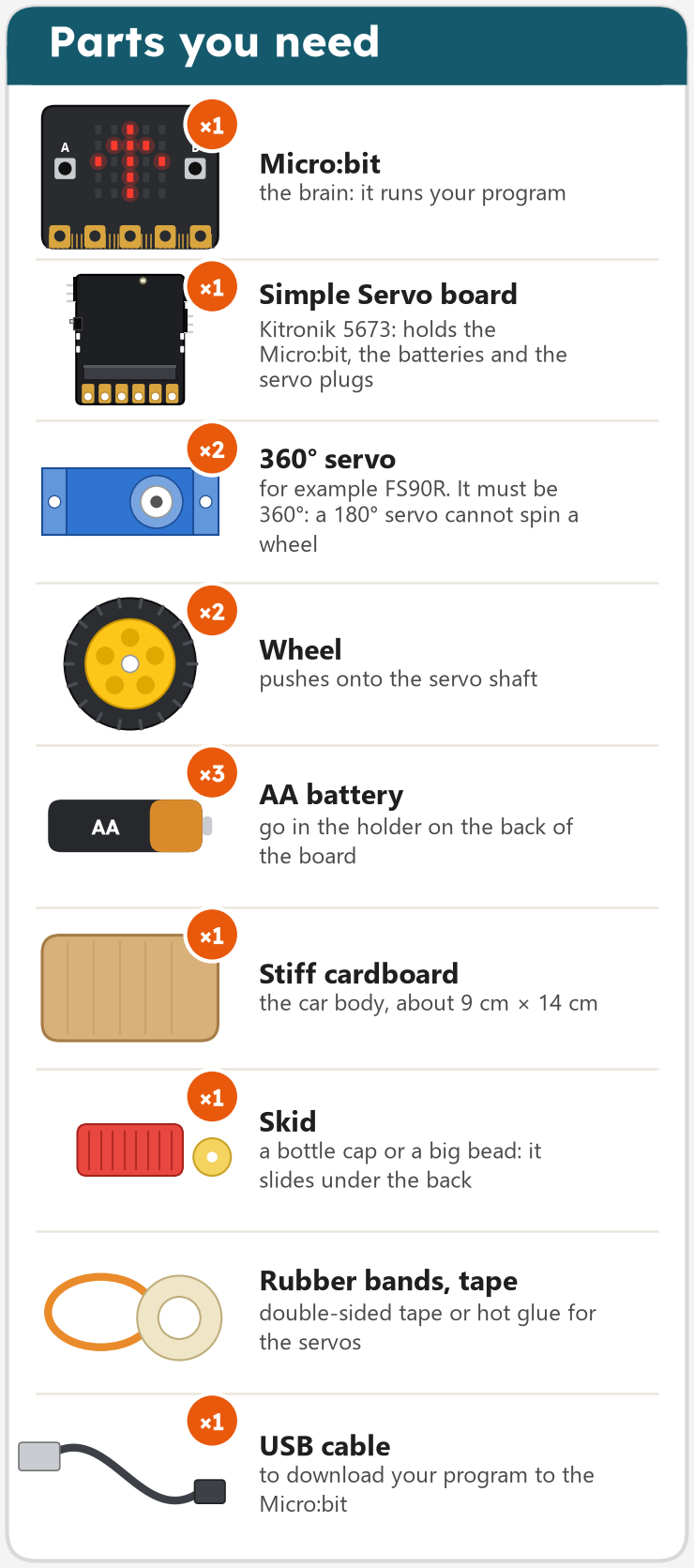
Parts: Micro:bit, Simple Servo board, two 360 degree servos, two wheels, three AA batteries, cardboard, a skid, rubber bands and tape, USB cable
A second Micro:bit: the remotefrom story 4

Most parts come from the recycling box. Your teacher hands out the rest.

3Learn the basics

The ideas behind this project, each explained once for all projects. Open "More" to dig deeper.

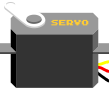
A small blue servo with its three wires

Servo

A servo is a small motor with gears and a little control chip. A 180° servo turns to an angle and stays there. A 360° servo (continuous) spins round, forwards or backwards: that one can drive a wheel.

Three wires: brown or black to GND, red to +, orange or yellow is the signal from a pin.

More: how a pin controls it

The board sends a short pulse 50 times a second. A pulse of 1 millisecond means 0°, 1.5 milliseconds 90°, 2 milliseconds 180°. A 360° servo reads the same pulses as a speed: 90 stands still, below 90 turns one way, above 90 the other way. Servos can take more current than a board pin gives, so a servo board like the Kitronik Simple Servo board gives them their own battery power.

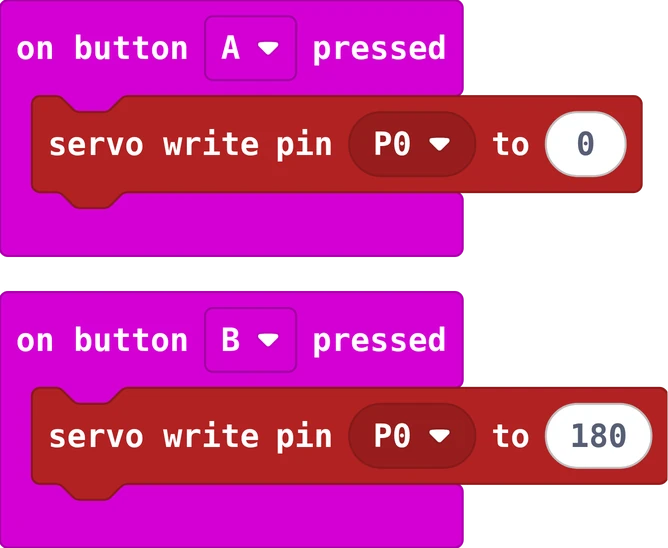
The MakeCode blocks of this program
The same in Python
def on_button_pressed_a():
    pins.servo_write_pin(AnalogPin.P0, 0)
input.on_button_pressed(Button.A, on_button_pressed_a)

def on_button_pressed_b():
    pins.servo_write_pin(AnalogPin.P0, 180)
input.on_button_pressed(Button.B, on_button_pressed_b)
#include <Servo.h>
Servo arm;                 // one Servo object per servo

void setup() {
  arm.attach(9);           // the signal wire on pin 9
}

void loop() {
  arm.write(0);            // to 0 degrees
  delay(1000);
  arm.write(180);          // to 180 degrees
  delay(1000);
}
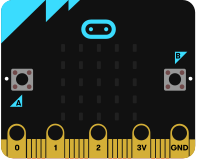
The Micro:bit board

Radio between Micro:bits

Every Micro:bit has a small radio. One Micro:bit sends a number (or a word); every Micro:bit nearby that listens on the same group receives it, a few metres away and through walls.

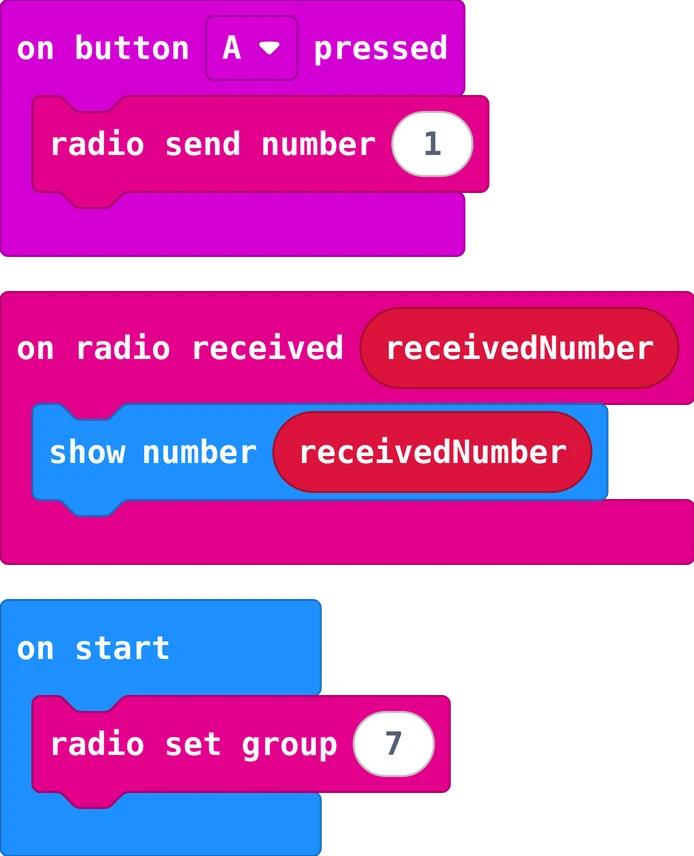
Same group number on both Micro:bits; one sends, the other reacts in "on radio received".

More: groups, and a first program

The group is a number from 0 to 255, like a channel. In a classroom every pair picks its own group, otherwise all cars obey all remotes. Put the same program on two Micro:bits: press A on one, and the other shows 1.

The MakeCode blocks of this program
The same in Python
radio.set_group(7)

def on_button_pressed_a():
    radio.send_number(1)
input.on_button_pressed(Button.A, on_button_pressed_a)

def on_received_number(receivedNumber):
    basic.show_number(receivedNumber)
radio.on_received_number(on_received_number)

4Build and wire it

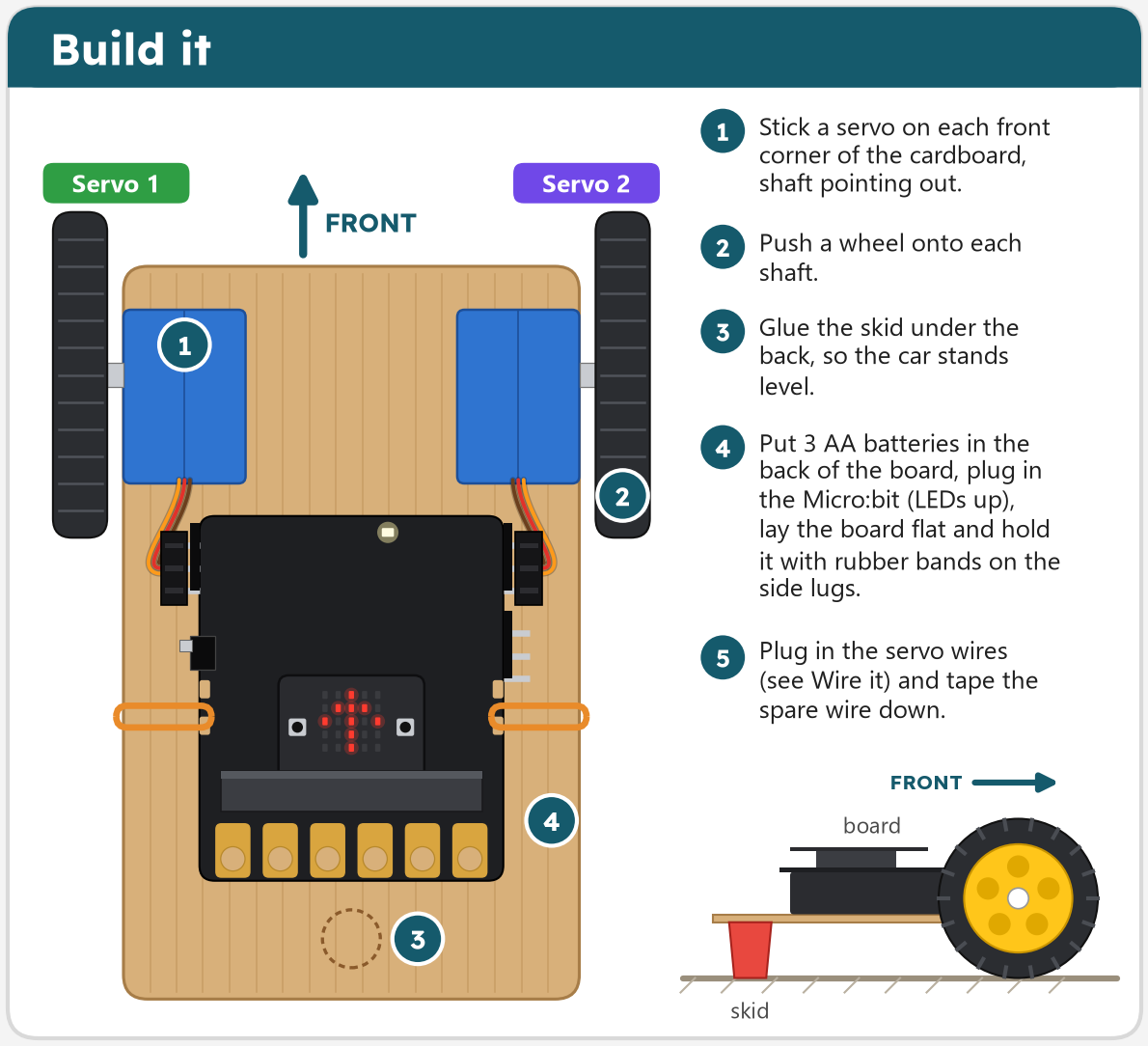
Top view of the car: servos at the front corners, wheels outside, board lying flat behind them, skid under the back

Wire it

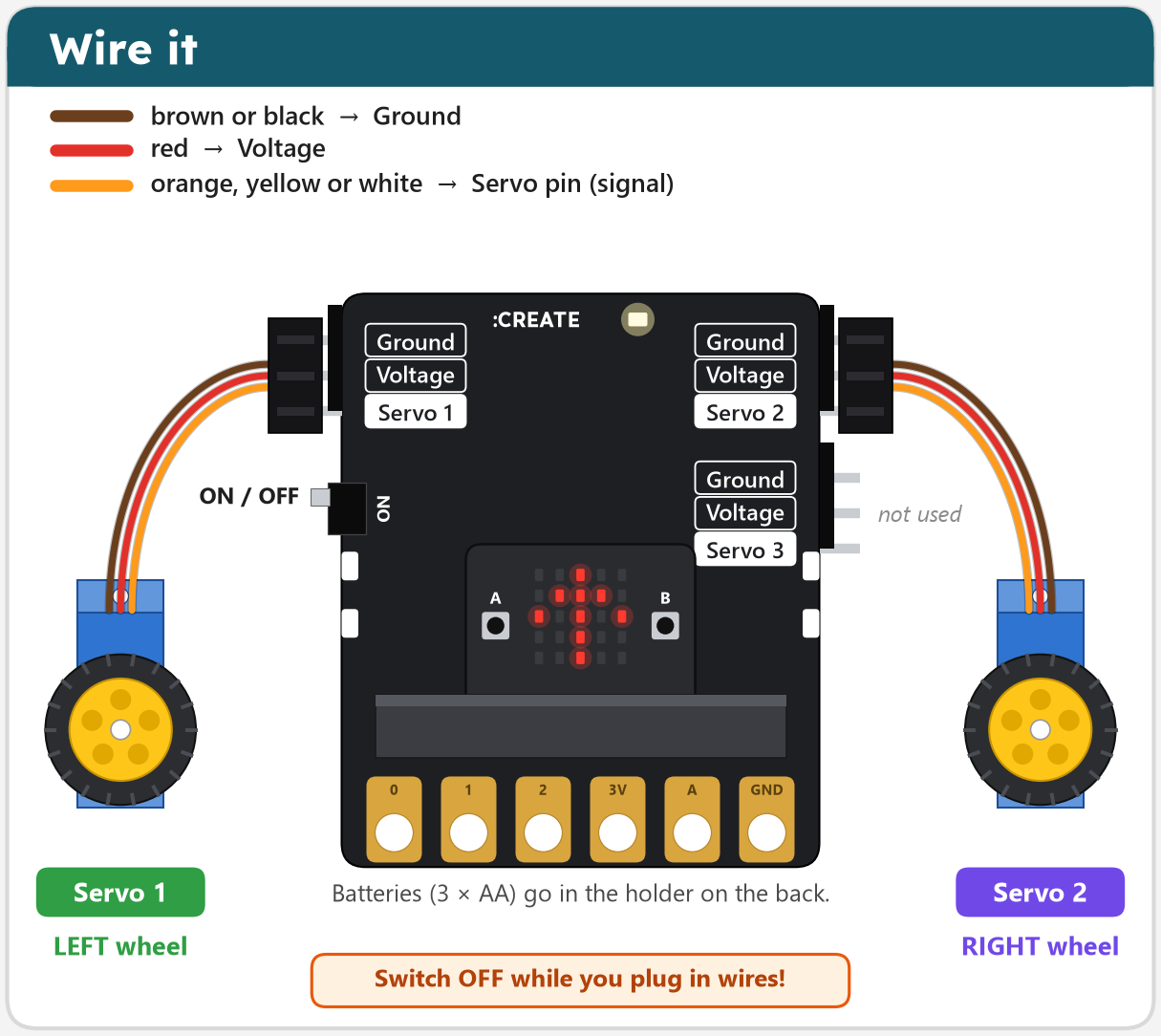
The board with the Micro:bit: Servo 1 plug on the left header goes to the left wheel, Servo 2 plug on the right header goes to the right wheel

Each servo plug has three wires. The darkest wire (brown or black) goes on Ground, at the top of the header. Switch the board OFF while you plug in wires. The wiring is the same for every story.

5Try it

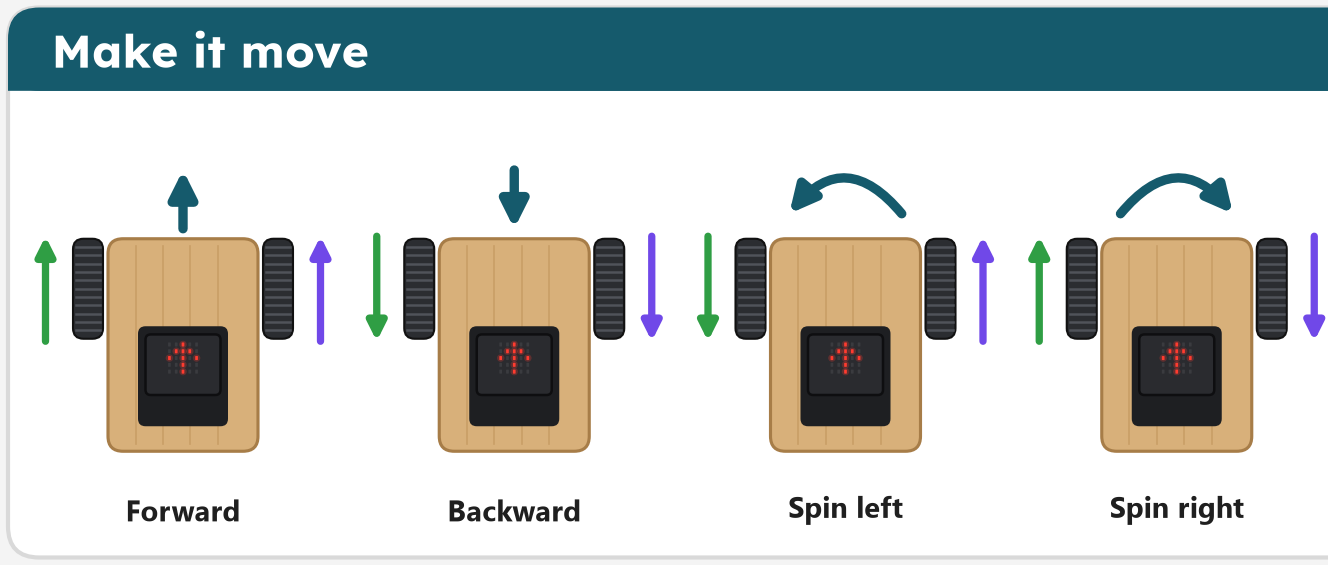
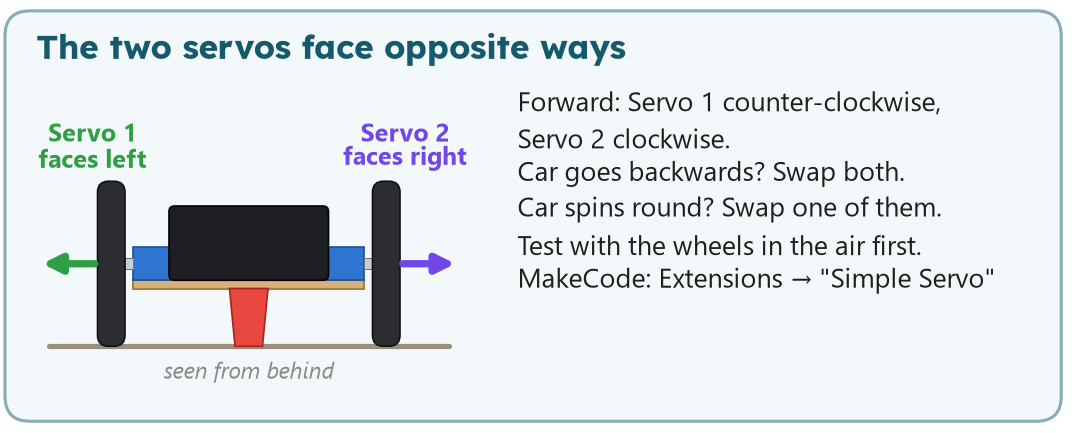
Four small cars: forward, backward, spin left, spin right, with arrows showing which way each wheel rolls The car seen from behind: Servo 1 faces left, Servo 2 faces right

Try it before you build: set the two servo blocks and watch what the car does. Scroll to zoom, drag to move. Tick Real servos to see why a real car never drives perfectly straight.

Open the simulator in a new tab

6Program it

You see the program for . Choose another story in the bar at the top of the page.

In MakeCode, add the extension first: Extensions, search Simple Servo. Its blocks appear in the green Servo drawer. Test with the wheels in the air first, then on the floor.

Start the MakeCode tutorial stories 1 and 2, step by step

Story 1: Drive and stopfunctions
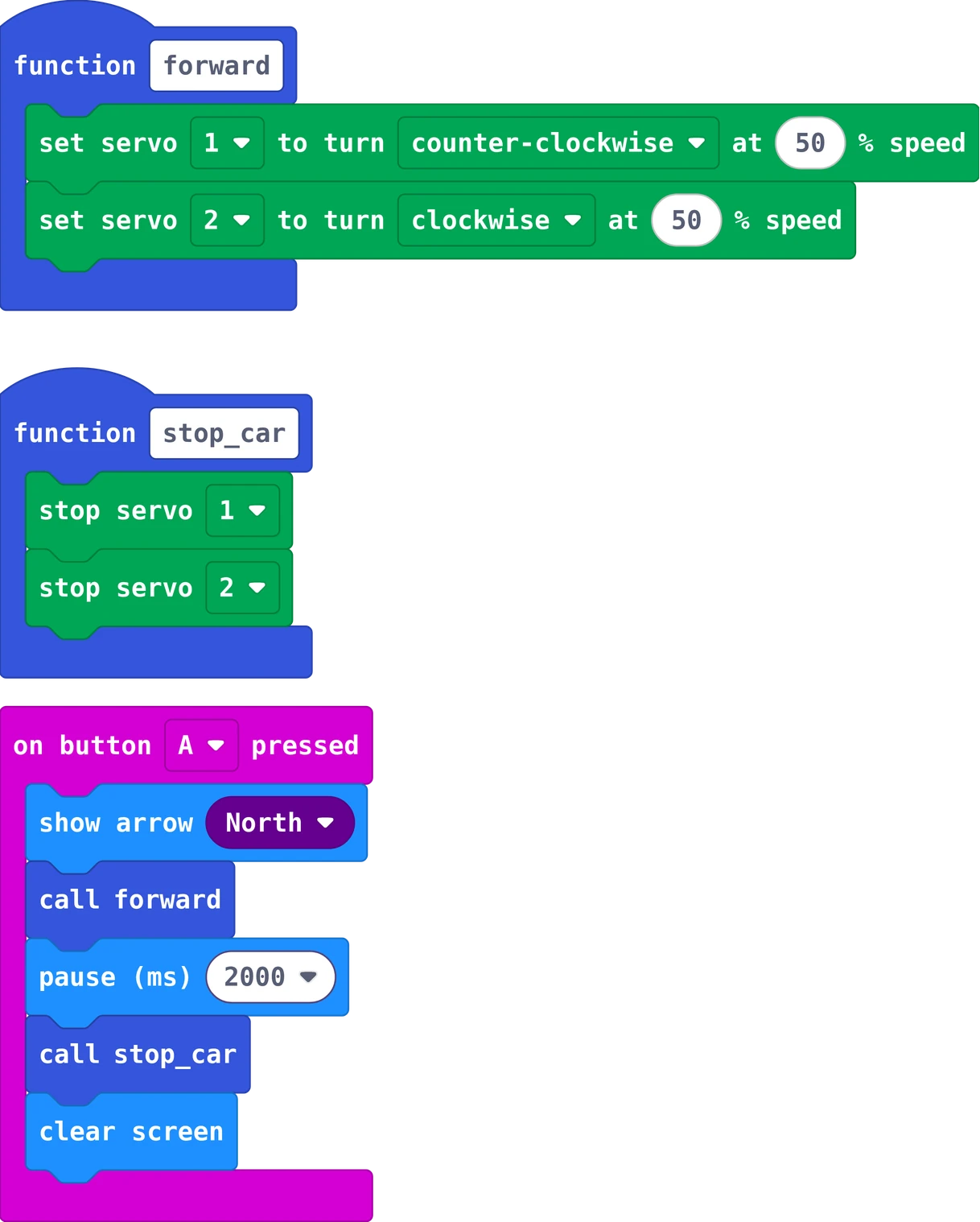
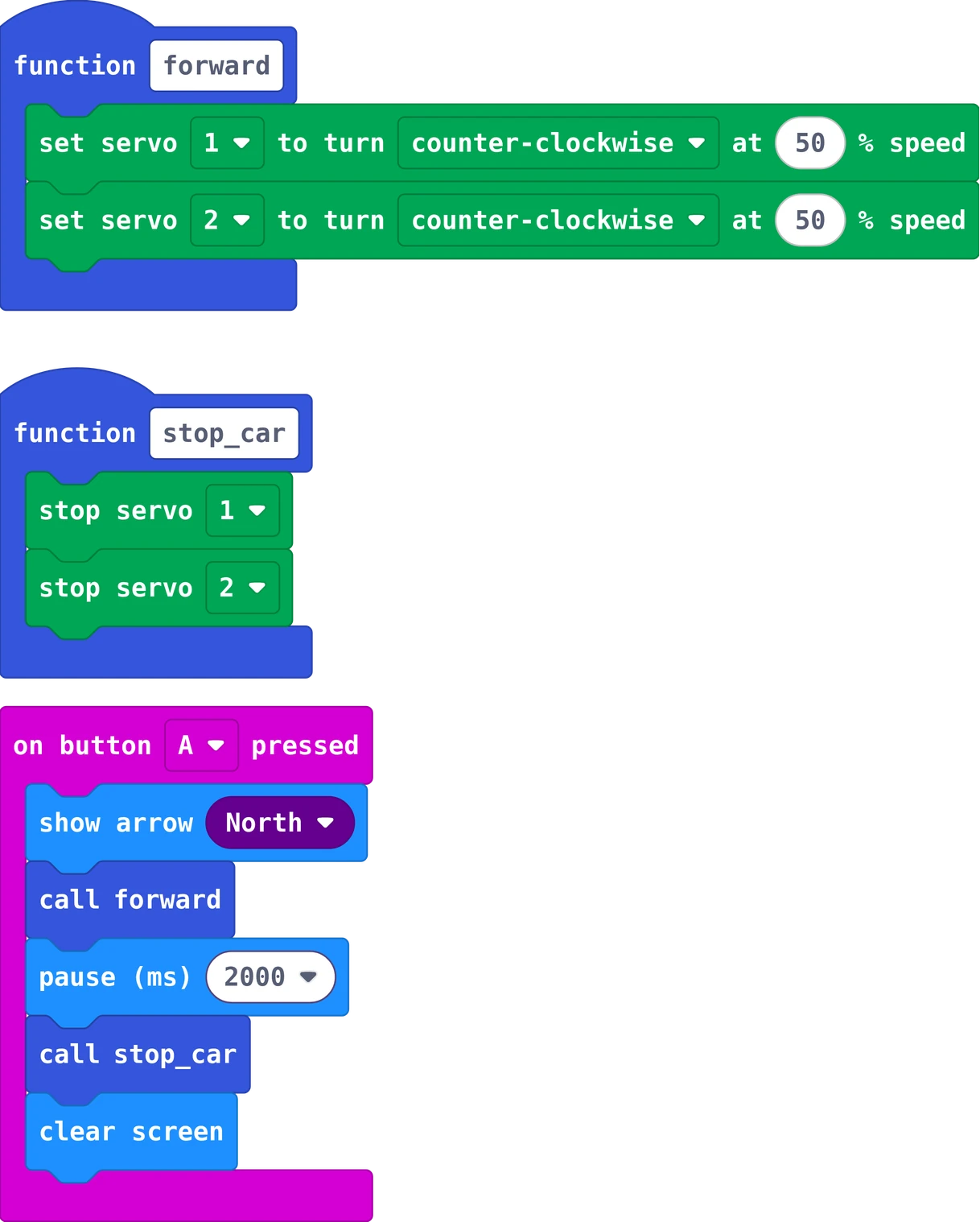
The MakeCode blocks of story 1
The same in Python
def forward():
    kitronik_simple_servo.servo_run_percentage(kitronik_simple_servo.ServoChoice.SERVO1,
        kitronik_simple_servo.ServoDirection.CCW,
        50)
    kitronik_simple_servo.servo_run_percentage(kitronik_simple_servo.ServoChoice.SERVO2,
        kitronik_simple_servo.ServoDirection.CW,
        50)
def stop_car():
    kitronik_simple_servo.servo_stop(kitronik_simple_servo.ServoChoice.SERVO1)
    kitronik_simple_servo.servo_stop(kitronik_simple_servo.ServoChoice.SERVO2)

def on_button_pressed_a():
    basic.show_arrow(ArrowNames.NORTH)
    forward()
    basic.pause(2000)
    stop_car()
    basic.clear_screen()
input.on_button_pressed(Button.A, on_button_pressed_a)

In MakeCode, switch from Blocks to Python at the top of the editor to type it yourself.

Two functions keep the program short: forward makes both wheels roll forwards, stop_car stops them. Servo 1 turns counter-clockwise and servo 2 clockwise, because the two servos face opposite ways.

Your turn: a function backward on button B: swap both directions.

Story 2: Spin aroundboth wheels the same way
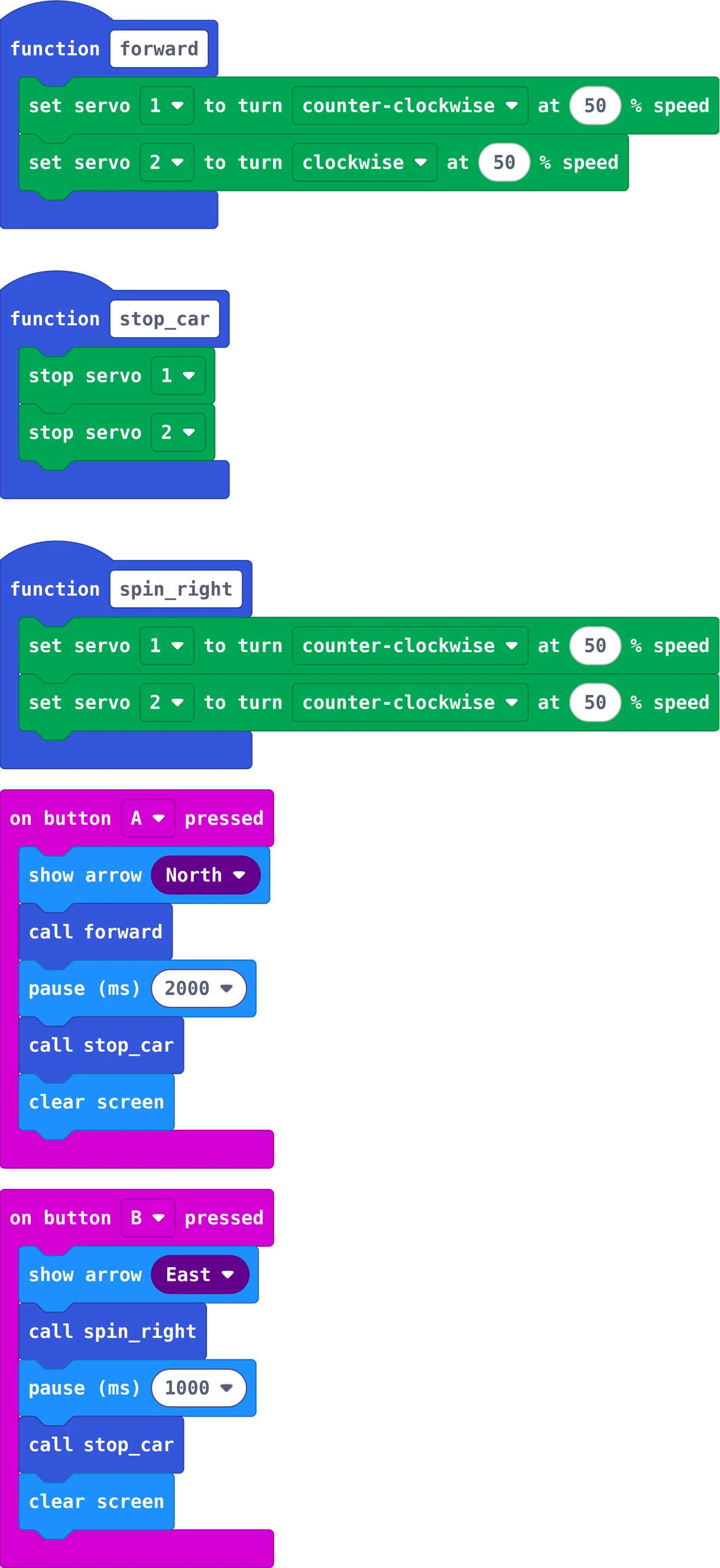
The MakeCode blocks of story 2
The same in Python
def forward():
    kitronik_simple_servo.servo_run_percentage(kitronik_simple_servo.ServoChoice.SERVO1,
        kitronik_simple_servo.ServoDirection.CCW,
        50)
    kitronik_simple_servo.servo_run_percentage(kitronik_simple_servo.ServoChoice.SERVO2,
        kitronik_simple_servo.ServoDirection.CW,
        50)
def stop_car():
    kitronik_simple_servo.servo_stop(kitronik_simple_servo.ServoChoice.SERVO1)
    kitronik_simple_servo.servo_stop(kitronik_simple_servo.ServoChoice.SERVO2)
def spin_right():
    kitronik_simple_servo.servo_run_percentage(kitronik_simple_servo.ServoChoice.SERVO1,
        kitronik_simple_servo.ServoDirection.CCW,
        50)
    kitronik_simple_servo.servo_run_percentage(kitronik_simple_servo.ServoChoice.SERVO2,
        kitronik_simple_servo.ServoDirection.CCW,
        50)

def on_button_pressed_a():
    basic.show_arrow(ArrowNames.NORTH)
    forward()
    basic.pause(2000)
    stop_car()
    basic.clear_screen()
input.on_button_pressed(Button.A, on_button_pressed_a)

def on_button_pressed_b():
    basic.show_arrow(ArrowNames.EAST)
    spin_right()
    basic.pause(1000)
    stop_car()
    basic.clear_screen()
input.on_button_pressed(Button.B, on_button_pressed_b)

In MakeCode, switch from Blocks to Python at the top of the editor to type it yourself.

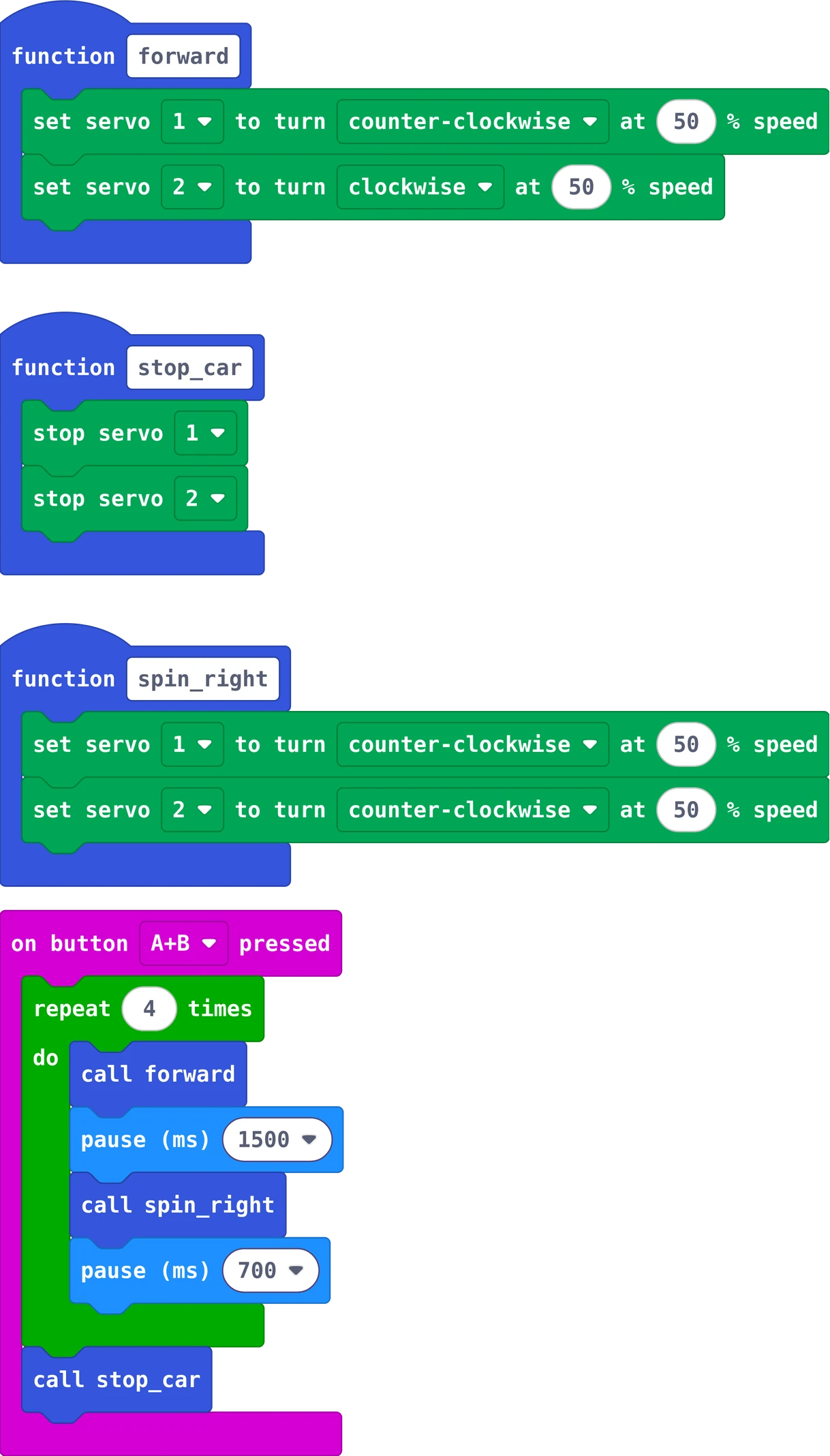
Both servos turn the same direction: one wheel rolls forward, the other backward, and the car spins on the spot.

Your turn: a function spin_left. How long must the pause be for exactly a quarter turn?

Story 3: Drive a squarea loop
The MakeCode blocks of story 3
The same in Python
def forward():
    kitronik_simple_servo.servo_run_percentage(kitronik_simple_servo.ServoChoice.SERVO1,
        kitronik_simple_servo.ServoDirection.CCW,
        50)
    kitronik_simple_servo.servo_run_percentage(kitronik_simple_servo.ServoChoice.SERVO2,
        kitronik_simple_servo.ServoDirection.CW,
        50)
def stop_car():
    kitronik_simple_servo.servo_stop(kitronik_simple_servo.ServoChoice.SERVO1)
    kitronik_simple_servo.servo_stop(kitronik_simple_servo.ServoChoice.SERVO2)
def spin_right():
    kitronik_simple_servo.servo_run_percentage(kitronik_simple_servo.ServoChoice.SERVO1,
        kitronik_simple_servo.ServoDirection.CCW,
        50)
    kitronik_simple_servo.servo_run_percentage(kitronik_simple_servo.ServoChoice.SERVO2,
        kitronik_simple_servo.ServoDirection.CCW,
        50)

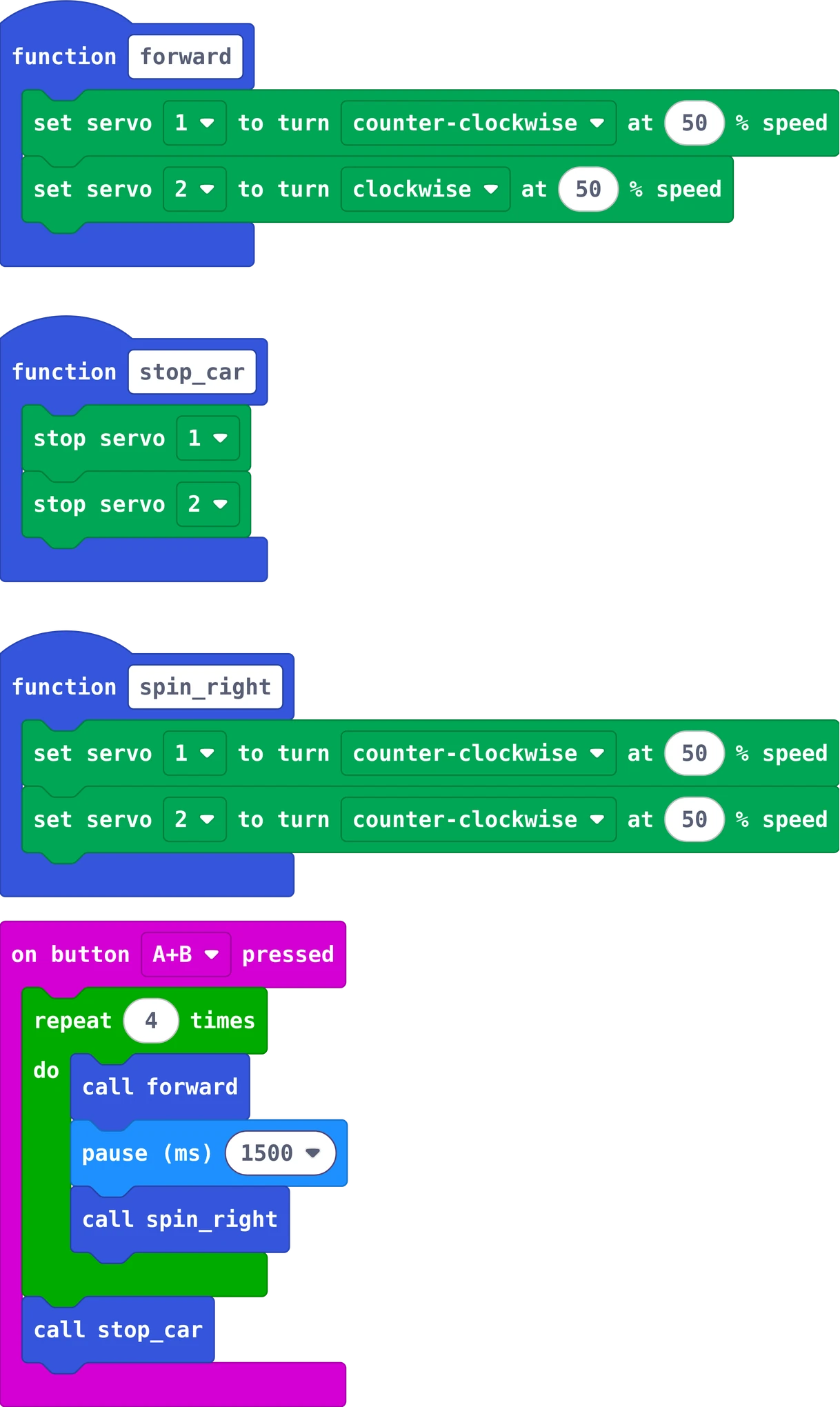
def on_button_pressed_ab():
    for index in range(4):
        forward()
        basic.pause(1500)
        spin_right()
        basic.pause(700)
    stop_car()
input.on_button_pressed(Button.AB, on_button_pressed_ab)

In MakeCode, switch from Blocks to Python at the top of the editor to type it yourself.

Press A and B together. The loop repeats a side and a quarter turn four times. Change 700 until every corner is a right angle: each floor and each set of batteries is a little different.

Your turn: a triangle: three sides, and each turn one third of a full turn.

Story 4: Steer with a remoteradio

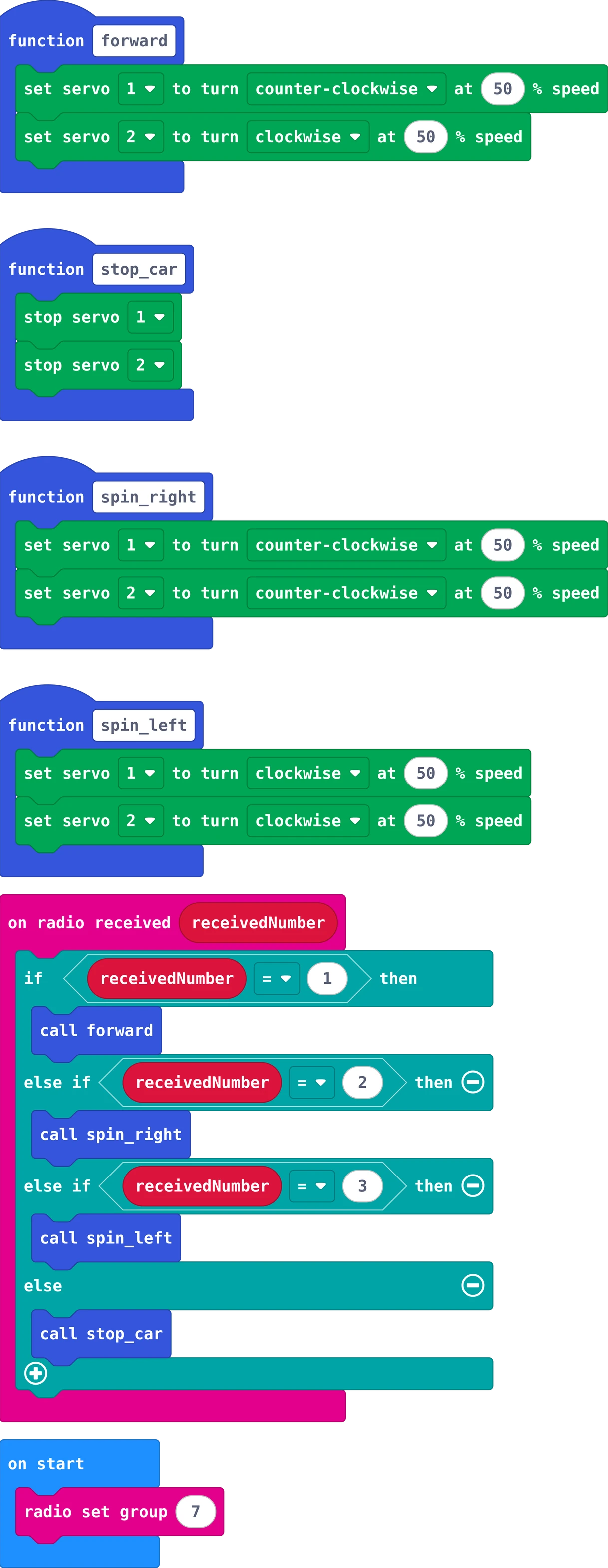
The car
The MakeCode blocks of story 4
The same in Python
def forward():
    kitronik_simple_servo.servo_run_percentage(kitronik_simple_servo.ServoChoice.SERVO1,
        kitronik_simple_servo.ServoDirection.CCW,
        50)
    kitronik_simple_servo.servo_run_percentage(kitronik_simple_servo.ServoChoice.SERVO2,
        kitronik_simple_servo.ServoDirection.CW,
        50)
def stop_car():
    kitronik_simple_servo.servo_stop(kitronik_simple_servo.ServoChoice.SERVO1)
    kitronik_simple_servo.servo_stop(kitronik_simple_servo.ServoChoice.SERVO2)
def spin_right():
    kitronik_simple_servo.servo_run_percentage(kitronik_simple_servo.ServoChoice.SERVO1,
        kitronik_simple_servo.ServoDirection.CCW,
        50)
    kitronik_simple_servo.servo_run_percentage(kitronik_simple_servo.ServoChoice.SERVO2,
        kitronik_simple_servo.ServoDirection.CCW,
        50)
def spin_left():
    kitronik_simple_servo.servo_run_percentage(kitronik_simple_servo.ServoChoice.SERVO1,
        kitronik_simple_servo.ServoDirection.CW,
        50)
    kitronik_simple_servo.servo_run_percentage(kitronik_simple_servo.ServoChoice.SERVO2,
        kitronik_simple_servo.ServoDirection.CW,
        50)
radio.set_group(7)

def on_received_number(receivedNumber):
    if receivedNumber == 1:
        forward()
    elif receivedNumber == 2:
        spin_right()
    elif receivedNumber == 3:
        spin_left()
    else:
        stop_car()
radio.on_received_number(on_received_number)

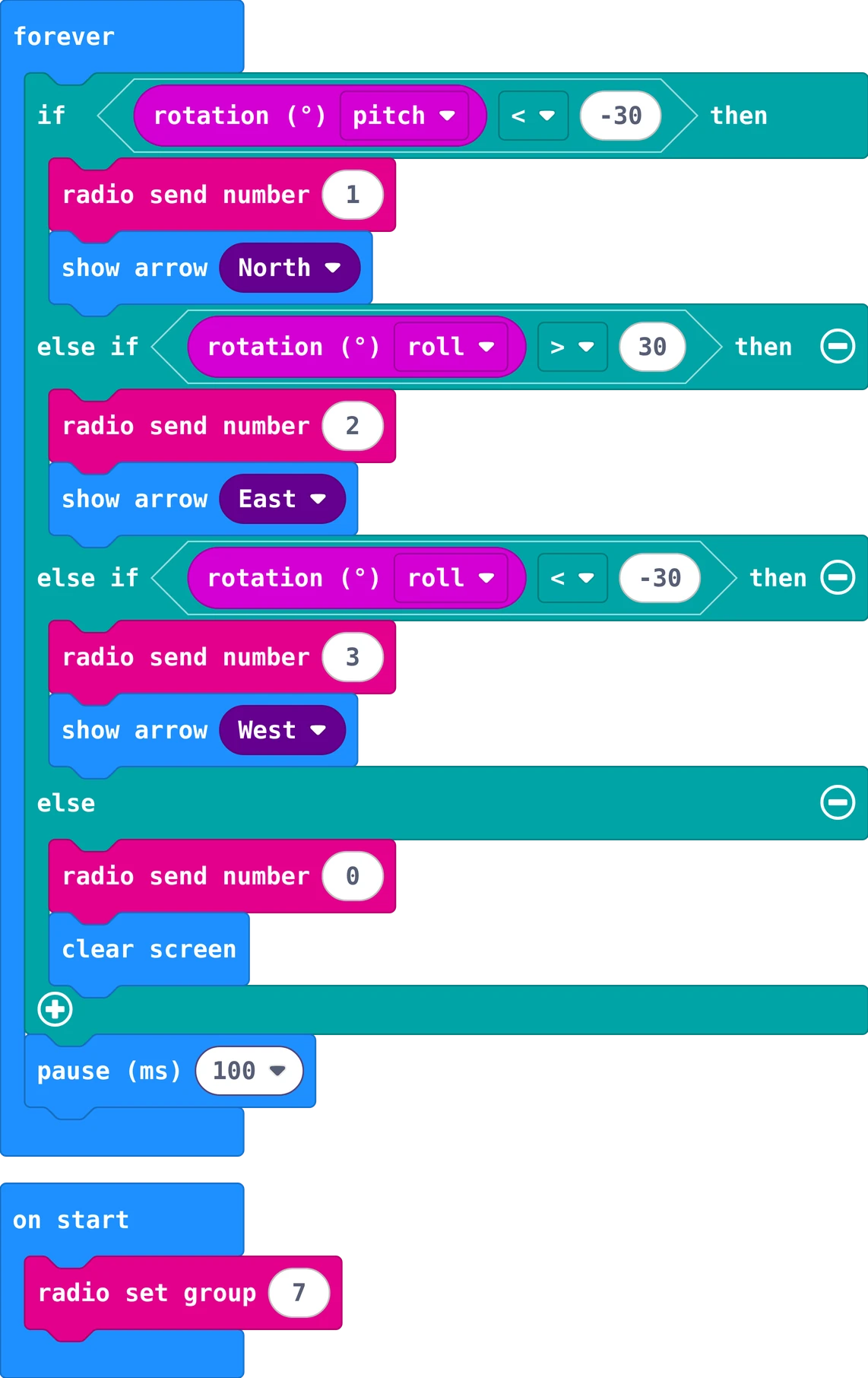
The remote: a second Micro:bit
The MakeCode blocks of story 4-remote
The same in Python
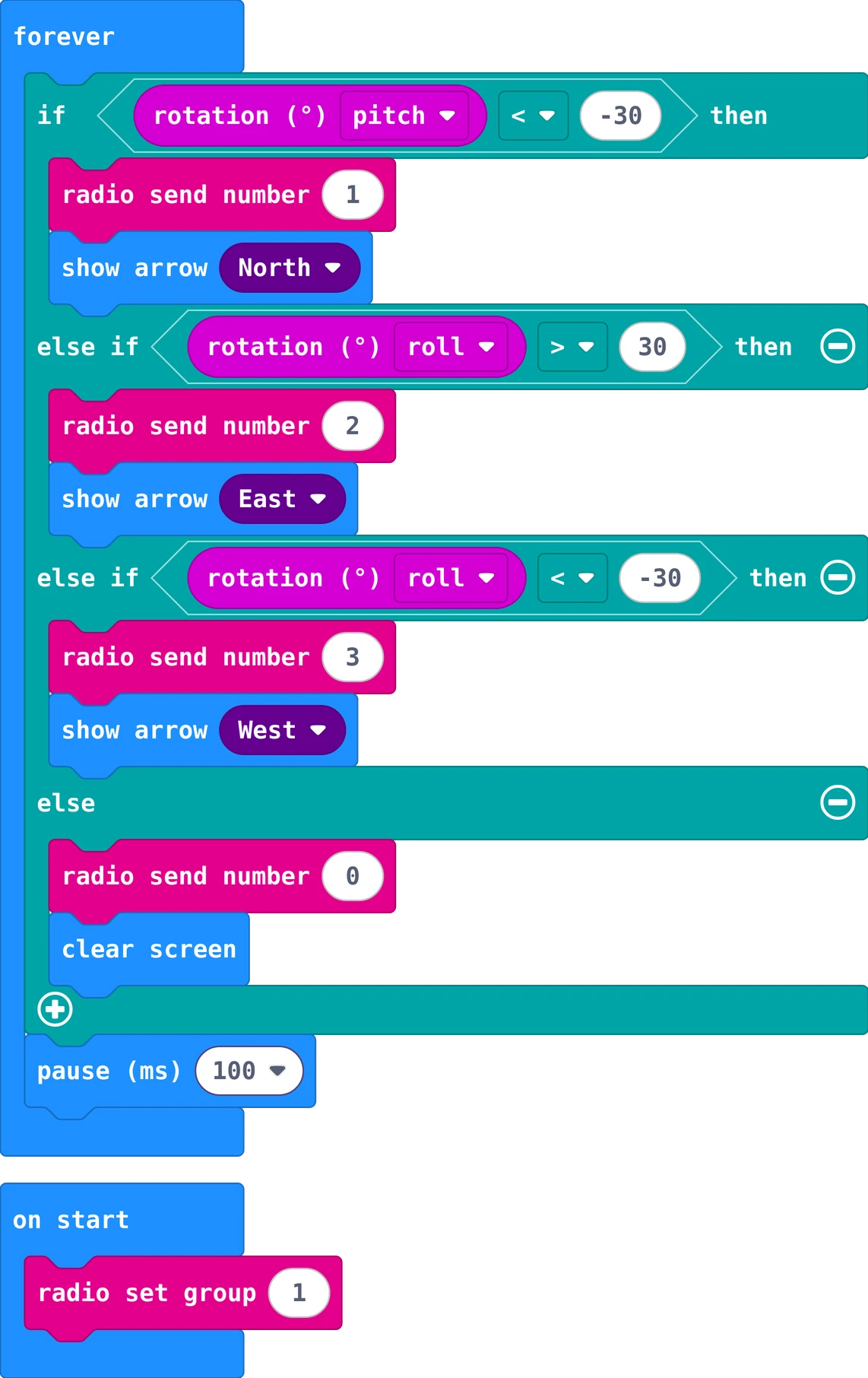
radio.set_group(7)

def on_forever():
    if input.rotation(Rotation.PITCH) < -30:
        radio.send_number(1)
        basic.show_arrow(ArrowNames.NORTH)
    elif input.rotation(Rotation.ROLL) > 30:
        radio.send_number(2)
        basic.show_arrow(ArrowNames.EAST)
    elif input.rotation(Rotation.ROLL) < -30:
        radio.send_number(3)
        basic.show_arrow(ArrowNames.WEST)
    else:
        radio.send_number(0)
        basic.clear_screen()
    basic.pause(100)
basic.forever(on_forever)

Tilt the remote forward: it sends 1 and the car drives. Tilt right or left: 2 or 3, the car spins. Flat: 0, the car stops. Both use radio group 7: in a class, every pair picks its own group number.

Your turn: tilt back to drive backwards (send 4).

Really stuck? Try first: you learn the most by building it yourself. If it still does not work, your teacher can give you a code for a ready-made program of your story.

Type the code in the lock at the top right of the page.

7Challenges

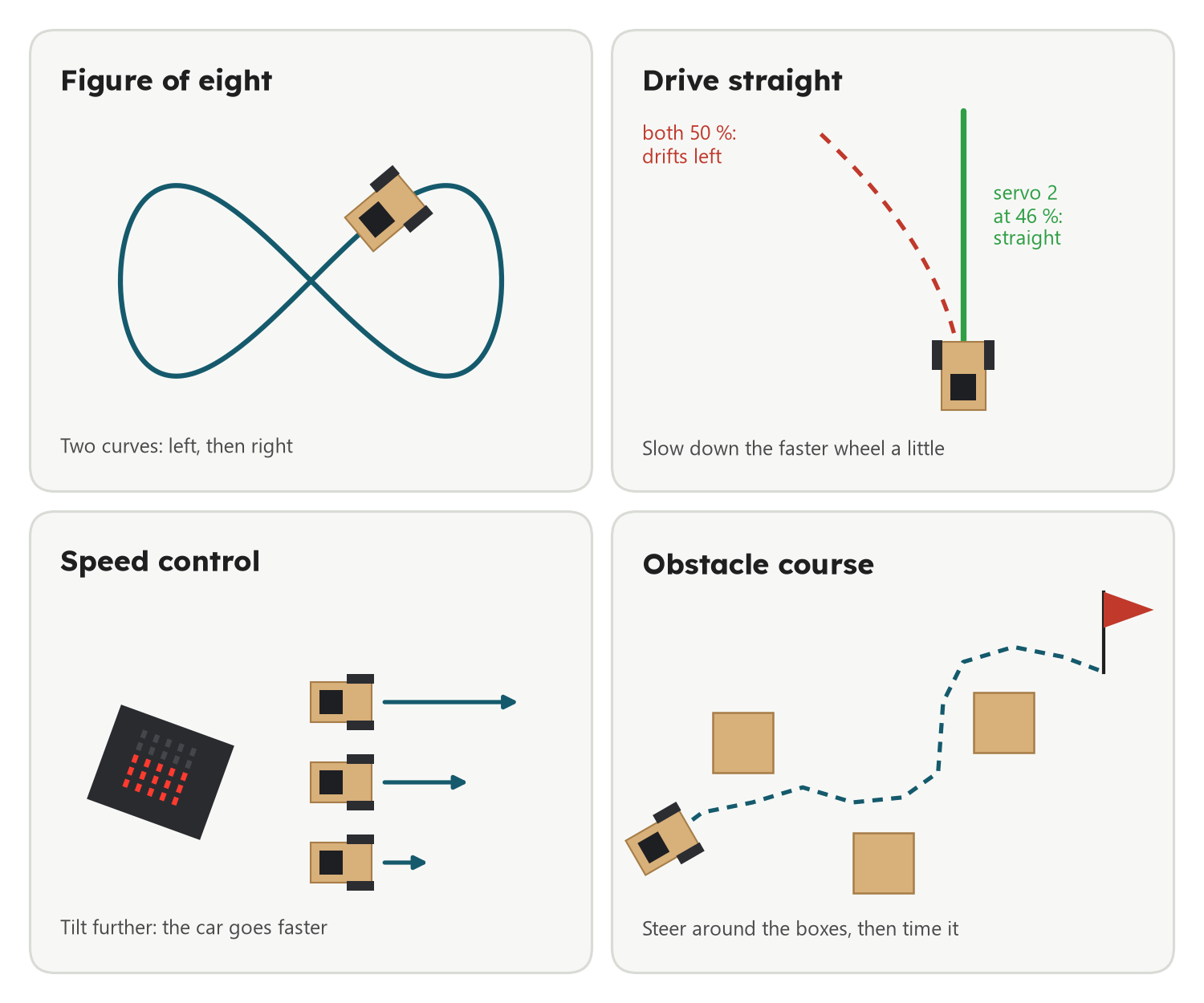
Four challenges: a figure of eight, driving straight, speed control with a tilted remote, and an obstacle course

Done already? Try these, and test each idea in the simulator first.

Challenges

  • Figure of eight: two curves, one with the left wheel slower, one with the right.
  • Drive straight: real servos are never equal. Find the speeds that make your car drive straight.
  • Dance: a short dance with music from the Micro:bit speaker.

Explore further

  • Obstacle course: drive a course of boxes with the remote, and time it.
  • Speed control: the further you tilt the remote, the faster the car.
  • Lights: show where the car turns with arrows on the Micro:bit's LEDs.

Example solutions for Figure of eight and Speed control. Try first; if you get stuck, or want to study it at home, ask your teacher for the code.

Type the code in the lock at the top right of the page.

8Check what you learned

Before you leave. Your teacher picks some of these for you: answer out loud, draw on paper, or work with the person next to you. Some cards change with your story: now .

Answer it

Everyone, then your story

  1. What is the difference between a 180° servo and a 360° servo? Which one does the car need, and why?
  2. A servo plug has three wires. Which one goes on Ground, and what do the other two do?
  3. To drive forward, servo 1 turns counter-clockwise and servo 2 clockwise. Why not both the same way?
  4. What does the function stop_car do? What would the car do without it?
  5. In spin_right both servos turn counter-clockwise. Which wheel rolls forward, and which backward?
  6. Why does the loop repeat 4 times? What would you change to drive a triangle?
  7. Why must the car and the remote use the same radio group? What does the remote send when it lies flat?

Predict, then try

Say what will happen first, then try it in the simulator or on the floor

  • Set only servo 2 to 25 %. Will the car drive straight, curve left, or curve right?
  • Make the pause in the spin twice as long. How far does the car turn now?
  • Change the 700 to 350. What shape does the car drive?
  • Two pairs in the room both use group 7. What happens to the two cars?

Draw it

For

Draw the flow chart of your car's program on paper: a box for each step, a diamond for each question, arrows for the order. Then point at each box and tell your teacher what the car does at that moment.

How to draw a flow chart

Flow charts

A flow chart shows what a program does, one step after the other. It works for every board and every language: the blocks change, the idea stays.

  • Rounded box: where it starts
  • Box: one thing to do
  • Diamond: a question with two answers, yes and no
  • Arrow: what comes next; an arrow back up repeats

One box for each step, a diamond for each question, and follow the arrows with your finger.

More: how to draw your own

Draw on paper with a pencil. Read your program from the top and draw one box for each block or line. "Forever" and "loop" are an arrow back up. "If", "while" and "on button pressed" are questions: a diamond with yes and no. Then point at the boxes with your finger and say out loud what the board does. If your finger gets stuck, the program would get stuck too.

I can …

Tick what is true for you today

Find the bug

A mistake we often see in class. What does the car do? Why? How do you fix it?

"I press A and the car spins on the spot instead of driving forward."

The MakeCode blocks of this program
The same in Python
def forward():
    kitronik_simple_servo.servo_run_percentage(kitronik_simple_servo.ServoChoice.SERVO1,
        kitronik_simple_servo.ServoDirection.CCW,
        50)
    kitronik_simple_servo.servo_run_percentage(kitronik_simple_servo.ServoChoice.SERVO2,
        kitronik_simple_servo.ServoDirection.CCW,
        50)
def stop_car():
    kitronik_simple_servo.servo_stop(kitronik_simple_servo.ServoChoice.SERVO1)
    kitronik_simple_servo.servo_stop(kitronik_simple_servo.ServoChoice.SERVO2)

def on_button_pressed_a():
    basic.show_arrow(ArrowNames.NORTH)
    forward()
    basic.pause(2000)
    stop_car()
    basic.clear_screen()
input.on_button_pressed(Button.A, on_button_pressed_a)

"The car should drive a square, but it drives one long straight line."

The MakeCode blocks of this program
The same in Python
def forward():
    kitronik_simple_servo.servo_run_percentage(kitronik_simple_servo.ServoChoice.SERVO1,
        kitronik_simple_servo.ServoDirection.CCW,
        50)
    kitronik_simple_servo.servo_run_percentage(kitronik_simple_servo.ServoChoice.SERVO2,
        kitronik_simple_servo.ServoDirection.CW,
        50)
def stop_car():
    kitronik_simple_servo.servo_stop(kitronik_simple_servo.ServoChoice.SERVO1)
    kitronik_simple_servo.servo_stop(kitronik_simple_servo.ServoChoice.SERVO2)
def spin_right():
    kitronik_simple_servo.servo_run_percentage(kitronik_simple_servo.ServoChoice.SERVO1,
        kitronik_simple_servo.ServoDirection.CCW,
        50)
    kitronik_simple_servo.servo_run_percentage(kitronik_simple_servo.ServoChoice.SERVO2,
        kitronik_simple_servo.ServoDirection.CCW,
        50)

def on_button_pressed_ab():
    for index in range(4):
        forward()
        basic.pause(1500)
        spin_right()
    stop_car()
input.on_button_pressed(Button.AB, on_button_pressed_ab)

"The remote shows the arrows, but the car does not move at all." The car has the story 4 program.

The MakeCode blocks of this program
The same in Python
radio.set_group(1)

def on_forever():
    if input.rotation(Rotation.PITCH) < -30:
        radio.send_number(1)
        basic.show_arrow(ArrowNames.NORTH)
    elif input.rotation(Rotation.ROLL) > 30:
        radio.send_number(2)
        basic.show_arrow(ArrowNames.EAST)
    elif input.rotation(Rotation.ROLL) < -30:
        radio.send_number(3)
        basic.show_arrow(ArrowNames.WEST)
    else:
        radio.send_number(0)
        basic.clear_screen()
    basic.pause(100)
basic.forever(on_forever)

Ask one question

Each of you asks one question about today

Ask your teacher or the class one question about today. Anything counts: a part, a block, a word on this page, something that went wrong, or where this is used in real life. There are no wrong questions, only questions nobody asked.

Start with: Why does …?   What happens if …?   How does a real … do it?   What does … mean?   Could I use this to …?

Answers for the teacher. The answers to the cards above, and a model flow chart for each story.

Type the code in the lock at the top right of the page.

Poster to print (PDF)