 START A BIT
Police and traffic lights: Micro:bit or Arduino
Start with one blinking LED, make police lights flash, then build a traffic light that listens to a pedestrian button. The same project works on the Micro:bit and on the Arduino.
Start with one blinking LED, make police lights flash, then build a traffic light that listens to a pedestrian button. The same project works on the Micro:bit and on the Arduino.
 Scan to open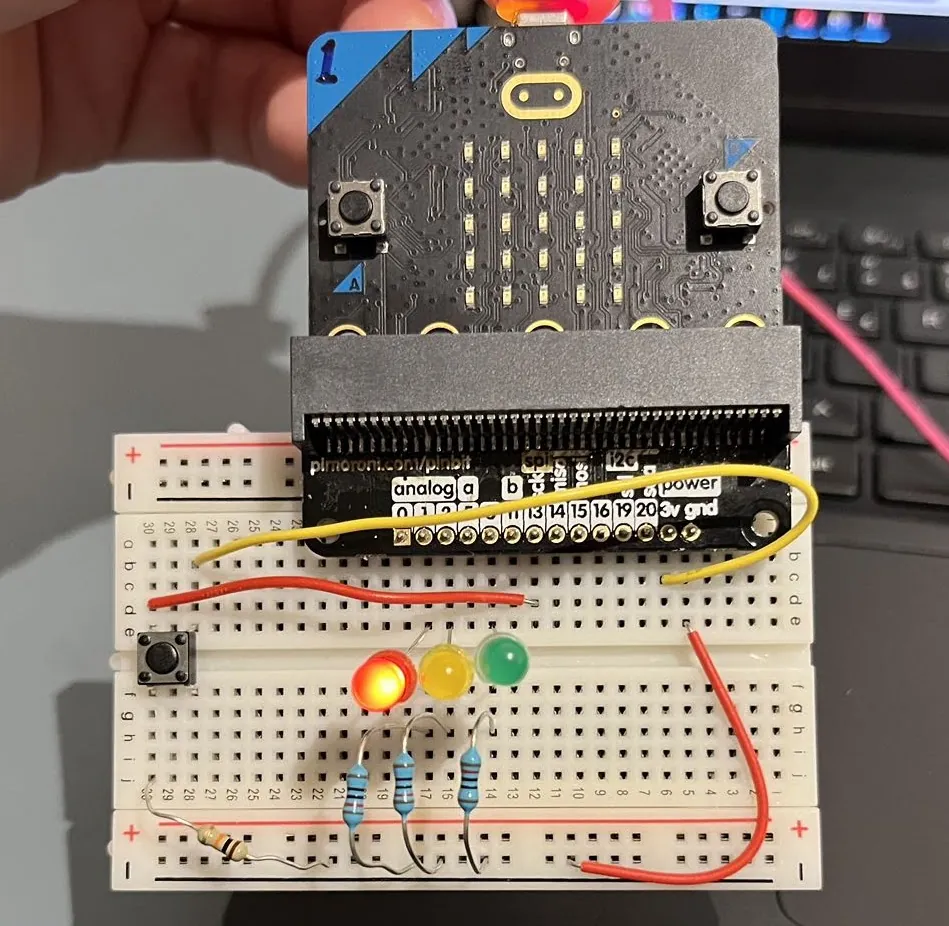
The blue LED needs almost 3 V, and the Micro:bit gives about 3.3 V, so blue looks dim with 220 Ω. A 100 Ω resistor makes it brighter, if you have one.
Other Arduino boards work with the same pins. In the Arduino IDE choose Arduino Uno for the UNO R3, Arduino Uno WiFi Rev2 for the WiFi board (the first time: Boards Manager, install "Arduino megaAVR Boards"), or Arduino Nano for a Nano (pins D2 to D7 and GND).
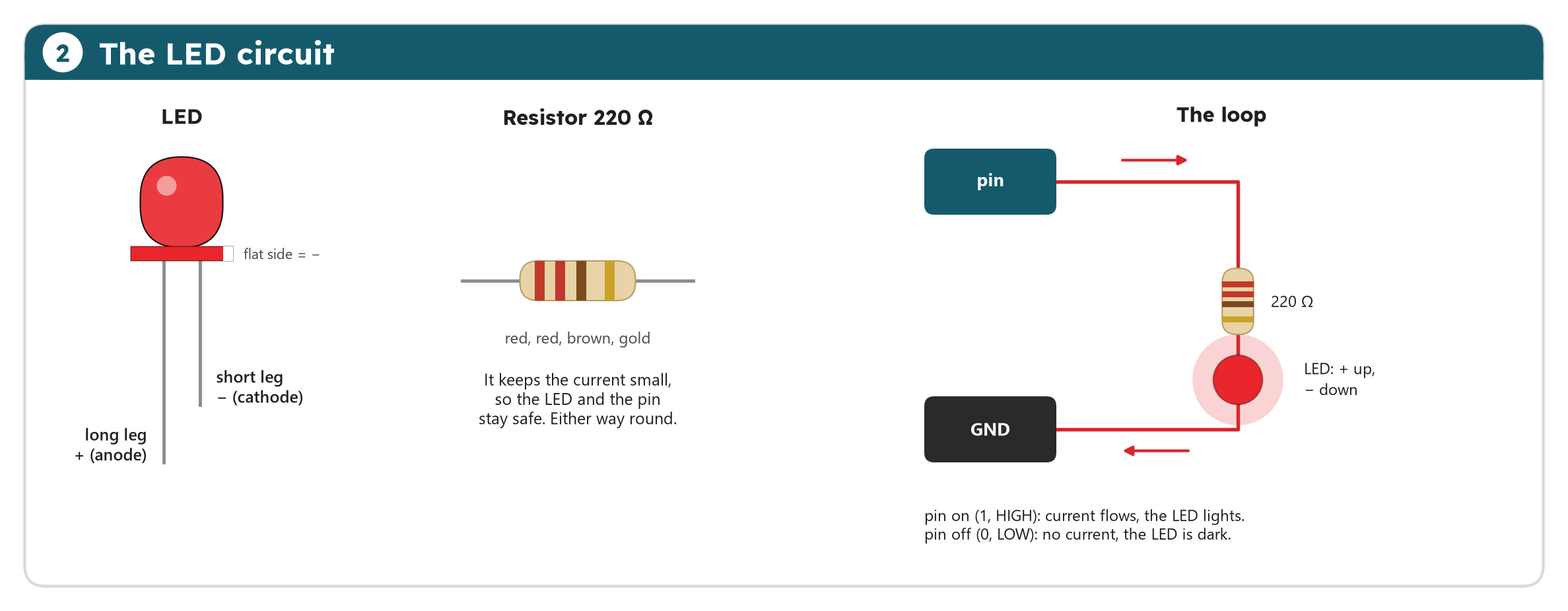
An LED only lights when the current goes in at the long leg and out at the short leg. The resistor keeps the current small. When the program turns the pin on, the LED lights; off, and it is dark.
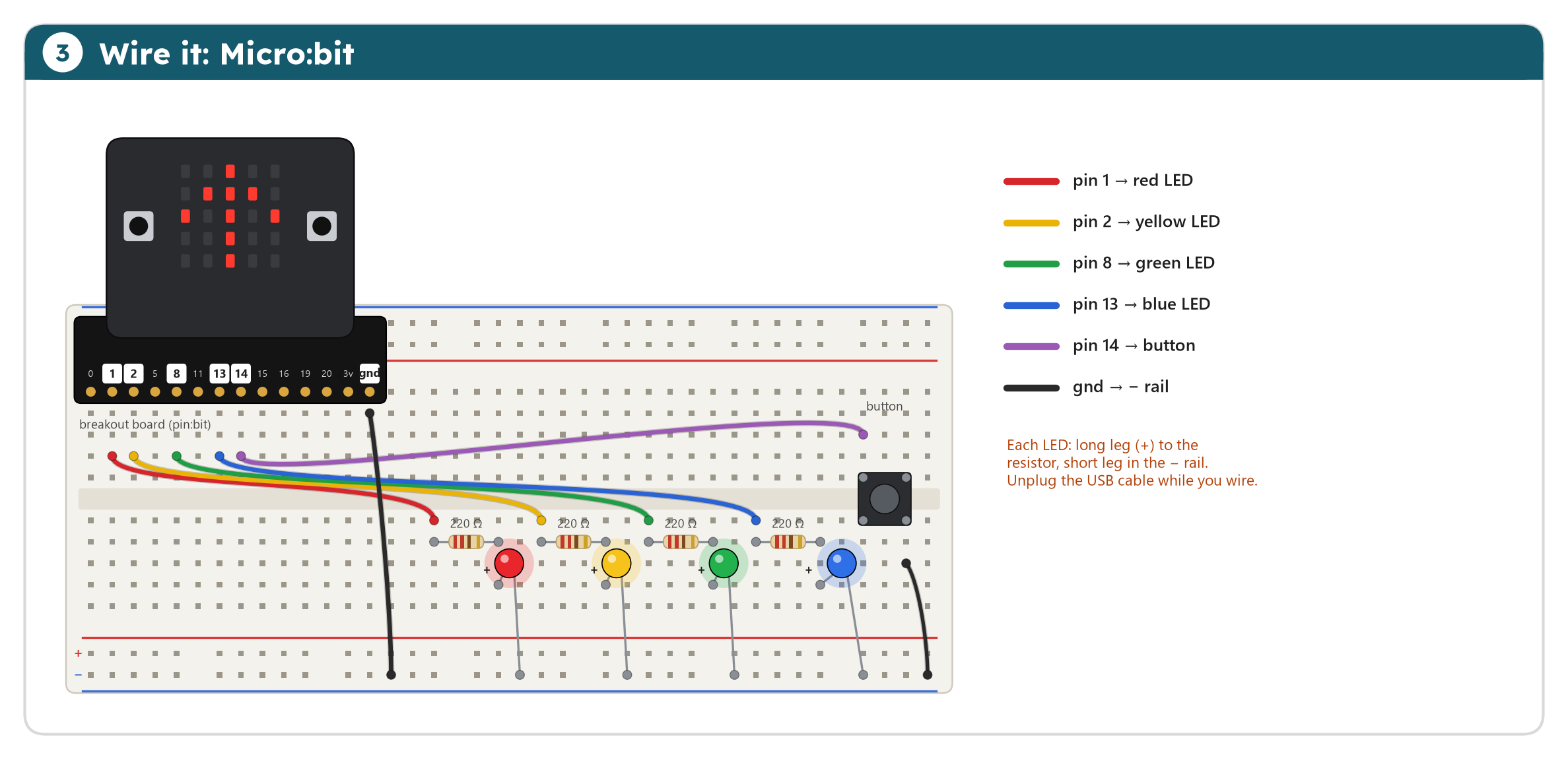
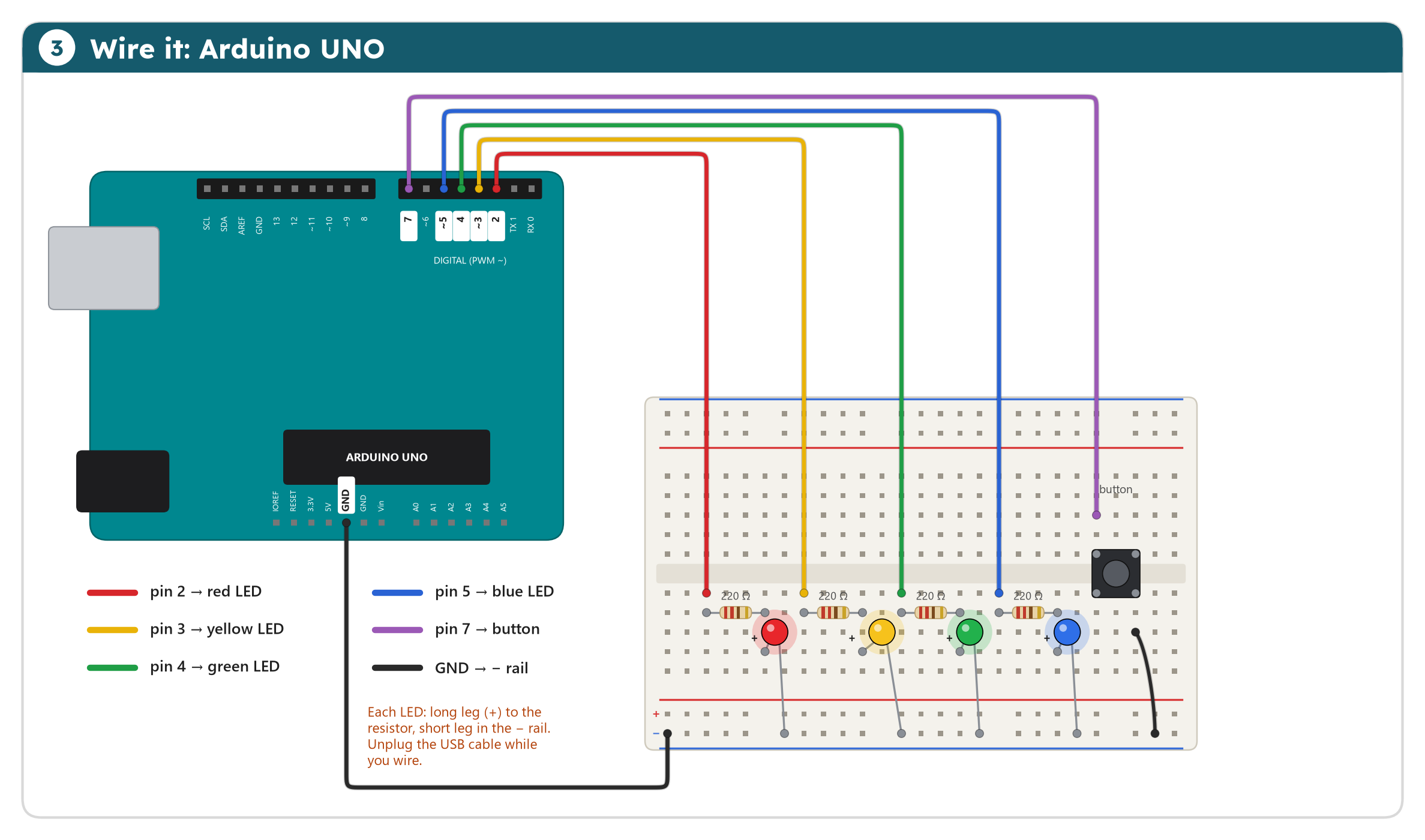
Build it bit by bit: for level 1 you only need the red LED. Add the blue one for level 2, yellow and green for level 3, and the button for level 4. Each wire goes to the left end of a resistor; the LED's long leg sits in the column of the resistor's right end.
The lights lab runs every level, step by step: watch which pins are 1 and which are 0. In level 4, press the button.
In MakeCode, the pin blocks are under Advanced, then Pins. Go as far as you like: every level works on its own. Click a level to open it.
Start the MakeCode tutorial all 4 levels, step by step
In the Arduino IDE: paste the code (or open the sketch file), choose your board and port, then Upload. Go as far as you like: every level works on its own. Click a level to open it.
const int redLedPin = 2;

void setup() {
  pinMode(redLedPin, OUTPUT);
}

void loop() {
  digitalWrite(redLedPin, HIGH);   // on
  delay(500);
  digitalWrite(redLedPin, LOW);    // off
  delay(500);
}
Sketch file: level1_blink.ino
A program sets the pin, then waits. Without the pauses the LED would switch thousands of times a second, and you would only see a dim glow.
Your turn: make it blink faster. How short can the pause be before you stop seeing the blinking?
const int redLedPin = 2;
const int blueLedPin = 5;

void setup() {
  pinMode(redLedPin, OUTPUT);
  pinMode(blueLedPin, OUTPUT);
}

void loop() {
  digitalWrite(redLedPin, HIGH);
  digitalWrite(blueLedPin, LOW);
  delay(300);
  digitalWrite(redLedPin, LOW);
  digitalWrite(blueLedPin, HIGH);
  delay(300);
}
Sketch file: level2_police_lights.ino
Each step sets both LEDs: one on, the other off. Then a short wait, and the other way round.
Your turn: a double flash, like real police cars: red on, off, on, off, then blue the same.
const int redLedPin = 2;
const int yellowLedPin = 3;
const int greenLedPin = 4;

// Switch the three lights at once: true is on, false is off.
void setLights(bool red, bool yellow, bool green) {
  digitalWrite(redLedPin, red);
  digitalWrite(yellowLedPin, yellow);
  digitalWrite(greenLedPin, green);
}

void setup() {
  pinMode(redLedPin, OUTPUT);
  pinMode(yellowLedPin, OUTPUT);
  pinMode(greenLedPin, OUTPUT);
}

void loop() {
  setLights(true, false, false);   // red: stop
  delay(3000);
  setLights(true, true, false);    // red and yellow: get ready
  delay(1000);
  setLights(false, false, true);   // green: go
  delay(3000);
  setLights(false, true, false);   // yellow: stop if you can
  delay(1000);
}
Sketch file: level3_traffic_lights.ino
The order in Sweden: red, red and yellow, green, yellow, and back to red. A function switches all three lights in one line, so the main loop reads like the order itself.
Your turn: time a real traffic light near you and copy its times.
const int redLedPin = 2;
const int yellowLedPin = 3;
const int greenLedPin = 4;
const int buttonPin = 7;

void setLights(bool red, bool yellow, bool green) {
  digitalWrite(redLedPin, red);
  digitalWrite(yellowLedPin, yellow);
  digitalWrite(greenLedPin, green);
}

void setup() {
  pinMode(redLedPin, OUTPUT);
  pinMode(yellowLedPin, OUTPUT);
  pinMode(greenLedPin, OUTPUT);
  pinMode(buttonPin, INPUT_PULLUP);   // HIGH when not pressed, LOW when pressed: no extra resistor needed
}

void loop() {
  setLights(false, false, true);      // green for the cars
  while (digitalRead(buttonPin) == HIGH) {
    delay(20);                        // wait for the button
  }
  delay(1000);                        // the cars get a moment
  setLights(false, true, false);      // yellow
  delay(1000);
  setLights(true, false, false);      // red: pedestrians cross
  delay(4000);
  setLights(true, true, false);       // red and yellow
  delay(1000);
}
Sketch file: level4_pedestrian_button.ino
The cars keep green until someone presses the button. Pull up makes the pin read 1 while the button is not pressed; pressing it connects the pin to GND, and it reads 0. Keep the level 3 function.
Your turn: make the pedestrians wait at least 10 seconds between two red phases.
Next step, real Python: traffic_lights.py is level 4 in MicroPython. Open it in python.microbit.org and download it to the Micro:bit.
The emergency challenge, solved, for your board. Try it yourself first; if you are really stuck, ask your teacher for the code.